Best USB Surge Protector: Safe Charging Guide
The best USB surge protector combines strong surge protection, useful USB charging, safe design, and enough outlets for daily needs.
A crowded desk can turn into a mess of chargers, laptops, lamps, monitors, and phones. A good USB surge protector helps solve that problem with one compact power hub. It can also reduce cable clutter and give your electronics a safer place to connect. I reviewed five popular options with different outlet layouts, USB ports, cord lengths, and surge ratings. My top pick is the Anker model for its balanced design, but each product fits a different home, office, dorm, or gaming setup.
See the differences between my top picks at a glance.
Anker Power Strip: Best Overall

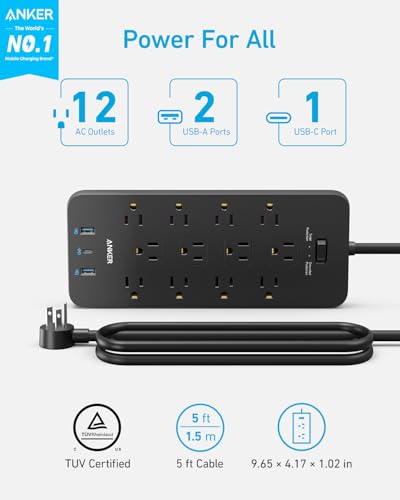
The Anker Power Strip is my best overall choice for a home office, bedside table, or dorm desk. It offers 12 AC outlets, one USB-C port, and two USB-A ports in one compact power hub. Its listed 2,100-joule surge rating gives connected equipment a useful layer of protection from voltage spikes. The five-foot cord also works well when the wall outlet sits near, but not directly beside, your desk.
I like the mix of old and new charging ports here. USB-C supports newer cables, while USB-A still works with many common phone, watch, and accessory cables. The product listing also identifies the unit as TUV listed, which gives buyers an extra safety detail to check when comparing power strips. As with any surge protector, I would use it within its stated load limits and avoid high-power appliances such as heaters.
Pros:
- 12 AC outlets support a busy workstation.
- Includes both USB-C and USB-A ports.
- 2,100-joule surge rating is useful for everyday electronics.
- Five-foot cord suits desks and nightstands.
- Compact outlet-extender design helps reduce cable clutter.
- TUV-listed information adds a useful safety reference.
Cons:
- It has only one USB-C port.
- The five-foot cord may feel short in a large room.
- USB charging is not the same as a high-power USB-C laptop charger.
What Amazon Buyers Are Saying
Buyer feedback commonly focuses on the large outlet count, compact shape, and useful USB mix. People who replace several small adapters often value the cleaner desk setup. Some buyers also like having USB-C without giving up USB-A. The main concerns to check in current reviews are outlet spacing, cord reach, and the charging speed of the USB ports, since needs differ by device.
My Recommendation
I recommend this model for most people who want a balanced USB surge protector. It has enough AC outlets for normal office gear and enough USB ports for daily accessories. It is not the best choice if you need many USB-C ports or a very long cord, but its feature mix is strong.
Nuetsa Power Strip: Best High-Rating Option
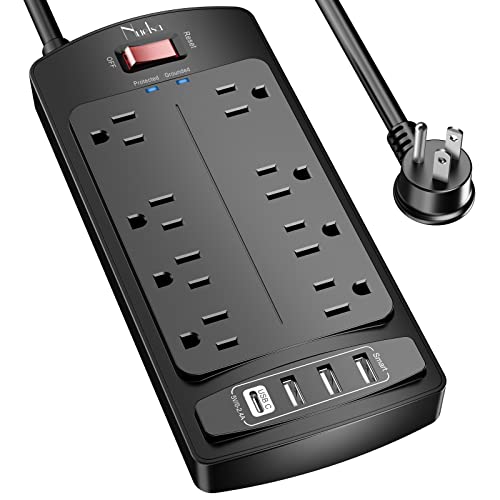
The Nuetsa power strip stands out with a 2,700-joule surge rating, eight AC outlets, and four USB ports. Its six-foot cord offers a little more reach than the Anker model. The flat plug can sit closer to a wall, desk, or cabinet than a bulky straight plug. This layout makes it a practical choice for a living room, home office, or shared charging area.
The four USB ports can reduce the need for separate charging bricks. The listing identifies four USB ports but does not state USB-C in the supplied product details, so buyers who need USB-C should confirm the current version before ordering. I also like the simple black finish because it blends into most desk and media-center setups. Its ETL-listed claim gives shoppers another safety detail to review.
Pros:
- 2,700-joule surge rating is the highest among several picks here.
- Four USB ports allow several small devices to charge at once.
- Eight AC outlets fit common home and office needs.
- Six-foot cord gives flexible placement.
- Flat plug works well behind furniture.
- ETL-listed information supports a more informed purchase.
Cons:
- It has fewer AC outlets than the 12- and 22-outlet models.
- The supplied title does not identify a USB-C port.
- Large plugs may still block nearby outlets, depending on their shape.
What Amazon Buyers Are Saying
Common buyer comments tend to praise the long cord, flat plug, and number of charging ports. Users with several phones or small accessories often find the USB section useful. Some product reviews may raise questions about port spacing or charging speed, so I suggest checking recent feedback for your device type. Buyers should also confirm that the current model matches the port layout they expect.
My Recommendation
This is a strong pick if surge capacity matters more to you than having 12 AC outlets. It suits a family charging station or desk with several USB devices. I would choose it over the Anker only when I wanted the higher listed joule rating and longer cord.
12-Outlet USB-C Strip: Best for Many USB Devices

This 12-outlet power strip is built for people who use many modern devices. It has 12 AC outlets, three USB-C ports, and three USB-A ports. The six USB ports can help charge phones, earbuds, watches, tablets, and other small devices without filling every AC outlet with adapters. Its listed 2,400-joule rating adds surge protection for a wide range of home and office electronics.
The 1.7-inch wide-spaced outlets are a useful detail for larger plugs and power adapters. The six-foot flat-plug cord gives it good reach for a desk, entertainment unit, or shared work area. The listed 1875-watt and 15-amp figures match a common full-size power strip rating, but I would still follow the label and avoid plugging in devices that exceed its limits. This is a feature-rich choice, not a replacement for a dedicated high-power charger.
Pros:
- Three USB-C ports support newer charging cables.
- Three USB-A ports keep older accessories compatible.
- 12 AC outlets handle a large desk or media setup.
- Wide-spaced outlets help fit larger adapters.
- Six-foot cord supports flexible placement.
- 2,400-joule surge protection adds useful capacity.
Cons:
- The larger outlet layout may take more desk space.
- USB charging speed depends on the device and shared power design.
- It may offer more ports than a small bedside setup needs.
What Amazon Buyers Are Saying
Buyer feedback for this type of layout commonly centers on the large number of ports and the value of having several USB-C connections. Users with newer phones and mixed cables often appreciate not needing extra wall chargers. The wide outlet spacing also matters to buyers with large power bricks. Before purchase, I would read current reviews for comments about physical size, cord placement, and the charging behavior of all ports used together.
My Recommendation
I recommend this model for a modern workstation, family charging zone, or entertainment center with many devices. It is one of the better choices here for USB-C access. If you only charge one or two devices, a smaller strip may cost less and take up less room.
SUPERDANNY Power Strip: Best for Large Setups

The SUPERDANNY power strip targets a very different buyer. It provides 22 AC outlets, five USB-A ports, and one USB-C port. That huge outlet count can suit a gaming room, studio, office bench, or shared workspace with many low- to medium-power devices. The 6.5-foot cord also gives more freedom when the wall socket sits far from the main setup.
The product lists a 2,100-joule surge rating and a 15-amp, 1875-watt capacity. Its six USB ports reduce the need for small charging blocks, while the flat plug helps the unit sit close to the wall. However, a large strip needs careful cable planning. I would avoid using every outlet simply because it is available, and I would keep total power within the product label.
Pros:
- 22 AC outlets support very large equipment setups.
- Five USB-A ports cover many older charging cables.
- One USB-C port adds support for newer devices.
- Six-and-a-half-foot cord provides excellent reach.
- 2,100-joule surge rating suits everyday electronics.
- Useful for gaming rooms, offices, and shared work areas.
Cons:
- The large body may not fit a small desk or nightstand.
- It has only one USB-C port.
- Many outlets can encourage unsafe overloading if users ignore power limits.
What Amazon Buyers Are Saying
Reviews for this style of power strip often highlight the unusually high outlet count. Buyers with many chargers, monitors, consoles, and accessories tend to value the extra space. The long cord and USB section also receive attention in real-world use. Common points to verify in recent reviews include the unit’s size, outlet access, switch feel, and how well it fits behind furniture.
My Recommendation
This is worth considering when a normal power strip cannot provide enough outlets. It makes the most sense for a large, organized setup rather than a simple desk. I would not buy it for a small space, but it is a practical high-capacity option when you truly need many connections.
Belkin USB Power Strip: Best High-Joule Choice

The Belkin USB Power Strip offers 12 AC outlets, two USB ports, a six-foot flat-plug cord, and a listed 3,996-joule surge rating. That joule figure is the highest in this comparison. It can appeal to buyers who want a familiar brand and strong listed surge capacity for a desktop, home theater, or office arrangement.
The two USB ports keep the design simple, but they may not meet the needs of a household with many USB devices. The six-foot cord gives better reach than a short extension lead, and the white finish can look clean beside light-colored furniture. I see this as a traditional surge protector with basic USB convenience, rather than a modern USB-C charging station.
Pros:
- 3,996-joule rating is the highest listed value in this group.
- 12 AC outlets support many connected devices.
- Six-foot cord provides flexible placement.
- Flat plug works well behind desks and media units.
- Two USB ports add simple direct charging.
- Belkin branding may appeal to buyers who prefer an established name.
Cons:
- Only two USB ports are included.
- The supplied title does not list USB-C.
- Its white finish may show dirt more easily in some spaces.
What Amazon Buyers Are Saying
Buyer discussions commonly focus on the number of AC outlets, the long cord, and the high listed joule rating. People who need a conventional office or entertainment power strip often find the layout easy to understand. Some buyers may want more USB ports or newer USB-C support. I suggest checking current listing details if fast charging or USB-C compatibility is important to you.
My Recommendation
The Belkin is a good fit for buyers who value a high listed joule rating and a simple, well-known design. It works especially well when most devices use standard AC plugs. I would choose another model if direct USB charging is a major reason for the purchase.
How to Choose Best USB Surge Protector
Choosing the Best USB Surge Protector means looking beyond the number of ports. I check the surge rating, outlet layout, USB type, cord length, safety marks, and total power limit. The right model should fit your actual devices without making the setup hard to manage. A larger strip is not always better if it wastes space or encourages overloading.
1. Match the Surge Rating to Your Equipment
A joule rating shows how much surge energy a protector can absorb over time. In simple terms, a higher number can offer more protection capacity, but it does not make the strip invincible. The Anker lists 2,100 joules, the Nuetsa lists 2,700 joules, the 12-outlet USB-C model lists 2,400 joules, and the Belkin lists 3,996 joules.
For a computer, monitor, router, game console, or television, I prefer a clearly stated surge rating from a reputable listing. I also look for a recognized safety mark, such as the TUV or ETL information shown in some product details. A surge protector cannot replace safe wiring, a proper circuit, or a whole-home protection plan. If the status light shows that protection has ended, replace the unit.
2. Count USB Types, Outlets, and Spacing
Start with a simple count of your gear. Add your laptop adapter, monitor, lamp, speakers, console, printer, phone charger, and other devices. Then leave a few open outlets for future use. Wide spacing matters when you use large charging bricks, since a crowded strip can waste several sockets.
USB-A still supports many cables, while USB-C fits newer phones, tablets, and accessories. Do not assume that every USB-C port supports laptop charging or fast charging. Check the product’s current output details before buying. USB ports often share power, so charging speed can change when several devices connect at once.
3. Check Cord Reach, Load Limits, and Placement
A five-foot cord works well beside a desk or bed. A six-foot or 6.5-foot cord gives more freedom across a room. A flat plug helps the strip sit close to the wall, which can help behind furniture. Measure the path before ordering, and check whether the strip will sit on the floor, desk, wall, or cabinet.
Always follow the stated amp and watt limits. Do not connect heaters, large cooking tools, or other high-draw appliances unless the product maker clearly allows that use. Keep the strip dry, uncovered, and away from heat. Do not connect one power strip to another. Good placement protects the strip and makes it easier to spot damaged cords or loose plugs.
Final Verdict: Which Should You Buy?
For most buyers, I recommend the Anker Power Strip as the Best USB Surge Protector. It balances 12 outlets, USB-C, USB-A, a 2,100-joule rating, and a useful five-foot cord.
Choose Nuetsa for more surge capacity, the USB-C model for many modern devices, SUPERDANNY for huge setups, or Belkin for its high listed joule rating and simple design.
FAQs Of Best USB Surge Protector
What is the Best USB Surge Protector for a home office?
The Anker model is the best overall choice for many home offices because it has 12 AC outlets, one USB-C port, two USB-A ports, and a 2,100-joule surge rating.
Are USB surge protectors safe for phones and tablets?
Yes, a properly rated and certified model can provide convenient charging for phones and tablets. Check the product output, use the correct cable, and follow the maker’s safety instructions.
Is a higher joule rating always better?
A higher joule rating usually means more surge absorption capacity, but it is not the only factor. Safety marks, build quality, outlet design, cord condition, and correct use also matter.
Should I buy USB-A or USB-C ports?
Choose USB-C for newer devices and USB-A for older cables. A model with both types gives the most flexibility, but USB-C does not always mean fast or laptop-level charging.
Can I plug a heater into a USB surge protector?
Do not plug in a heater unless the product maker clearly approves it and the heater stays within the strip’s power limit. High-draw appliances can overload a power strip.