Best Smart Lock: Secure Picks For Every Door
The best smart lock blends secure entry, easy setup, remote control, and reliable access for daily life.
Coming home with full hands, lending keys to a guest, or checking a door from work can become a hassle. A smart lock solves these small problems with codes, fingerprints, phone access, or voice control. I reviewed five popular options for different homes and budgets. I focused on entry methods, Wi-Fi access, battery life, security grade, app features, and daily ease of use. This guide will help you find the best smart lock for your front door without paying for features you may never use.
See the differences between my top picks at a glance.
eufy Security Smart Lock C220

The eufy Security Smart Lock C220 is a strong choice for people who want fingerprint access without buying a separate Wi-Fi bridge. Its built-in Wi-Fi lets you manage the lock through the app when you are away from home. You can also use a phone, a physical key, or the fingerprint reader. The fingerprint option feels especially useful when your hands are full or your phone is buried in a bag.
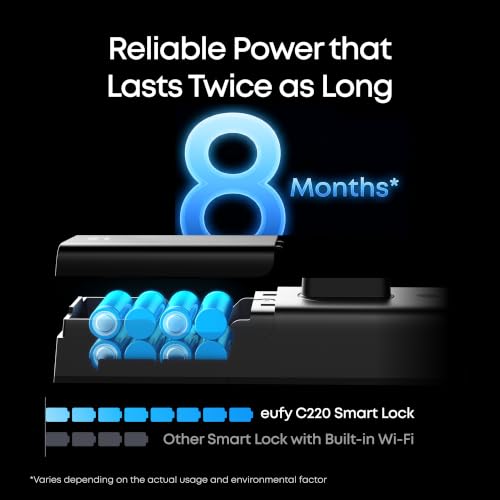
The C220 lists up to eight months of battery life, although real use can vary with traffic, temperature, and Wi-Fi activity. Its IP53 rating offers some protection from dust and light water exposure, but it is not a lock for direct heavy rain without suitable door cover. The BHMA Grade 3 rating places it in a residential security class, so I would match it to a normal home entry door. Overall, it offers a practical mix of fast entry and remote control.
Pros:
- Built-in Wi-Fi supports remote app access.
- Fingerprint entry can be faster than entering a code.
- Physical key access provides a simple backup.
- Advertised battery life can reduce battery changes.
- IP53 protection suits many covered exterior doors.
- Compact feature set fits everyday home use.
Cons:
- BHMA Grade 3 is not the highest residential grade.
- Battery life may change with weather and frequent use.
- Fingerprint readers can need a second try with wet or dirty fingers.
What Amazon Buyers Are Saying
Buyer discussions commonly focus on easy keyless entry, the convenience of fingerprint access, and the value of built-in Wi-Fi. Many shoppers also pay close attention to installation and app setup. As with most electronic locks, some owners report that door alignment matters a great deal. A smart lock may work poorly if the deadbolt rubs against the strike plate, so buyers who adjust the door first tend to have a better experience.
My Recommendation
I recommend the eufy C220 for households that want fingerprint unlocking and remote control in one unit. It is a practical pick for a covered front door and a good value when its features match your needs. Check your existing deadbolt size and door alignment before ordering. I rate it 4.4 out of 5.
Philips WiFi Keypad Deadbolt With Handle
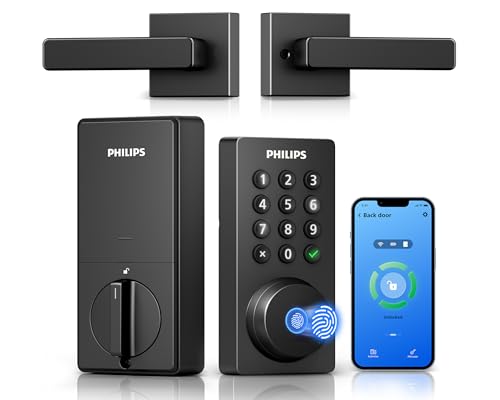
This Philips smart lock combines a keypad deadbolt with a matching door handle. That makes it useful for anyone replacing more than the lock itself. The product supports fingerprint entry, app control, voice access, and flexible codes. Its backlit keypad should also make nighttime entry easier than a standard keyhole.
Built-in Wi-Fi allows remote management without relying on a separate bridge listed for this model. Auto-lock can help protect a busy home where someone often forgets to turn the lock. Since this package includes a lever, measure your door and compare the existing handle position before purchase. I see this as a convenient full-hardware option, but buyers should read the installation details closely.
Pros:
- Includes a door lever as well as the deadbolt.
- Offers several ways to unlock the door.
- Built-in Wi-Fi supports app access from outside the home.
- Backlit keys help with low-light entry.
- Flexible codes can suit family members and guests.
- Auto-lock adds a useful daily safety habit.
Cons:
- A handle package may require more installation work than a deadbolt alone.
- Door measurements must match both the lock and lever.
- Voice control depends on setup with a compatible smart-home service.
What Amazon Buyers Are Saying
Customer feedback for smart lock packages like this often highlights the convenience of a handle and keypad in one purchase. Buyers tend to like the clean keyless design and the ability to create codes for visitors. Installation comments can vary because door thickness, bore holes, and latch alignment differ from home to home. I would treat any report about setup time as highly dependent on the existing hardware.
My Recommendation
This Philips model is worth considering if you need a deadbolt and handle together. It gives a household more entry choices than a keypad-only lock and can reduce the need for separate hardware shopping. It is less attractive if your current handle is already perfect and you only want a simple lock swap. I rate it 4.2 out of 5.
WYZE Auto-Lock Bolt v2

The WYZE Auto-Lock Bolt v2 focuses on convenient access and automatic locking. It includes a fingerprint scanner, keypad, backup keys, and Wi-Fi features. That range gives family members several ways to enter without passing around a single key. The fingerprint scanner may appeal to users who want a quick unlock with less tapping.
WYZE lists up to eight months of battery life and an IP53 rating for the lock. The product also lists BHMA Grade 2 security, which is a stronger grade than Grade 3 in this comparison. Its anti-peep keypad can help reduce the risk of someone learning a code by watching finger placement. Auto-lock and the advertised learning scanner make this a particularly interesting choice for people who want the lock to fit their routine.
Pros:
- Provides fingerprint, keypad, and backup key entry.
- BHMA Grade 2 offers a strong residential security position.
- Anti-peep keypad design adds privacy during code entry.
- Automatic locking can help prevent an unlocked door.
- Advertised battery life supports lower maintenance.
- IP53 protection suits many sheltered exterior locations.
Cons:
- Automatic features still need careful setup and testing.
- Fingerprint performance can vary with finger condition.
- IP53 protection does not mean full waterproofing.
What Amazon Buyers Are Saying
Buyers commonly look at WYZE locks for the mix of fingerprint access, keypad entry, and automatic locking. Feedback about electronic locks often centers on app setup, Wi-Fi connection, and how smoothly the deadbolt moves in the door. Owners who report trouble usually need to check alignment, batteries, or network settings before judging the lock itself. I recommend reading the latest buyer comments for firmware and app experiences before purchasing.
My Recommendation
The WYZE Bolt v2 is one of my strongest picks for people who value automatic locking and a higher listed security grade. It also gives you useful backup choices if the fingerprint reader does not respond. This is a smart buy for a connected home, but it still needs a well-aligned door and a reliable Wi-Fi setup. I rate it 4.5 out of 5.
Schlage Encode Smart WiFi Deadbolt
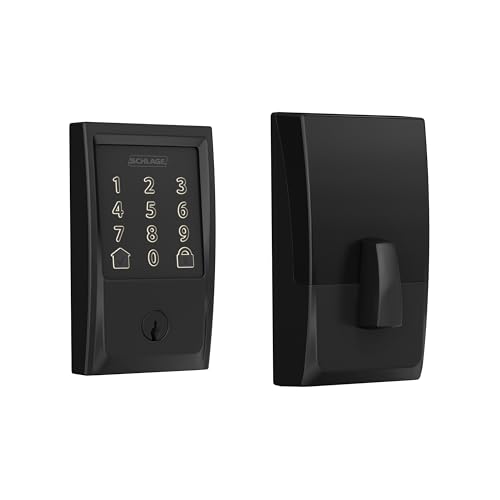
The Schlage Encode is a well-known option for buyers who want a touchscreen keypad and built-in Wi-Fi. It removes the need for a separate hub in the basic setup described for this model. You can manage entry through the app and use the lock with Alexa, Google Home, Ring, and Airbnb systems as listed. That makes it a natural fit for households already using one or more of those services.
The Century trim gives the lock a clean, modern look, while the touchscreen keeps the front of the lock simple. Keypad access is useful for family members, service workers, and guests who do not need a physical key. The main trade-off is that this model does not offer fingerprint entry like several newer alternatives in this guide. I would choose it for brand confidence, smart-home links, and straightforward code access.
Pros:
- Built-in Wi-Fi supports remote app control.
- Touchscreen keypad provides keyless entry.
- Works with several well-known smart-home platforms.
- Airbnb compatibility may help with managed guest access.
- Schlage is an established lock hardware brand.
- Clean Century trim suits many modern front doors.
Cons:
- No fingerprint entry is listed for this model.
- Touchscreen access depends on battery power.
- Smart-home features may require account and platform setup.
What Amazon Buyers Are Saying
Amazon buyers often choose the Schlage Encode for its familiar brand, simple code entry, and direct Wi-Fi connection. Reviews commonly discuss easy daily use and integration with smart-home systems. Some buyers also mention battery use and the importance of proper installation. As with any keypad lock, a stiff deadbolt can create problems that are caused by door pressure rather than the electronic unit.
My Recommendation
I recommend the Schlage Encode for buyers who prefer a proven keypad design and broad smart-home compatibility. It is especially appealing when you already use Alexa, Google Home, Ring, or Airbnb tools. Choose another model if fingerprint access is a must-have. I rate it 4.4 out of 5.
Philips Wi-Fi Smart Deadbolt

This Philips Wi-Fi Smart Deadbolt is built for households that want several keyless entry methods. It supports codes, fingerprints, app control, and voice unlocking. The built-in Wi-Fi helps you control the lock remotely without adding a separate Wi-Fi accessory listed for this product. Its backlit touchscreen also gives the front door a modern look.
Auto-lock can help create a simple routine after people leave the house. The app may also make it easier to manage access when a family member or service worker arrives. I like the flexibility here, but buyers should confirm that their door and existing deadbolt fit the installation requirements. This model is a good middle ground for shoppers who want fingerprint access but also value code and voice control.
Pros:
- Supports fingerprint, code, app, and voice unlocking.
- Built-in Wi-Fi enables remote access.
- Backlit touchscreen is useful in low light.
- Auto-lock supports a more consistent locking routine.
- Keyless entry reduces the need to carry keys.
- Several access methods help different household users.
Cons:
- More features can make setup take longer.
- Voice unlocking requires compatible smart-home setup.
- Fingerprint performance may vary with wet, cold, or dirty fingers.
What Amazon Buyers Are Saying
Buyer interest often centers on the lock’s many entry choices and the convenience of remote access. Customers tend to value a bright touchscreen and the ability to share codes instead of physical keys. Setup and door fit remain the most important points to check in review feedback. I would also test the auto-lock timer and remote commands soon after installation so you know how the lock behaves before relying on it.
My Recommendation
I recommend this Philips deadbolt for buyers who want a feature-rich keyless lock at the front door. It gives you more ways to enter than the Schlage model and avoids the need to choose only between a code or a fingerprint. It is worth buying when you are comfortable with app setup and regular battery checks. I rate it 4.3 out of 5.
How to Choose the Best Smart Lock
Choosing the best smart lock means matching the lock to your door, habits, and home network. A long list of features does not always mean a better lock. The right model should work well when your hands are full, your phone is unavailable, or a guest needs access. It should also keep a physical backup method or another safe recovery option.
1. Match the Lock to Your Door
Start with the door, not the app. Check the door thickness, backset, bore hole, latch, and strike plate. A replacement deadbolt must fit the existing opening or include the parts needed for a new installation. Also check whether the door closes without force. If the bolt rubs against the frame, even the best smart lock may drain batteries faster or fail to lock smoothly.
Look at whether you need a deadbolt only or a deadbolt with a handle. The Philips keypad package includes a lever, while the other choices focus on the deadbolt area. Measure twice before ordering. If your door has glass nearby, an interior thumb turn and strong frame may matter more than a large list of app features.
2. Pick the Right Entry Method
Keypad entry works well for families, guests, cleaners, and short-term access. It lets you share a code instead of a physical key. Fingerprint entry can feel faster for daily use, but it may need a clean finger and a good scan. Phone access helps when you need to unlock the door from a distance, yet it depends on your phone, account, app, and network.
I like locks that offer more than one useful method. A fingerprint reader plus keypad gives you speed and a backup. A physical key can help during a dead battery or electronic problem. Before buying, decide who will use the door and which method each person will use most often.
3. Compare Security, Power, and Smart Features
Pay attention to the listed BHMA grade, construction, and backup access. In this group, the WYZE Bolt v2 lists BHMA Grade 2, while the eufy C220 lists BHMA Grade 3. A security grade is useful, but it does not replace a strong door frame, long screws, and a properly fitted strike plate.
Built-in Wi-Fi makes remote control easier, but it can use more battery than a lock that connects only by Bluetooth. Check the advertised battery life as a guide, not a promise. Cold weather, frequent entry, weak Wi-Fi, and repeated motor movement can change results. Set low-battery alerts, keep fresh batteries available, and test the physical backup before you need it.
Finally, review smart-home support. Alexa, Google Home, Ring, and Airbnb compatibility may matter if those services already run in your home. Voice unlocking deserves extra care because convenience must not reduce security. Use a strong account password, turn on two-step verification when available, and share access only with people you trust.
Final Verdict: Which Should You Buy?
For most connected homes, I would choose the WYZE Auto-Lock Bolt v2 for its fingerprint entry, auto-lock features, backup keys, and listed BHMA Grade 2 rating. The eufy C220 is a close choice for simple fingerprint access and built-in Wi-Fi.
The best smart lock is the one that fits your door and daily routine. Measure first, test alignment, and keep a backup entry method ready for peace of mind.
FAQs Of Best Smart Lock
What is the best smart lock for fingerprint entry?
The WYZE Bolt v2, eufy C220, and Philips models all offer fingerprint access. The best choice depends on your preferred app, door fit, battery needs, and other smart-home features.
Do smart locks work without Wi-Fi?
Many smart locks still allow keypad, fingerprint, or physical key entry without Wi-Fi. Remote app control usually needs Wi-Fi or another connection, so check the specific product setup.
Are smart locks safe for front doors?
They can be safe when installed on a strong, well-aligned door. Use a secure account, update the app, protect your codes, and keep a reliable backup entry method.
How long do smart lock batteries last?
Battery life varies by model and use. The products reviewed here list battery life of up to about eight months, but Wi-Fi activity, weather, and door resistance can change that result.
Should I choose a keypad or fingerprint smart lock?
A keypad is easy to share with guests and family. A fingerprint reader can be faster for daily use. A lock with both gives you more flexibility.