Best 4K Streaming Device: Find Your Perfect Match
The best 4K streaming device for most homes is the Roku Streaming Stick Plus, thanks to its simple interface and sharp HDR picture.
You may have a 4K TV but still struggle with slow menus, weak Wi-Fi, or too many remote buttons. A good streaming device can fix those daily hassles and bring Netflix, Prime Video, Disney+, YouTube, live TV, and free channels into one easy menu. I compared five popular models for picture quality, speed, remote control, storage, smart features, and value. This guide will help you find the right fit for your TV and viewing habits.
See the differences between my top picks at a glance.
Roku Streaming Stick Plus

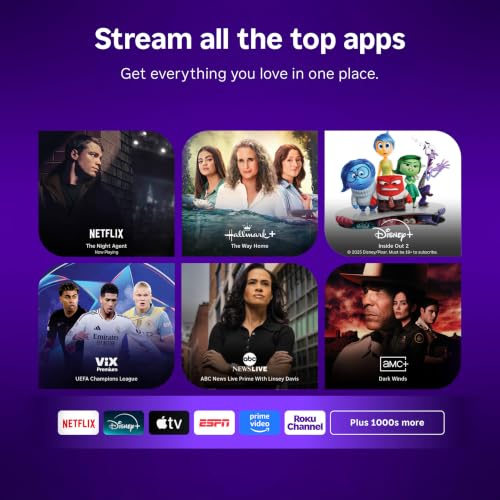
The Roku Streaming Stick Plus is my easiest recommendation for most people. It supports 4K resolution and HDR10+, so compatible TVs can show a clear picture with better contrast and color. The compact stick plugs into an HDMI port and hides behind the television. Its Roku Voice Remote also makes it easy to search for films, shows, actors, and apps.
Roku keeps the home screen simple. You can open major streaming services without digging through complex menus. The platform also offers free and live channels, including news and sports choices, though channel availability can change by location. This model suits bedrooms, family rooms, and older 4K TVs that need a faster interface.
Pros:
- Clean and easy Roku interface
- Supports 4K and HDR10+
- Compact stick design saves space
- Voice remote speeds up content searches
- Includes free and live channel options
- Simple setup for most HDMI-equipped TVs
Cons:
- Does not offer built-in Ethernet in the listed package
- Storage details are not promoted like larger Google TV devices
- Some apps or channels may show ads
What Amazon Buyers Are Saying
Common buyer feedback highlights the simple setup, small size, and familiar Roku menu. Many shoppers choose it for an older television or for a second room. Users also tend to like the voice remote because it reduces typing with the on-screen keyboard. As with any streaming stick, some real-world experiences depend on home Wi-Fi strength and the TV’s available HDMI and power connections.
Some buyers may prefer a device with more storage or a wired network port. Others may need time to adjust if they are moving from Fire TV or Google TV. App availability, advertisements, and remote preferences also vary from household to household. I recommend checking the current Amazon listing and recent reviews for package details before ordering.
My Recommendation
I recommend the Roku Streaming Stick Plus for viewers who want fast access to common services without a busy smart TV menu. It is especially good for families, older adults, guest rooms, and anyone who values a short learning curve. It is worth buying when simplicity matters more than advanced smart-home control or large app storage.
| Category | Rating |
|---|---|
| Picture quality | 4.5/5 |
| Ease of use | 4.8/5 |
| Remote and search | 4.5/5 |
| Features | 4.3/5 |
| Value | 4.6/5 |
| Overall rating | 4.6/5 |
Google Streamer 4K

The Google Streamer 4K is a strong choice for homes that already use Google TV, Google Assistant, or other Google smart-home tools. It brings movies, shows, live channels, and apps into a content-focused interface. The included voice search remote helps you find content without typing long titles. The device supports 4K viewing and HDR on compatible content and displays.
One major advantage is its listed 32 GB of storage. That gives users more room for apps than many basic streaming sticks. Google also positions the device as a smart-home control point, which may appeal to people with compatible cameras, lights, or other devices. I see it as a flexible pick for viewers who want more than a basic app launcher.
Pros:
- 4K streaming with HDR support
- 32 GB of listed storage
- Voice search remote helps reduce typing
- Works well within the Google TV ecosystem
- Supports live channels and major streaming apps
- Can help manage compatible smart-home devices
Cons:
- Google TV recommendations may feel busy to some users
- Best smart-home features depend on compatible devices
- HDR results depend on the TV and the content source
What Amazon Buyers Are Saying
Amazon shoppers commonly focus on the device’s speed, Google TV layout, and voice search. Buyers who already use Android phones or Google services often find the setup familiar. The storage capacity also stands out for people who install many apps. Users may report different results based on their Wi-Fi router, TV model, and the number of services connected to the account.
Some shoppers may not love the number of recommendations shown on the home screen. Others may want a more basic remote with fewer smart features. It is also important to remember that advertised features can depend on software updates and regional service support. I would review the current listing if you need a specific app, smart-home function, or connection type.
My Recommendation
The Google Streamer 4K is worth buying for Google households and viewers who want generous app storage. It offers a wider feature set than a simple streaming stick, but its interface may take a little longer to learn. I would choose it for a main living-room TV where app access, voice search, and smart-home control all matter.
| Category | Rating |
|---|---|
| Picture quality | 4.5/5 |
| Speed and storage | 4.6/5 |
| Voice search | 4.5/5 |
| Smart-home features | 4.4/5 |
| Value | 4.3/5 |
| Overall rating | 4.5/5 |
onn 4K Pro Streaming Device

The onn 4K Pro Streaming Device targets viewers who want strong hardware at a lower price. Its listed features include Google TV, 32 GB of storage, and 3 GB of RAM. It also supports Dolby Vision and Dolby Atmos when the display, sound system, and content support them. The backlit remote and Find My Remote feature add useful comfort in a busy home.
This model also lists an Ethernet port. That can help when a wired connection works better than wireless service in your living room. The Google TV platform gives access to voice search, streaming apps, and live content. I think this device makes the most sense for buyers who want advanced features but do not want to pay for a premium brand name.
Pros:
- 4K output for compatible televisions
- Listed 32 GB storage and 3 GB RAM
- Dolby Vision and Dolby Atmos support
- Ethernet port can provide a wired connection
- Backlit remote is easier to use in a dark room
- Find My Remote feature helps locate the controller
Cons:
- Google TV may show many recommendations on the home screen
- Dolby formats require compatible equipment and content
- Software support and availability may vary by region
What Amazon Buyers Are Saying
Buyer interest often centers on the hardware list and price. Shoppers may like the extra storage, wired Ethernet option, and remote features. The device can appeal to people who want one box for streaming and smart-TV functions. As with other Android or Google TV products, buyers may mention that setup, app performance, and picture quality depend on network speed, TV settings, and the services they use.
Some customers may compare the interface with other Google TV devices and find it less familiar at first. A few users may also expect every Dolby feature to work with every TV, soundbar, or app. That is not how format support works, so I suggest checking your equipment before purchase. Read current customer comments for the latest software experience.
My Recommendation
I recommend the onn 4K Pro to value-focused buyers who want more hardware features than a basic streaming stick. The Ethernet port, extra storage, RAM, and remote finder make it attractive for a main TV. It is a good buy when the current price is clearly below premium competitors and your setup supports its Dolby features.
| Category | Rating |
|---|---|
| Picture and audio support | 4.6/5 |
| Speed and storage | 4.6/5 |
| Remote features | 4.5/5 |
| Connectivity | 4.5/5 |
| Value | 4.4/5 |
| Overall rating | 4.4/5 |
onn Android TV 4K UHD Device

The onn Android TV 4K UHD Streaming Device is a straightforward way to add smart features to a compatible TV. It includes a voice remote with Google Assistant and a high-speed HDMI cable. Its 4K UHD output can improve clarity when paired with a 4K television and suitable content. The small box design works well when you want a separate streamer instead of replacing the TV.
This model is best for shoppers who care about basic 4K access and a low purchase price. Google Assistant voice control can make searches easier than using the directional buttons alone. The included HDMI cable also removes one small item from the shopping list. It does not target buyers who need the largest storage capacity or the newest premium hardware.
Pros:
- Supports 4K UHD streaming
- Includes a voice remote
- Google Assistant supports spoken searches
- High-speed HDMI cable is included
- Simple way to upgrade a compatible TV
- Usually suits budget-conscious buyers
Cons:
- Less advanced than the onn 4K Pro model
- Storage and memory details may not suit heavy app users
- Wireless performance depends on router placement and signal strength
What Amazon Buyers Are Saying
Amazon buyers often look at this model because it offers 4K streaming and a voice remote at an accessible price. Common positive themes may include easy access to Google Assistant and the convenience of the included cable. It can work well as a replacement for a slow built-in TV system. Actual results can vary with the age of the television, home network, and installed apps.
Budget devices can also bring more mixed opinions than premium models. Some shoppers may want faster menus, more storage, or a cleaner interface. Others may find it fully adequate for a few services such as Netflix, YouTube, and Prime Video. I suggest checking recent reviews and the current listing if speed is your main concern.
My Recommendation
This onn Android TV device is worth considering for a spare room, guest room, or older 4K TV. It delivers the core features many casual viewers need without adding much cost. I would not choose it for a large app library or a demanding home theater setup, but it remains a practical entry-level option.
| Category | Rating |
|---|---|
| Picture quality | 4.1/5 |
| Ease of setup | 4.1/5 |
| Voice control | 4.0/5 |
| Features | 3.9/5 |
| Value | 4.4/5 |
| Overall rating | 4.1/5 |
Amazon Fire TV Stick 4K Plus
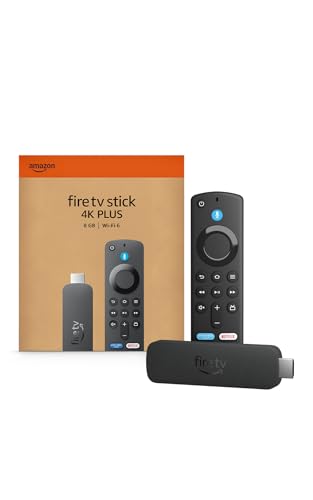
The Amazon Fire TV Stick 4K Plus is a natural fit for people who already use Alexa or Amazon Prime. It supports 4K streaming and includes Wi-Fi 6 for compatible routers. Amazon highlights AI-powered Fire TV Search, which aims to help users find shows and films faster. The stick design keeps the hardware behind the TV and leaves more space around the entertainment center.
Fire TV gives access to a large mix of paid apps, free content, and live TV choices. Alexa can help search, open apps, and control compatible smart-home products. The experience works best for shoppers who are comfortable with Amazon’s content-focused home screen. If you prefer the cleanest possible menu, Roku may feel easier at first.
Pros:
- 4K streaming for compatible TVs and content
- Wi-Fi 6 support with compatible network equipment
- Alexa voice control and smart-home functions
- AI-powered Fire TV Search
- Compact stick design
- Strong fit for Prime and Alexa households
Cons:
- Fire TV home screen may include many content suggestions
- Some features depend on an Alexa account and compatible devices
- Wi-Fi 6 does not improve speed if the home router lacks support
What Amazon Buyers Are Saying
Buyers commonly like the small size, voice control, and integration with Amazon accounts. People who already own Echo speakers or other Alexa products may find the setup familiar. The device can also appeal to Prime members who want their subscriptions and viewing history close at hand. Streaming quality still depends on the TV, source quality, internet plan, and wireless signal.
Some reviewers may dislike the amount of promoted content on the Fire TV home screen. Others may need time to learn where settings and app controls appear. Wi-Fi 6 is useful only when the complete network supports it, so it should not be the only reason to upgrade. Check current app support if you use a smaller or specialized streaming service.
My Recommendation
I recommend the Fire TV Stick 4K Plus to Amazon-centered households. It combines 4K support, Wi-Fi 6, Alexa, and a compact design in one affordable package. It is worth buying if you like Fire TV’s interface; Roku is a better choice if you want a calmer and simpler home screen.
| Category | Rating |
|---|---|
| Picture quality | 4.5/5 |
| Wireless performance | 4.5/5 |
| Voice control | 4.6/5 |
| App and content access | 4.5/5 |
| Value | 4.4/5 |
| Overall rating | 4.5/5 |
How to Choose Best 4K Streaming Device
Choosing the Best 4K Streaming Device starts with your TV, network, and favorite services. A higher price does not always mean a better fit. I suggest checking the points below before you choose a model.
1. Match the Device to Your TV and Sound System
First, check that your TV has an open HDMI port. The TV must also support 4K if you want to see 4K output. A 4K device can still work with many HD TVs, but the picture will not become 4K on an HD screen.
Next, check HDR and sound support. HDR10+ and Dolby Vision can improve contrast and color on compatible TVs. Dolby Atmos can add a more spacious sound effect with compatible content and audio equipment. These formats do not create magic on their own, so match the streamer to your TV and soundbar.
2. Choose the Right Interface and Remote
The interface affects every viewing session. Roku offers a simple layout that many first-time users understand quickly. Google TV collects apps, recommendations, live channels, and smart-home tools in one place. Fire TV suits Amazon users who want Alexa and Prime content close by.
Think about the remote, too. Voice search saves time when you watch many services. A backlit remote helps in a dark room. A remote finder can help in a busy family room. The best remote is the one that matches how your household watches TV.
3. Check Network, Storage, and Long-Term Value
A strong internet connection matters more than a fancy box when you stream 4K video. Place your router where the signal reaches the TV well. If Wi-Fi is weak, an Ethernet port can offer a more stable option. The onn 4K Pro is the only model in this group that clearly lists Ethernet in the supplied product title.
Storage matters when you install many apps. The Google Streamer 4K and onn 4K Pro list 32 GB, while the simpler models focus more on core streaming. Also check the current price, warranty, software support, and app availability. A lower-priced device can be a smart buy for a bedroom, while a stronger model may offer better value as your main streamer.
Final Verdict: Which Should You Buy?
For most viewers, the Roku Streaming Stick Plus is the Best 4K Streaming Device because it combines easy menus, 4K HDR10+ support, voice search, and good value. Choose Google Streamer 4K for storage and Google features, or Fire TV Stick 4K Plus for Alexa.
Pick the onn 4K Pro for advanced features at a value price. Any choice works best when it matches your TV, network, sound system, and favorite apps.
FAQs Of Best 4K Streaming Device
What is the best 4K streaming device for most people?
The Roku Streaming Stick Plus is the best general choice for most homes. It offers a simple interface, 4K support, HDR10+, voice search, and access to many popular services.
Do I need a 4K TV to use a 4K streaming device?
No. Many 4K streamers can work with HD TVs, but the TV will display the picture at its own lower resolution. You need a compatible 4K TV to see 4K detail.
Is Dolby Vision important in a 4K streaming device?
Dolby Vision can improve color and contrast, but your TV, streaming service, and content must support it. If your TV only supports HDR10, Dolby Vision will not add its full benefit.
Which 4K streaming device is best for Alexa users?
The Amazon Fire TV Stick 4K Plus is the best match for Alexa users. It supports Alexa voice control and works well with compatible Amazon smart-home products.
Is Ethernet better than Wi-Fi for 4K streaming?
Ethernet can provide a steadier connection when Wi-Fi is weak or crowded. Wi-Fi works well when your router is close to the TV and your internet service has enough speed.