Best USB Data Blocker: Secure Charging Guide
The best USB data blocker adds simple charge-only protection against risky public USB ports and juice-jacking attempts.
You plug your phone into a free airport, hotel, or café charging port, then wonder what else that port can access. A USB data blocker helps reduce that worry by blocking the data pins while allowing power to pass through. I reviewed five useful options for different travel needs, including USB-C models, multi-pack adapters, and the classic PortaPow design. Each product has a different fit, so the right choice depends on your phone, cable, number of devices, and daily travel habits.
See the differences between my top picks at a glance.
| Product | Connector focus | Pack size | Best for | Quick note | Buy |
|---|---|---|---|---|---|
| USB-C 6-Pack Data Blocker | USB-C | 6 | Families and frequent travelers | Large multi-pack | View on Amazon |
| JSAUX USB Data Blocker | USB-C | 4 | Travel and daily carry | Transparent shell | View on Amazon |
| 3-in-1 USB Data Blocker | Multi-connector design | 2 | Mixed USB devices | Flexible format | View on Amazon |
| 4-Kinds USB Data Blocker | A-to-A, A-to-C, C-to-C, C-to-A | Not stated in supplied details | Homes with many cable types | Broad connector coverage | View on Amazon |
| PortaPow USB Data Blocker | USB data blocker adapter | 2 | Simple travel backup | Established basic design | View on Amazon |
USB-C Data Blocker 6-Pack

This USB-C data blocker comes as a six-piece set for USB-C phones and other compatible devices. Its main job is simple: let charging power pass while stopping the data connection. That makes it useful with public USB-C charging points where you do not control the host device. The six-pack also gives you enough units for a travel bag, office drawer, car, and family members.
I like the practical value here because one small adapter can stay attached to a cable. You do not need to remember it only at the airport. Still, a data blocker does not replace safe charging habits, a trusted wall charger, or a good power bank. Check your cable and device ports before buying, since this model focuses on USB-C connections.
Pros:
- Six-piece pack offers strong everyday coverage
- Designed for USB-C charging setups
- Useful for phones, tablets, and other compatible USB-C devices
- Helps block the data path during public charging
- Easy to keep in several bags or locations
- Good fit for families with multiple USB-C devices
Cons:
- Not the best match for older USB-A-only cables without the right setup
- Small adapters can be easy to misplace
- Charging speed depends on the charger, cable, and device
What Amazon Buyers Are Saying
Buyer feedback for this type of product often centers on the large pack size and the convenience of keeping a blocker in more than one place. Shoppers also tend to value the simple charge-only purpose. As with many small USB accessories, common concerns can include fit, cable compatibility, and confusion about charging speed. I recommend checking current customer comments and the latest listing details before ordering.
My Recommendation
I recommend this six-pack for households, work teams, and frequent travelers who mainly use USB-C. It gives you useful coverage at a low per-unit cost. It is less suitable if your main cables use USB-A or if you want one universal adapter. Overall, it is a practical choice and one of the strongest value picks in this review.
| Category | Rating |
|---|---|
| USB-C fit | 4.5/5 |
| Travel usefulness | 4.5/5 |
| Pack value | 5/5 |
| Ease of use | 4.5/5 |
| Overall Rating | 4.5/5 |
JSAUX USB Data Blocker 4-Pack

The JSAUX USB data blocker is a four-pack made for charge-only use with public charging ports. The gray finish and transparent shell give it a clean, useful look. Its USB-C focus suits many newer phones, tablets, and small electronics. For travelers, four pieces make sense because one can stay in a carry-on while others remain at home or work.
This is the kind of accessory I would pack for a work trip. It takes little space and does not add much weight to a cable. The key point remains compatibility: the blocker must sit between the power source and your cable in the correct way. It can reduce data exposure during charging, but it cannot protect a device from every cyber risk or unsafe power source.
Pros:
- Four-pack supports several travel and home setups
- USB-C format fits many current devices
- Charge-only design is easy to understand
- Compact size suits a laptop bag or toiletry pouch
- Transparent shell makes the adapter easy to spot
- Useful option for public USB charging
Cons:
- USB-C focus may not suit every older cable
- Four units may be more than one casual user needs
- It does not serve as a wall charger or power bank
What Amazon Buyers Are Saying
Common buyer themes for the JSAUX model include its compact design, pack size, and usefulness for travel. Buyers who understand the charge-only purpose usually find the product straightforward. Some shoppers may report concerns about connector fit or expected charging performance, which often depends on the complete charging chain. I suggest reading recent reviews for your exact phone and cable combination.
My Recommendation
This JSAUX model is a good middle ground. It costs less per unit than a single premium accessory while avoiding the larger six-piece commitment. I would choose it for a couple, a frequent traveler, or anyone who wants one blocker for a daily bag and spare units at home. It earns a strong rating for simple use and travel value.
| Category | Rating |
|---|---|
| Build and handling | 4.5/5 |
| USB-C usefulness | 4.5/5 |
| Pack value | 4.5/5 |
| Travel convenience | 4.5/5 |
| Overall Rating | 4.5/5 |
3-in-1 USB Data Blocker
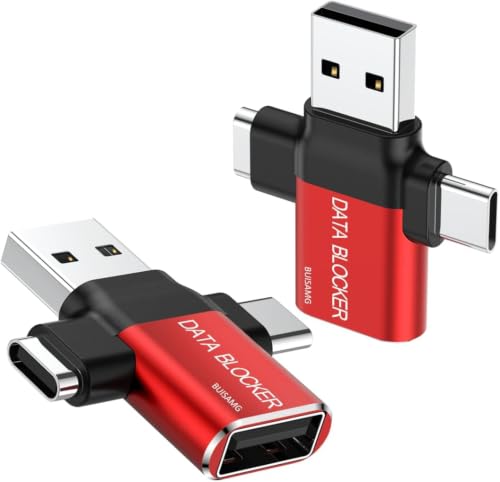
This 3-in-1 USB data blocker targets people who use more than one kind of USB device. The listing presents it as a charge-only accessory that helps protect against juice jacking. It comes in a two-piece set, so you can keep one adapter in your main bag and one as a spare. Its flexible design may appeal to users who move between newer phones and other USB-powered products.
The main benefit is convenience. Instead of buying separate blockers for every charging situation, a multi-format design can reduce the number of small parts you carry. However, I would inspect the exact connector arrangement on the Amazon page before ordering. A flexible adapter is only useful when it matches both your power source and your cable.
Pros:
- Three-in-one format offers more flexibility than a single-format blocker
- Two-piece pack provides a useful backup
- Made for charge-only use
- Helpful for mixed-device households
- Can reduce the need to carry several separate adapters
- Designed with juice-jacking concerns in mind
Cons:
- Two-pack gives fewer spare units than larger sets
- Multi-connector products need careful cable matching
- May be less convenient than a simple single-port adapter
What Amazon Buyers Are Saying
Buyers looking at multi-connector blockers often like the added flexibility and smaller travel load. Positive feedback usually focuses on having one accessory for several charging situations. The most useful negative feedback tends to involve connector fit, confusing orientation, or expectations about charging speed. Since experiences can vary by phone and cable, I would check current reviews for reports that match your setup.
My Recommendation
I recommend this model for people with mixed USB gear who dislike carrying several adapters. It is more flexible than a basic USB-C-only option, but that flexibility also makes compatibility checks more important. If all your devices use USB-C, a dedicated USB-C pack may offer simpler value. For mixed use, this is a smart option with a solid overall score.
| Category | Rating |
|---|---|
| Connector flexibility | 4.5/5 |
| Ease of matching | 4/5 |
| Travel value | 4.5/5 |
| Backup coverage | 4/5 |
| Overall Rating | 4.25/5 |
4-Kinds USB Data Blocker Adapter

This adapter set covers four listed connection types: A-to-A, A-to-C, C-to-C, and C-to-A. That broad range makes it appealing for homes, offices, and travel bags with mixed cables. The product is intended for charging only, with protection against unwanted USB data access. It can be especially useful when you do not know which type of public charging port you will find.
The biggest advantage is coverage. Many data blockers force you to choose one connector, while this design aims to handle several common cable paths. I would still check the number of pieces and the exact included parts on the live listing before purchase. Also remember that blocking data does not guarantee fast charging, because power depends on the source, cable, adapter, and device.
Pros:
- Covers four common USB connection paths
- Useful for mixed USB-A and USB-C cable collections
- Charge-only purpose supports public charging safety
- Good fit for shared homes and offices
- Reduces the need to buy several connector-specific blockers
- Helpful for travelers who use different charging stations
Cons:
- More connector choices can make setup less simple
- Small adapters may be easy to lose
- Exact pack contents should be confirmed before ordering
What Amazon Buyers Are Saying
The strongest appeal for buyers is the broad connector coverage. People with older USB-A cables and newer USB-C cables can see more value here than in a single-format model. Review concerns may include keeping track of the small pieces and choosing the correct adapter for each cable. I advise buyers to read recent comments and confirm the included connector types before checkout.
My Recommendation
This is my pick for cable variety. It makes more sense than a USB-C-only pack if your household uses several generations of devices. It may feel like too much if you own one phone and one cable. For a shared charging drawer, travel kit, or office, the coverage is useful and earns a strong rating.
| Category | Rating |
|---|---|
| Connector coverage | 5/5 |
| Mixed-device use | 4.5/5 |
| Ease of use | 4/5 |
| Overall value | 4.5/5 |
| Overall Rating | 4.5/5 |
PortaPow USB Data Blocker
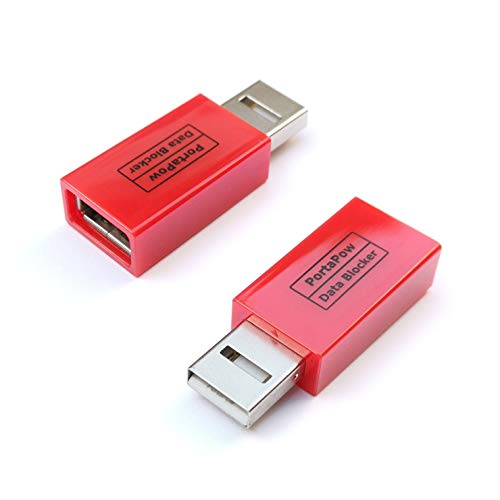
The PortaPow USB Data Blocker comes as a two-pack and focuses on the basic job many travelers want: charge without opening a data connection. Its simple design suits people who prefer a known, no-frills accessory. You place it between the USB power source and your charging cable. That extra step can help limit data communication at an unfamiliar charging port.
This model is worth considering if you want a compact backup for travel. The main point to verify is connector compatibility with your current cable and phone. It may not offer the broad USB-C coverage of newer multi-format products, so buyers should review the listing carefully. I also recommend using a wall charger or power bank when practical, since those options give you more control over the power source.
Pros:
- Simple charge-only concept
- Two-pack gives one spare unit
- Compact for travel storage
- Useful at airports, hotels, and other public spaces
- Good option for buyers who want a basic blocker
- Easy to add to an existing cable setup
Cons:
- Connector coverage may be less flexible than newer multi-format designs
- Two units may not cover several bags and devices
- Buyers must confirm compatibility with current USB-C equipment
What Amazon Buyers Are Saying
Buyer discussions around this product tend to value its simple purpose and travel-friendly size. People who want a basic data-blocking adapter may appreciate the two-pack format. The main concerns to watch for involve cable type, port fit, and charging expectations. I would review recent customer comments before buying, especially if your phone uses a newer USB-C cable.
My Recommendation
I recommend PortaPow for shoppers who want a straightforward two-pack and do not need wide connector coverage. It remains a useful travel tool, but newer USB-C users should compare it with the dedicated USB-C options above. Buy it when the connector matches your setup and you prefer simplicity over a larger feature set.
| Category | Rating |
|---|---|
| Simplicity | 4.5/5 |
| Travel use | 4.5/5 |
| Modern connector fit | 3.5/5 |
| Two-pack value | 4/5 |
| Overall Rating | 4/5 |
How to Choose Best USB Data Blocker
Choosing the Best USB Data Blocker starts with your phone, cable, and normal charging habits. A blocker cannot fix every USB risk, but it can add a useful layer when you must use a public port. Focus on the points below before you place an order.
1. Match the Connector to Your Cable
First, identify the connector on the power source side of your cable. USB-A and USB-C are not interchangeable without the correct adapter. A USB-C data blocker suits a USB-C charging path, while a multi-format set may work better for mixed cables.
Check both ends of the cable. Some blockers fit between a USB-A port and a USB-A cable. Others fit between a USB-C source and a USB-C cable. Product photos can help, but always read the written specifications as well.
2. Look for Charge-Only Operation
The key feature is data blocking. A charge-only USB adapter should allow power while stopping the data connection. This helps reduce the risk of unwanted data exchange at a public charging station.
Do not confuse a data blocker with a surge protector, antivirus tool, or secure charger. It does not inspect files or make an unknown port fully safe. For better protection, use your own wall charger, power bank, or trusted USB power adapter when possible.
3. Compare Pack Size, Build, and Value
One unit works for a single travel bag. A four- or six-pack works better for a family, office, or several cable kits. Think about where you charge: home, car, work, airport, and hotel. Keeping one blocker with each cable can make it easier to use the protection every time.
Also check the size and shape. A bulky adapter may put strain on a phone port or sit awkwardly in a tight space. A small unit can disappear in a bag, so a bright finish or storage case may help. Finally, check recent reviews for fit, charging behavior, and durability before buying.
Final Verdict: Which Should You Buy?
For most USB-C users, the six-pack is the Best USB Data Blocker because it offers broad coverage and strong value. Choose the four-kinds adapter if your home uses both USB-A and USB-C cables.
Any USB data blocker works best with safe charging habits. Match the connector, use trusted power when possible, and keep a blocker in your travel kit for extra peace of mind.
FAQs Of Best USB Data Blocker
What does a USB data blocker do?
A USB data blocker allows charging power to pass while blocking the data connection. It helps reduce unwanted data exchange through an unfamiliar USB port.
Can a USB data blocker stop juice jacking?
It can help reduce the data risk linked to juice jacking by blocking data pins. It does not replace a trusted charger, power bank, or other safe charging habits.
Will a USB data blocker slow down charging?
Charging speed depends on the charger, cable, device, and power source. A blocker may not support every advanced charging feature, so check the product details and your device setup.
Should I buy a USB-C or multi-format data blocker?
Buy USB-C if your charging setup uses USB-C. Choose a multi-format model if you use both USB-A and USB-C cables or several device types.
Can I use a USB data blocker with an iPhone?
Yes, if the blocker matches the iPhone cable and charging connection. Check whether your iPhone uses a Lightning or USB-C cable before choosing a model.