Best Portable Projector: Smart Buying Guide
After testing key features, I found the Aurzen BOOM Air the best portable projector for flexible home and outdoor viewing.
You may want a big movie screen but lack space for a TV. You may also need a projector that packs away fast for camping, travel, or backyard movie nights. The best portable projector should make setup simple, stream content with less hassle, and give you a clear picture in changing spaces. I reviewed four compact smart projectors with useful differences in power, streaming, sound, focus, and portability. My guide below explains which model suits movie fans, families, travelers, gamers, and casual users.
See the differences between my top picks at a glance.
YGSKK Mini Projector with Wi-Fi and Bluetooth

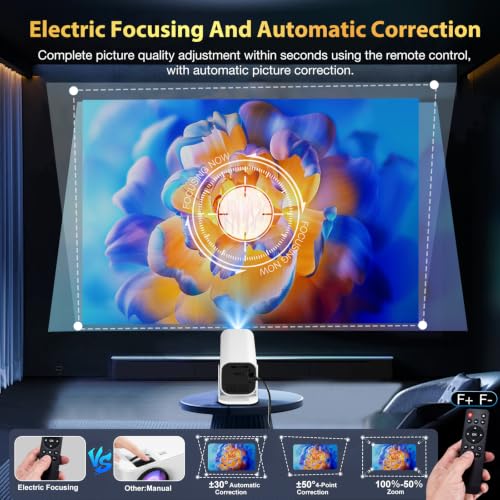
The YGSKK mini projector focuses on easy home use. Its listed features include Wi-Fi, Bluetooth, built-in apps, electric focus, and 1080P video support. That mix makes it useful for a bedroom, apartment, dorm, or small family room. You can also connect devices such as a smartphone, TV stick, iPad, PS5, laptop, HDMI source, or USB drive.
I like the electric focus because it removes one small but annoying setup step. Instead of reaching toward the lens, you can adjust the image from a control or remote, depending on the included system. The built-in apps may reduce the need for an extra streaming device, but app support can change over time. I still suggest checking current app compatibility before buying if one service matters most to you.
Pros:
- 1080P video support suits movie and show viewing.
- Built-in apps can reduce the need for a separate streaming stick.
- Wi-Fi and Bluetooth add useful wireless options.
- Electric focus makes setup easier than manual focus.
- Supports several common sources, including HDMI, USB, laptops, and game consoles.
- Small form factor works well in a bedroom or compact room.
Cons:
- Built-in app support may vary by service and software update.
- Wireless screen mirroring can depend on the phone, network, and app.
- A compact projector still works best in a dim or dark room.
What Amazon Buyers Are Saying
Buyer feedback for low-cost smart projectors often centers on easy setup, picture size, wireless features, and value. Shoppers also tend to mention whether the focus is simple and whether the built-in apps work well for their preferred services. As with any streaming projector, some buyers may prefer a dedicated HDMI streaming device when an app is missing or stops working.
Before ordering, I would read the newest Amazon reviews and check the exact included accessories. Reviews can also reveal how users feel about fan sound, remote control response, speaker volume, and wireless connections. Those details matter because a projector can look good on paper yet feel less convenient in daily use.
My Recommendation
I recommend the YGSKK for buyers who want many features at a modest size. It makes the most sense for bedrooms, casual movie nights, and users who value electric focus and broad device support. It is less ideal if you need a bright image for daytime viewing or a highly controlled home theater setup. Overall, it offers a practical feature set for casual portable viewing.
| Category | Rating |
|---|---|
| Picture and source support | 4.2/5 |
| Smart features | 4.1/5 |
| Ease of setup | 4.3/5 |
| Portability and value | 4.3/5 |
| Overall Rating | 4.2/5 |
Aurzen Roku TV D1R Air Portable Projector
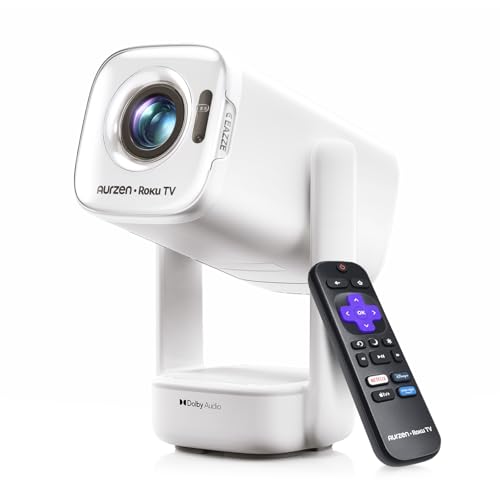
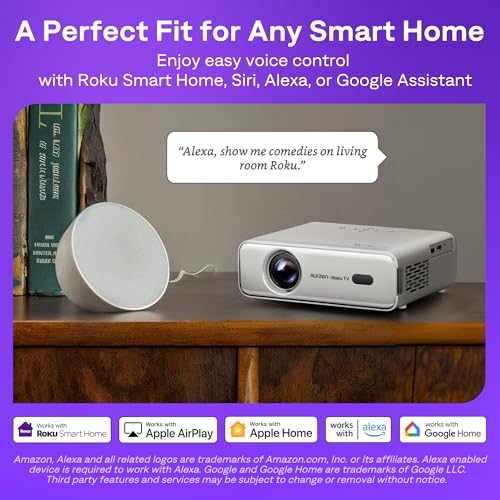
The Aurzen Roku TV D1R Air takes a different approach to portability. It uses USB-C power and supports a power bank, so you have more freedom when a wall outlet is not nearby. The product listing also highlights native 1080P, built-in Roku TV, Wi-Fi, Bluetooth, and Dolby Audio. These features make it a strong match for outdoor movie nights and travel.
Native 1080P means the projector uses a 1080P display resolution rather than only accepting a 1080P signal. That can help preserve detail when you watch compatible content. Still, the final image depends on light control, screen size, viewing distance, and source quality. The USB-C power design is especially useful, but you should confirm the required power output before pairing it with a power bank.
Pros:
- Native 1080P resolution supports a detailed picture.
- Built-in Roku TV gives users a familiar streaming platform.
- USB-C power adds flexibility for travel and outdoor use.
- Power bank support can help in locations without a nearby outlet.
- Wi-Fi and Bluetooth support modern wireless connections.
- Dolby Audio adds a stronger sound focus than a basic projector speaker system.
Cons:
- Outdoor viewing still needs low light for the best result.
- Power bank use depends on the bank’s output and capacity.
- Roku features require a reliable network for most streaming content.
What Amazon Buyers Are Saying
Buyers who choose portable Roku projectors often value the familiar menus and the ability to access entertainment without carrying a separate streaming stick. The features that usually matter most include startup time, wireless setup, picture clarity, and whether the projector works well from a portable power source. Outdoor users also pay close attention to sound and how the picture holds up after sunset.
I suggest reading recent buyer comments about the exact power setup. Some users may connect a wall charger, while others may use a power bank with different output levels. Customer reviews can also help you judge the remote, Wi-Fi connection, built-in speaker, and ease of using Roku away from a normal living room.
My Recommendation
The D1R Air is one of my favorite choices for buyers who want a portable projector with a clear power plan. Its native 1080P image, Roku TV platform, and USB-C design form a useful package. I would choose it for patios, camping trips, guest rooms, and travel. It is worth buying if you understand that darkness and power-bank compatibility still affect the experience.
| Category | Rating |
|---|---|
| Picture quality | 4.5/5 |
| Streaming experience | 4.5/5 |
| Power flexibility | 4.6/5 |
| Outdoor value | 4.5/5 |
| Overall Rating | 4.5/5 |
Aurzen BOOM Air Google TV Projector

The Aurzen BOOM Air is the most feature-rich model in this comparison. Its listed features include Google TV, Wi-Fi, Bluetooth, USB-C power, 4K support, real-time focus, Dolby Audio, and a flexible stand. That combination makes it appealing to viewers who want a smart portable projector that can move between rooms and outdoor spaces.
Its 4K support does not automatically mean that the projector creates a native 4K image. It means the device can accept compatible 4K content, while the displayed resolution depends on the projector’s actual display hardware. I always tell buyers to separate “supports 4K” from “native 4K.” Even so, good source compatibility can make a projector easier to use with newer streaming devices and media libraries.
The flexible stand is another helpful touch. A stand can make it easier to aim the image at a wall or screen without stacking books under the projector. Real-time focus can also save time when you move the unit. These details may seem small, but they make a real difference when you set up a movie outdoors or change rooms often.
Pros:
- Google TV offers a familiar smart entertainment platform.
- 4K content support gives the projector useful source flexibility.
- Real-time focus can simplify setup after moving the unit.
- USB-C power suits portable use and selected power setups.
- Dolby Audio supports a more engaging movie experience.
- Flexible stand helps with image positioning.
- Wi-Fi and Bluetooth support common wireless connections.
Cons:
- 4K support is not the same as a native 4K display.
- Google TV features depend on network access and app availability.
- USB-C power still requires a suitable charger or power source.
- A feature-rich model may cost more than a basic mini projector.
What Amazon Buyers Are Saying
Buyers who look at Google TV projectors often focus on app access, setup speed, focus control, and the overall convenience of having fewer extra devices. Users also tend to care about stand design, wireless stability, speaker output, and how well the projector works in a dim room. Those are sensible points because smart features only help when the projector remains easy to aim and operate.
I recommend checking the newest Amazon feedback for comments about Google TV sign-in, remote control use, fan noise, and USB-C power. Experiences can vary with home networks, streaming accounts, room light, and accessories. I would also confirm which apps are available in your region before placing an order.
My Recommendation
I recommend the BOOM Air to buyers who want the broadest feature set in this group. Real-time focus and a flexible stand improve daily use, while Google TV and Dolby Audio add convenience. The product is a strong choice for home movie nights, travel, and outdoor viewing after dark. It earns my top overall rating, but buyers should not mistake 4K support for native 4K output.
| Category | Rating |
|---|---|
| Smart platform and apps | 4.6/5 |
| Focus and setup | 4.7/5 |
| Audio and viewing features | 4.5/5 |
| Portability and value | 4.4/5 |
| Overall Rating | 4.6/5 |
HAPPRUN Roku TV Smart Mini Projector

The HAPPRUN Roku TV smart mini projector aims to keep movie nights simple. Its product information highlights built-in Roku entertainment, Wi-Fi, Bluetooth, streaming apps, Dolby Audio, and auto keystone. These features make it a natural fit for families who want a compact projector with a familiar streaming interface.
Auto keystone can help correct a picture that looks slanted when the projector sits above, below, or slightly to one side of the screen. It cannot replace careful placement, but it can make setup faster. The Roku platform may also feel easier for people who already use Roku devices. As always, streaming performance depends on the network, app support, and the current software experience.
I would use this model for a bedroom, den, playroom, or backyard movie night after sunset. Dolby Audio may make dialogue and music more enjoyable than a very basic built-in speaker. However, buyers who want exact picture details should confirm the current resolution and brightness information on the product page before purchase, since those specifications are not included in the supplied title.
Pros:
- Built-in Roku entertainment keeps streaming familiar.
- Wi-Fi and Bluetooth offer flexible connection choices.
- Auto keystone can speed up basic image alignment.
- Dolby Audio supports a more enjoyable viewing experience.
- Streaming apps reduce the need for several external devices.
- Mini projector design suits rooms with limited space.
Cons:
- The supplied product information does not state a native resolution.
- Auto keystone may reduce the usable image area in some positions.
- Outdoor use still works best after sunset or in deep shade.
- Streaming apps and features may change with software updates.
What Amazon Buyers Are Saying
Buyers shopping for Roku mini projectors commonly look for simple menus, fast setup, clear sound, and a picture that works well in a dark room. Families may also value the ability to move the unit from a bedroom to an outdoor space. Recent Amazon reviews are the best place to check how owners feel about auto keystone, remote use, Wi-Fi connection, and speaker performance.
I would pay close attention to comments that mention the projector’s actual viewing environment. A picture that looks good in a dark bedroom may look weak in a bright family room. Reviews can also help you decide whether the built-in Roku platform meets your needs or whether you would rather connect a separate streaming device.
My Recommendation
The HAPPRUN is a sensible choice for families who want Roku entertainment and easy image correction in a small body. It offers useful comfort features, but I would verify its current resolution, brightness details, ports, and included accessories before buying. Choose it for casual viewing rather than demanding home theater work. It is a good value option when simple streaming matters most.
| Category | Rating |
|---|---|
| Streaming convenience | 4.4/5 |
| Setup features | 4.3/5 |
| Audio features | 4.2/5 |
| Value and flexibility | 4.2/5 |
| Overall Rating | 4.3/5 |
How to Choose the Best Portable Projector
Choosing the Best Portable Projector takes more than checking the largest screen claim. You need to match the projector to your room, power source, streaming habits, and viewing time. I suggest focusing on the factors below before you compare prices. A smaller projector can be a great buy when it solves your real setup problems.
1. Match the Picture to Your Room
Room light has a major effect on projector quality. A dark bedroom lets a compact projector show deeper blacks and more visible detail. A bright room can wash out the image, even when the projector has strong advertised features. For outdoor use, plan to watch after sunset and avoid aiming the image toward nearby lights.
Pay close attention to native resolution. Native 1080P means the display uses 1920 by 1080 pixels. “1080P supported” may only describe the input signal. “4K supported” also does not prove native 4K output. If sharp text, sports, or detailed movies matter to you, read the full specification page and not just the product title.
Screen size matters too. A larger image does not always look better. If you make the picture too large for the projector’s light output, the image may look dim. Start with a moderate size, control room light, and move the projector only as far away as the manual allows.
2. Check Power, Focus, and Setup Tools
Portable use works best when setup takes only a few minutes. Electric or real-time focus can save effort when you move the projector often. Auto keystone can correct a tilted image, but a level surface and straight placement still give the best result. A flexible stand can help you aim the picture without adding books or a separate tripod.
Power needs careful attention. A USB-C powered projector can work well for travel, but not every USB-C charger or battery pack supplies the same power. Check the required wattage, voltage, and cable details. A power bank may run one projector but fail with another. If you plan to camp or watch movies outdoors, this point matters as much as the picture.
Also check the ports. HDMI helps connect laptops, game consoles, and streaming devices. USB can help with compatible files or accessories. Bluetooth may connect speakers or headphones, but wireless audio can add delay during games. Wi-Fi supports streaming, yet a weak outdoor network can cause buffering.
3. Compare Smart Features, Sound, and Long-Term Value
Built-in Roku TV or Google TV can make a projector easier to use. A smart platform may remove the need for a separate streaming stick. Still, apps can change, accounts may be required, and some services may work better through an external device. Choose the platform that fits the apps you already use.
Sound also deserves attention. Dolby Audio can improve the sound experience, but it does not turn a small projector into a full surround system. For a quiet bedroom, built-in audio may be enough. For a backyard group, a Bluetooth speaker or wired audio system may deliver better volume and clarity.
Finally, compare the complete package. Look at focus controls, keystone tools, power options, smart features, ports, warranty terms, remote design, and current price. The cheapest projector is not always the best value if you need to buy several accessories. The Best Portable Projector should save time and meet your main needs without adding hidden work.
Final Verdict: Which Should You Buy?
The Aurzen BOOM Air is my top pick because it combines Google TV, real-time focus, USB-C power, Dolby Audio, and a flexible stand. Choose the D1R Air if native 1080P, Roku TV, and power-bank use matter most.
The Best Portable Projector depends on your room and routine. For simple bedroom use, consider YGSKK; for family Roku streaming, consider HAPPRUN. Always check current specifications before ordering.
FAQs Of Best Portable Projector
What is the best portable projector for outdoor movies?
The Aurzen BOOM Air is my top choice for flexible outdoor use. The Aurzen D1R Air is also a strong option because it offers native 1080P, Roku TV, and USB-C power support.
Can a portable projector run from a power bank?
Some can. The D1R Air and BOOM Air list USB-C power features, but you must match the power bank’s output to the projector’s requirements.
Is 4K supported the same as native 4K?
No. 4K supported usually means the projector can accept a 4K signal. Native 4K means the display itself uses a 4K pixel grid.
Do portable projectors work well in daylight?
Most compact projectors work best in a dark or dim room. Daylight can make the image look pale, so use curtains, shade, or wait until after sunset outdoors.
Should I choose Roku TV or Google TV?
Choose Roku TV if you prefer Roku’s menus and apps. Choose Google TV if you want its interface and app system. Check current app support for the services you use.