Best Ergonomic Office Chair: Comfort Buying Guide
Finding the best ergonomic office chair means matching lumbar support, adjustability, comfort, and value to your workday.
If your back feels tight after emails, meetings, or long gaming sessions, your chair may be the cause. A good ergonomic office chair helps you sit with better support while keeping your desk work comfortable. I reviewed five popular Amazon chairs with different strengths, including footrests, headrests, wide seats, adjustable arms, and breathable mesh. My picks suit home offices, study spaces, gaming setups, and long work sessions. Use the table below to compare the key features before reading my hands-on style buying guide and product breakdowns.
See the differences between my top picks at a glance.
| Chair | Main Support | Standout Feature | Best For | Link |
|---|---|---|---|---|
| ELABEST X100 | Adjustable 3D lumbar support | Footrest and 5D flip-up arms | Long work and rest sessions | View on Amazon |
| Marsail High-Back | Adjustable lumbar support | 3D armrests and headrest | Balanced home-office use | View on Amazon |
| GABRYLLY High-Back | Ergonomic back support | Wide cushion and tilt lock | Broad seating comfort | View on Amazon |
| TRALT 330-LB Chair | Built-in lumbar support | Headrest and flip-up arms | Higher weight capacity needs | View on Amazon |
| MUXX.STIL Mesh Chair | Adjustable lumbar support | Breathable mesh and flip-up arms | Simple home-office setups | View on Amazon |
ELABEST X100 Ergonomic Office Chair

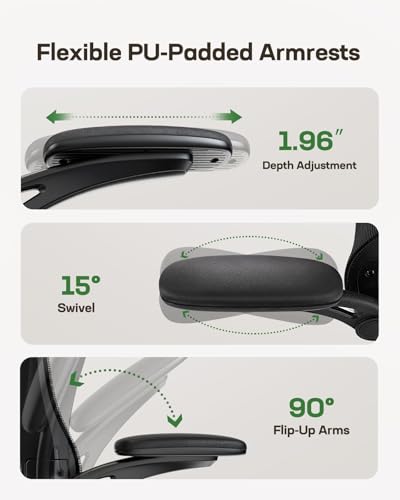
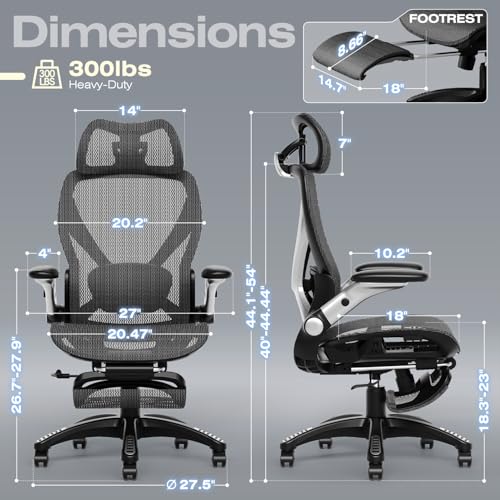
The ELABEST X100 is the most feature-rich chair in this group. It combines a mesh office-chair design with adjustable 3D lumbar support, a footrest, and 5D flip-up arms. That mix gives it a clear advantage for people who change positions often. It also has the larger, more substantial look many shoppers want in a big-and-tall desk chair.
I like the footrest for short breaks, reading, and video viewing. It lets you move away from a strict upright work posture without needing a second chair. The flip-up arms can also help the chair fit under a desk when you finish work. Still, you should measure your desk and room before buying because this is not the smallest option.
Pros:
- Adjustable 3D lumbar support helps you fine-tune lower-back contact
- Included footrest supports relaxed breaks and reclined use
- 5D flip-up arms offer many adjustment options
- Mesh surfaces can feel cooler than fully padded upholstery
- Big-and-tall design may suit users who need more room
- Works for office tasks, gaming, reading, and general computer use
Cons:
- Its larger feature set may take more time to adjust
- The footrest needs enough space to extend fully
- Shoppers should confirm the seat dimensions and desk clearance
What Amazon Buyers Are Saying
Amazon buyers commonly focus on the chair’s many adjustments, the footrest, and the roomy design. Reviews for chairs in this class often show that comfort depends on correct setup, body size, and desk height. Some buyers may need time to learn the lumbar, armrest, and recline settings. Before purchase, read the newest reviews for assembly notes, long-term cushion comfort, and fit.
My Recommendation
I recommend the ELABEST X100 for users who want more than a basic desk chair. It is a strong choice for long mixed-use sessions, especially if you value a footrest and flexible arm support. I would not choose it for a very small desk or a minimalist workspace. Overall, it offers the broadest feature set in this review.
| Category | Rating |
|---|---|
| Ergonomic support | 4.5/5 |
| Adjustability | 4.7/5 |
| Comfort features | 4.6/5 |
| Space efficiency | 3.9/5 |
| Overall Rating | 4.5/5 |
Marsail High-Back Ergonomic Office Chair

The Marsail high-back chair takes a balanced approach to office comfort. It includes adjustable lumbar support, a headrest, and 3D armrests. The high back gives the chair a supportive shape for desk work, while the mesh construction may help reduce heat during busy days. It looks suitable for a home office without feeling too much like a gaming chair.
The 3D armrests are useful when you want to bring your elbows closer to your body. Proper arm support can reduce the need to lift your shoulders while typing. The headrest may also help during reclined breaks, but its value depends on your height and sitting position. I suggest adjusting the chair after setting your monitor and keyboard in place.
Pros:
- Adjustable lumbar support allows a more personal fit
- 3D armrests support different typing and resting positions
- Headrest adds comfort during reclined breaks
- High-back design gives broad upper-back coverage
- Mesh material may feel cooler in warm rooms
- Neutral styling fits many home-office spaces
Cons:
- Headrest comfort may vary with user height
- More adjustment points can make setup less simple
- Mesh may feel firmer than a thick foam office chair
What Amazon Buyers Are Saying
Amazon review patterns for this model center on the high back, adjustable arms, headrest, and lumbar support. Buyers often value chairs that assemble without major trouble and roll smoothly on a home-office floor. As with most adjustable chairs, some users may prefer firmer or softer support than others. Check recent reviews for comments about assembly, armrest movement, and comfort after several hours.
My Recommendation
The Marsail is a sensible middle-ground pick. I would choose it for a user who wants a headrest and adjustable arms but does not need a footrest or an oversized chair. It offers useful ergonomic features without an overly complex design. It is worth considering for everyday work, study, and light gaming.
| Category | Rating |
|---|---|
| Ergonomic support | 4.4/5 |
| Armrest adjustment | 4.5/5 |
| Headrest comfort | 4.2/5 |
| Everyday value | 4.4/5 |
| Overall Rating | 4.4/5 |
GABRYLLY Wide-Seat Office Chair

The GABRYLLY office chair stands out with its wide cushion, high back, headrest, and flip-up arms. That combination makes it appealing to people who dislike narrow seats or rigid armrests. The 90-120-degree tilt-lock range also gives you more control over upright work and relaxed sitting. Its black mesh look suits both home and office spaces.
This chair may be a good fit for users who move between typing, reading, and video calls. Flip-up arms make it easier to slide the chair beneath a desk when you need more floor space. The wide seat can feel welcoming, yet a larger seat does not fit every body equally well. I recommend checking the full measurements and comparing them with your desk height before ordering.
Pros:
- Wide cushion can offer a less cramped sitting area
- High back supports the upper body during desk work
- Headrest provides support during rest periods
- Flip-up arms improve desk clearance and storage
- 90-120-degree tilt lock supports several sitting angles
- Mesh design may help air move around the back
Cons:
- Wide seating may not suit smaller users or small desks
- Fixed features may feel less precise than highly adjustable systems
- Headrest position can depend on body height and posture
What Amazon Buyers Are Saying
Amazon buyers often highlight the roomy cushion, back support, headrest, and easy-to-use flip-up arms. Some shoppers choose it because they want more seat space than a standard task chair provides. Reviews can also vary on cushion firmness and headrest fit. I suggest reading recent buyer comments that match your height, weight, and daily sitting time rather than relying on a single review.
My Recommendation
I recommend the GABRYLLY for shoppers who place seat width and simple comfort first. It is a practical choice for home offices, study rooms, and users who like to recline during breaks. It may not offer the same fine adjustment range as the ELABEST or Marsail. Still, its wide cushion and tilt lock give it strong everyday appeal.
| Category | Rating |
|---|---|
| Seat comfort | 4.6/5 |
| Tilt control | 4.4/5 |
| Space and fit | 4.5/5 |
| Adjustability | 4.1/5 |
| Overall Rating | 4.4/5 |
TRALT 330-LB Ergonomic Office Chair

The TRALT office chair focuses on support for users who want a stated 330-pound weight capacity. It includes lumbar support, a headrest, and flip-up armrests. The chair also works as a reading, computer, or gaming chair, so it can serve more than one room or activity. Its simple feature mix may appeal to buyers who want useful support without a long list of controls.
The flip-up arms are helpful when you need to move close to a desk or store the chair under it. The headrest can make reading and relaxed viewing more pleasant when it lines up with your neck. Weight capacity is only one part of chair fit, so I would also check seat width, height range, and base details. Good posture still depends on adjusting the chair to your desk and body.
Pros:
- Stated 330-pound weight capacity supports a wider user range
- Lumbar support helps target the lower back
- Headrest adds comfort for reading and reclined use
- Flip-up arms help save space around the desk
- Useful for office work, study, reading, and gaming
- Simple layout may be easier to learn than a highly adjustable chair
Cons:
- Weight capacity does not guarantee the right fit for every body
- Users should verify seat and back measurements before purchase
- It may provide fewer fine adjustments than premium ergonomic chairs
What Amazon Buyers Are Saying
Amazon shoppers commonly look at the stated weight capacity, lumbar support, headrest, and armrest design when considering this chair. Buyers may also discuss assembly time and whether the chair feels stable on their floor. As with any office chair, comfort reports can differ due to height, posture, and personal preference. Read the latest reviews for details that match your own work routine.
My Recommendation
The TRALT is worth considering for users who need a higher stated weight capacity and a broad-use chair. I like its practical mix of lumbar support, headrest, and flip-up arms. It is not the best choice if you want many independent adjustments. For the right user and room, it offers a solid balance of support and function.
| Category | Rating |
|---|---|
| Support structure | 4.3/5 |
| User range | 4.5/5 |
| Headrest and arms | 4.2/5 |
| Overall value | 4.4/5 |
| Overall Rating | 4.3/5 |
MUXX.STIL Mesh Office Chair

The MUXX.STIL chair is the simple, clean option in this comparison. It combines adjustable lumbar support with a breathable mesh back and flip-up armrests. The khaki color gives it a softer look than many black office chairs. It can work well for a bedroom office, apartment desk, or small home workspace.
I see this chair as a good fit for shoppers who want core ergonomic features without a footrest or a large executive frame. The flip-up arms make it easier to move the chair out of the way. Breathable mesh may feel comfortable in warm rooms, though some users prefer the soft feel of a padded back. Check the dimensions and color carefully before you order.
Pros:
- Adjustable lumbar support provides basic lower-back customization
- Breathable mesh can help reduce heat at the back
- Flip-up arms make storage and desk clearance easier
- Khaki finish offers a softer home-office appearance
- Compact feature set may suit simple workstations
- Useful for everyday computer work and study
Cons:
- It may lack the headrest found on several competing models
- Mesh back support can feel firm to users who prefer cushions
- Fewer premium adjustments may limit fine-tuning
What Amazon Buyers Are Saying
Amazon buyers commonly pay attention to the chair’s appearance, mesh back, lumbar adjustment, and flip-up arms. Many shoppers choose a chair like this for a home office where size and style matter. Reviews may differ on cushion feel, assembly, and support over a full workday. I recommend checking recent comments and buyer photos for a better sense of fit and finish.
My Recommendation
The MUXX.STIL is a good value-focused choice for basic desk work. I would pick it for a smaller home office or anyone who prefers a lighter, simpler design. It may not satisfy users who need a headrest, footrest, or many adjustments. If your needs are modest, its lumbar support and breathable back make it worth a look.
| Category | Rating |
|---|---|
| Basic ergonomic support | 4.1/5 |
| Breathability | 4.3/5 |
| Space efficiency | 4.4/5 |
| Feature range | 3.9/5 |
| Overall Rating | 4.2/5 |
How to Choose the Best Ergonomic Office Chair
Choosing the Best Ergonomic Office Chair is not only about buying the chair with the most features. Your body size, desk height, work habits, and room space all matter. The right chair should let you sit with your feet supported, your shoulders relaxed, and your screen at a comfortable height. The Occupational Safety and Health Administration and other workplace safety guidance stress neutral posture, good workstation setup, and regular movement. A chair helps, but it cannot replace short standing and walking breaks.
1. Match the Chair to Your Body and Desk
Start with seat height. Your feet should rest on the floor, or on a stable footrest, while your knees stay close to a comfortable right angle. Your thighs should feel supported without the front edge pressing into the backs of your knees. Check the seat depth, seat width, back height, and listed weight capacity before you buy.
Desk height matters too. If the chair is too low, you may lift your shoulders to reach the keyboard. If it is too high, your feet may dangle. Your elbows should stay near your sides while you type. A chair with adjustable arms can help, but only if the armrests fit under or beside your desk.
2. Look for Useful Ergonomic Adjustments
Lumbar support should contact your lower back without forcing you into an uncomfortable curve. Adjustable support gives you more control than a fixed bump. A tilt function can help you change posture during the day. A tilt lock is useful when you want a steady upright position for focused work.
Armrests, headrests, and footrests are personal choices. Adjustable arms help support your forearms and may reduce shoulder tension. A headrest can feel good during a reclined break, but it should not push your head forward. A footrest adds comfort for rest, yet it also needs room to extend. Do not pay for features you will not use.
3. Compare Materials, Build, and Long-Term Value
Mesh can feel cool and light. Padded seats can feel softer at first. Neither material suits everyone. Look for a stable base, smooth casters, a firm back frame, and controls that work without force. If the product page lists assembly details, review them before purchase. Also check the return policy and warranty terms, since comfort is personal.
Do not judge value by the number of buttons or levers. A chair with three useful adjustments may serve you better than a chair with ten confusing ones. Read recent Amazon reviews with care. Look for repeated comments about assembly, fit, noise, cushion comfort, and support after extended use. Product prices, stock, and specifications can change, so confirm the current listing before ordering.
Final Verdict: Which Should You Buy?
For most users, I would choose the ELABEST X100 because it offers the strongest mix of adjustable lumbar support, flexible arms, and a footrest. The Marsail is a close choice for balanced everyday office work.
The Best Ergonomic Office Chair is the one that fits your body, desk, and habits. Measure first, adjust it carefully, and take regular movement breaks for better daily comfort.
FAQs Of Best Ergonomic Office Chair
What makes an office chair ergonomic?
An ergonomic chair supports a neutral sitting position with features such as seat-height adjustment, lumbar support, comfortable back support, and suitable armrests. Fit matters as much as the feature list.
Is mesh better than a padded office chair?
Mesh often feels cooler and provides a firmer feel. Padding may feel softer. The better choice depends on your room temperature, comfort preference, and daily sitting time.
Do I need a headrest for desk work?
No. A headrest is optional for most desk work. It can help during reclined breaks, but it should fit your height and avoid pushing your head forward.
How do I choose an ergonomic chair for a larger body?
Check the listed weight capacity, seat width, seat depth, back height, and armrest spacing. A higher capacity alone does not prove that the chair will fit comfortably.
Can an ergonomic office chair fix back pain?
A supportive chair may improve comfort and posture, but it cannot diagnose or treat back pain. Seek advice from a qualified health professional for ongoing or severe pain.