Best Portable Monitor: Top Features To Consider
The best portable monitor adds useful screen space without weighing down your laptop bag.
A small laptop screen can feel tight when you work with documents, spreadsheets, or video calls. A portable monitor solves that problem by giving you a second display at your desk, in a hotel, or at a coffee shop. I compared five popular models for screen quality, connection options, size, travel use, and value. These picks also cover casual work, gaming, console use, and simple laptop screen extension.
See the differences between my top picks at a glance.
| Model | Screen | Connections | Best For | Notable Feature | Amazon |
|---|---|---|---|---|---|
| cocopar 15.6-inch | 15.6-inch, 1080p, 60Hz | USB-C, HDMI | Work and travel | VESA mountable | View on Amazon |
| KYY 15.6-inch | 15.6-inch, 1080p | USB-C, HDMI | Simple second screen use | Cover included | View on Amazon |
| MNN 15.6-inch | 15.6-inch, 1080p, 60Hz | USB-C, HDMI | Budget work and gaming | HDR and low-blue mode | View on Amazon |
| VisionOwl 16-inch QHD | 16-inch, 2.5K, 144Hz | USB-C, HDMI | Gaming and detailed work | 144Hz refresh rate | View on Amazon |
| VisionOwl 18.5-inch | 18.5-inch IPS | USB-C, HDMI | Large mobile workspace | Built-in kickstand | View on Amazon |
cocopar 15.6-Inch Portable Monitor

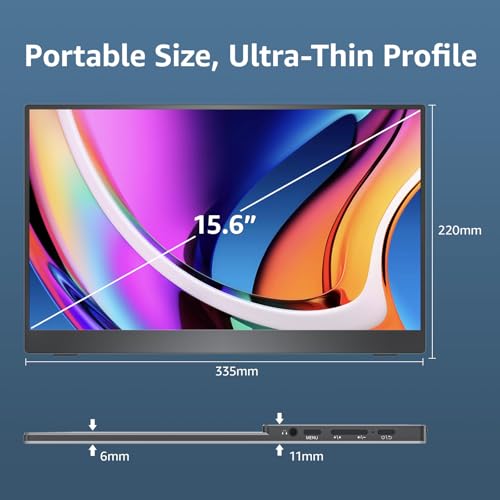
The cocopar portable monitor offers a practical 15.6-inch Full HD screen for daily work and travel. Its 1920 by 1080 resolution gives text and web pages a familiar, usable look. The listed 60Hz refresh rate suits office work, streaming, and normal console play. Its 85% sRGB coverage should also provide a reasonable color range for general use, though it is not a pro photo display.
I like the mix of HDMI and USB-C inputs because it gives this screen wider device support. You can use it with many laptops, computers, game consoles, and other compatible devices. The built-in speaker, cover stand, and VESA mounting support add useful flexibility at home or on the road. Before buying, check whether your laptop USB-C port supports video output, since a standard charging-only port will not carry the picture.
Pros:
- 15.6-inch Full HD screen gives useful workspace
- 60Hz refresh rate works well for office tasks and casual gaming
- USB-C and HDMI support provide flexible connections
- VESA mounting support helps with desk setups
- Built-in speaker adds basic audio convenience
- Cover stand makes travel and setup easier
Cons:
- USB-C video output depends on the host device
- 85% sRGB coverage may not suit color-critical creative work
- One cable may not be enough for every laptop or console setup
What Amazon Buyers Are Saying
Customer review patterns for this type of cocopar display often focus on its useful size, simple setup, and value as a second screen. Buyers tend to appreciate the combination of USB-C and HDMI, especially when they move between a laptop and a console. The included cover and stand also make the monitor easier to carry and position.
Common concerns with portable monitors include cable needs, brightness in strong daylight, and USB-C compatibility. Those points matter here too. I would read the latest listing details and confirm your device ports before ordering, rather than assuming every USB-C port supports display output.
My Recommendation
I recommend the cocopar as a balanced choice for remote work, travel, and general entertainment. It does not chase premium gaming features, but it covers the basics well and adds VESA support. For most people who want a dependable 1080p second screen, it is worth considering.
KYY 15.6-Inch Portable Monitor

The KYY 15.6-inch portable monitor targets buyers who want a simple laptop screen extender. It uses a 1080p Full HD IPS display, which is a sensible resolution for a screen this size. The wide viewing behavior of an IPS panel helps when you do not sit directly in front of it. Its cover also protects the display during transport and helps support it during use.
This model includes USB-C and HDMI, so it can fit into mixed-device setups. The product listing also highlights HDR, a speaker, and gaming use, which gives it more range than a basic office screen. Still, I would treat HDR as a helpful image feature, not a promise of television-level contrast. The KYY makes the most sense for work, study, travel, and casual play rather than demanding competitive gaming.
Pros:
- 1080p resolution keeps text clear for common tasks
- IPS panel supports broad viewing angles
- USB-C and HDMI improve device compatibility
- Protective cover helps during storage and travel
- Speaker provides sound without a separate small speaker
- HDR support can add more image range with compatible content
Cons:
- Refresh-rate details may not satisfy serious competitive gamers
- USB-C single-cable use depends on the laptop port and power needs
- Built-in speakers on slim monitors usually offer modest sound
What Amazon Buyers Are Saying
Buyers commonly look for three things in this KYY model: an easy setup, a useful screen size, and a case that makes it travel friendly. Reviews for portable displays often praise the ability to place a second screen beside a laptop in a hotel room or temporary office. The USB-C and HDMI options also appeal to people who use more than one type of device.
The main complaints seen with this product category usually involve brightness, cables, or power. Some setups may need an extra power source, especially when connected to HDMI. I suggest checking the included accessories and your device requirements before a trip so you do not discover a missing cable at the wrong time.
My Recommendation
The KYY is a good value pick for students, remote workers, and travelers who want a straightforward portable monitor. Its feature list is broad, but buyers should keep expectations realistic about speakers and HDR. I would choose it when easy transport matters more than high refresh gaming.
MNN 15.6-Inch FHD Portable Monitor

The MNN 15.6-inch portable monitor is built around a familiar 1080p IPS panel and a 60Hz refresh rate. That combination fits everyday work, school tasks, movies, and casual gaming. The listing highlights USB-C one-cable use, HDMI support, HDR, and a smart case. It also lists compatibility with PC, Mac, phone, and Nintendo Switch devices, although compatibility still depends on the correct port and cable.
I see this model as a practical budget screen for people who want broad use without a complex setup. The low-blue feature may help make long sessions more comfortable for some users, but it does not replace good breaks and sensible screen brightness. The case should make the monitor easier to protect and prop up. If you plan to connect a console through HDMI, remember that HDMI setups may need separate power.
Pros:
- 15.6-inch 1080p IPS screen suits most daily tasks
- 60Hz refresh rate supports normal video and casual play
- USB-C one-cable design can reduce desk clutter
- HDMI input expands use with computers and consoles
- HDR support adds flexibility for compatible content
- Low-blue mode may improve comfort for some users
- Smart case helps with protection and viewing position
Cons:
- 60Hz is not aimed at high-refresh competitive gaming
- Some phones and laptops may need adapters or extra power
- Full HD gives less desktop space than a QHD monitor
What Amazon Buyers Are Saying
Amazon shoppers who consider this MNN display often value its low-cost way to add a second screen. The common appeal is clear: the monitor is large enough to feel useful, yet still easier to carry than a full desktop display. Buyers also tend to like the case, the choice of USB-C or HDMI, and the ability to use it for both work and entertainment.
As with other slim portable screens, some real-world experiences can vary by host device. A laptop with full-featured USB-C may work with one cable, while another computer may need power and video cables. The safest approach is to check your computer, phone, or Switch setup before purchase and confirm that the required video mode is supported.
My Recommendation
The MNN is one of my better budget choices for a basic second monitor. It offers a useful set of features without moving into premium pricing or premium gaming performance. I recommend it for students, office users, and travelers who want a flexible 1080p display.
VisionOwl 16-Inch QHD 144Hz Monitor

The VisionOwl 16-inch QHD portable monitor is the performance-focused option in this group. Its 2.5K resolution offers more detail than a standard 1080p screen, while the 16:10 shape gives a little more vertical room. The listed 144Hz refresh rate is also a major step above the 60Hz models here. That makes it more interesting for gaming and for users who enjoy smoother scrolling.
This display also lists HDR, USB-C, HDMI, speakers, VESA mounting, and a built-in kickstand. Those features let it work as a travel screen or as part of a more fixed desk setup. The higher resolution and refresh rate may increase the power and bandwidth demands, so check the laptop or console connection before expecting every feature to work at once. I also recommend checking game settings and cable support if high-refresh play is your main goal.
Pros:
- 2.5K QHD resolution provides sharper detail than 1080p
- 144Hz refresh rate suits smoother gaming and scrolling
- 16:10 aspect ratio adds useful vertical workspace
- USB-C and HDMI support multiple connection types
- VESA mountable design works in flexible desk setups
- Built-in kickstand makes quick placement easy
- Speakers add basic all-in-one convenience
Cons:
- Higher resolution and refresh rate may use more power
- Not every USB-C port can drive QHD at 144Hz
- Premium features may be unnecessary for simple office work
What Amazon Buyers Are Saying
Buyers interested in this VisionOwl model are likely drawn to its sharper QHD image and fast refresh rate. Feedback for this class of monitor often centers on smoother motion, improved detail, and the extra room offered by a larger mobile panel. The kickstand, speakers, and VESA support also make it more versatile than a basic travel display.
The most important point to check in customer feedback is connection behavior. A high-refresh portable monitor can show a lower refresh rate when the computer, port, or cable limits the signal. I would also review comments about brightness, stand stability, and power use before buying, since those factors affect the experience outside the specifications list.
My Recommendation
I recommend the VisionOwl QHD model for gamers and creators who want more detail and smoother motion in a portable package. It is not the most sensible choice if you only need email and spreadsheets, but it offers the strongest performance profile in this comparison. Choose it when your device can support its higher demands.
VisionOwl 18.5-Inch Portable Monitor

The 18.5-inch VisionOwl is the largest screen in this portable monitor comparison. Its size gives you a more open workspace for side-by-side windows, timelines, reference pages, and presentations. The IPS panel should provide comfortable viewing from different positions, which helps when you share a screen or work at a temporary desk. USB-C and HDMI inputs make it useful with laptops, MacBook models, computers, and game consoles that support the required connection.
The built-in kickstand makes setup simple, while the speakers remove the need for a separate audio accessory during basic use. VESA mounting support gives you another way to position the screen at home. The trade-off is portability: an 18.5-inch panel takes more room in a bag than a 15.6-inch model. I would choose this monitor for a larger mobile workspace, not for the smallest possible travel kit.
Pros:
- 18.5-inch screen offers generous workspace
- IPS panel supports broad viewing angles
- USB-C and HDMI provide useful connection choices
- Built-in kickstand helps with quick setup
- Speakers support basic media and presentation use
- VESA mounting adds desk arrangement flexibility
- Useful for side-by-side work and larger presentations
Cons:
- Larger body takes more space in a travel bag
- It may feel less portable than a 15.6-inch model
- Buyers should verify the exact resolution and refresh rate before purchase
What Amazon Buyers Are Saying
People who choose a large portable monitor usually want more room than a standard laptop can provide. Customer discussions around this type of VisionOwl display often focus on the comfortable screen size, simple kickstand setup, and useful USB-C and HDMI inputs. The speakers and VESA support also appeal to buyers who want one screen for both travel and home use.
The main concern is the same reason many people buy it: size. A larger panel can feel better at a desk, but it may not fit every laptop sleeve or small carry-on pocket. I would measure your bag and work area first. Also check the current product listing for exact display details before placing an order.
My Recommendation
The 18.5-inch VisionOwl is a strong choice when workspace matters more than compact travel. It works well for a temporary office, presentations, console play, and home use. I would not call it the lightest travel option, but it is worth buying for users who want a truly large second screen.
How to Choose the Best Portable Monitor
Choosing the Best Portable Monitor depends on how you work, what devices you own, and how often you travel. A good screen should fit your bag, show a clean image, and connect without needless trouble. Use the points below before you compare prices.
1. Match the Screen to Your Work
A 15.6-inch 1080p monitor is enough for email, documents, web research, and most remote work. It gives useful extra space without adding too much bulk. If you edit detailed images, manage large timelines, or want sharper text, a QHD model such as the 16-inch VisionOwl may suit you better.
Screen size also changes comfort. A larger display gives more room for two windows, but it takes more space in your bag. Think about where you will use it. A small hotel desk may favor a 15.6-inch model, while a home office may benefit from the 18.5-inch VisionOwl.
2. Check USB-C, HDMI, and Power Needs
Do not assume that every USB-C port carries video. Many USB-C ports only charge devices or transfer data. Your laptop must support video over USB-C for a true one-cable setup. If it does not, you may need HDMI for the picture and another USB connection for power.
HDMI gives broad compatibility with computers, consoles, and other devices. However, HDMI setups often need a separate power source. Before you buy, check the monitor input, your device output, cable type, and power needs. This small check can prevent most connection problems.
3. Balance Refresh Rate, Resolution, and Value
Refresh rate tells you how often the screen can update the image. A 60Hz portable monitor works well for office tasks, movies, and casual play. A 144Hz model can look smoother during supported games and fast scrolling, but your device and cable must also support that signal.
Resolution affects sharpness and workspace. Full HD keeps the price and power needs more manageable. QHD offers more detail, but it can demand more from your laptop. For most buyers, the best value comes from choosing the features they will use, rather than paying for a high specification that their device cannot deliver.
Final Verdict: Which Should You Buy?
For most users, I recommend the cocopar 15.6-inch as the best portable monitor balance of size, connections, and useful features. Choose the VisionOwl 16-inch QHD model for gaming and sharper detail.
Check your device ports before buying. The right portable monitor can make travel work, study, and entertainment much easier.
FAQs Of Best Portable Monitor
What is the best portable monitor for a laptop?
The cocopar 15.6-inch is a balanced choice for most laptop users because it offers Full HD resolution, USB-C, HDMI, a cover stand, and VESA support.
Can a portable monitor work with any USB-C laptop?
No. The USB-C port must support video output. A charging-only or data-only USB-C port may need HDMI or another video connection.
Is a 1080p portable monitor good for work?
Yes. A 1080p portable monitor works well for documents, spreadsheets, email, web browsing, and video calls on a 15.6-inch screen.
Is a 144Hz portable monitor worth it for gaming?
It can be worth it if your computer, console, cable, and game support a high refresh rate. For office work alone, 60Hz is usually enough.
What size portable monitor should I buy?
Choose 15.6 inches for easier travel, 16 inches for a balance of detail and portability, or 18.5 inches when you want a larger mobile workspace.