Best Gaming Headset: Ultimate Guide For Clear Audio
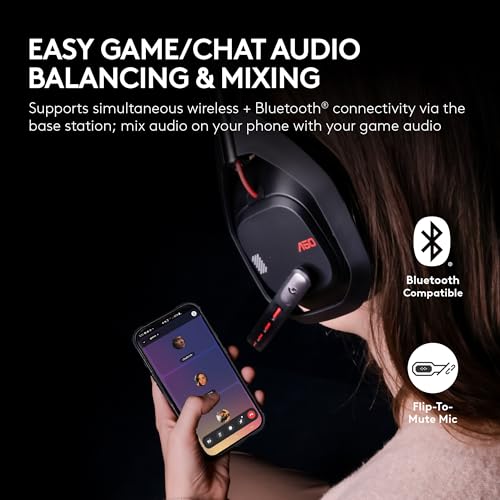
The Logitech G Astro A50 is my top pick for the best gaming headset in 2026.
A good gaming headset can change the way you play. Clear sound helps you hear steps, reloads, and team calls. A strong microphone keeps your squad communication clean. Comfort also matters during long sessions, since a tight headband or hot ear cup can ruin an otherwise great game. I compared five popular models for sound, microphone quality, comfort, connection options, battery life, platform support, and value. These picks cover premium wireless headsets, budget wired models, and flexible choices for PC, PlayStation, Xbox, Switch, and mobile gaming.
See the differences between my top picks at a glance.
| Headset | Connection | Best Feature | Battery / Power | Best For | Buy |
|---|---|---|---|---|---|
| Logitech G Astro A50 | 2.4GHz wireless + Bluetooth | PLAYSYNC switching | Up to 24 hours | Multi-platform gamers | View on Amazon |
| SteelSeries Arctis Nova Pro Omni | 2.4GHz + Bluetooth | ANC and 96kHz/24-bit audio | Wireless system | Serious PC and console play | View on Amazon |
| Logitech G733 Lightspeed | Lightspeed wireless | Light fit and Blue VO!CE mic | Wireless battery | PC and PlayStation users | View on Amazon |
| Razer BlackShark V2 X | 3.5mm wired | Low-cost 50mm driver design | No charging needed | Budget gamers | View on Amazon |
| Turtle Beach Stealth 700 | Wireless + Bluetooth | 80-hour battery claim | Up to 80 hours | Xbox, PlayStation, and mobile | View on Amazon |
Logitech G Astro A50 Gaming Headset

The Logitech G Astro A50 is built for players who use more than one gaming platform. Its main advantage is the PLAYSYNC audio switcher, which lets you move between supported systems with less cable swapping. The headset uses a 2.4GHz wireless connection for gaming and also supports Bluetooth for phones and other devices. That mix makes it much more useful than a headset that only works with one console.
Sound quality suits both competitive games and story-driven titles. The listed specifications support audio below 16-bit/48kHz on console and below 24-bit/48kHz on PC, while the battery is rated for up to 24 hours. The charging base also gives the headset a neat home on your desk. I like this model most for a gaming room with a PC, PlayStation, Xbox, or Switch setup that changes often.
Pros:
- PLAYSYNC makes multi-platform use more convenient
- 2.4GHz wireless connection is suited to gaming
- Bluetooth adds a useful second connection
- Up to 24 hours of listed battery life
- Charging base keeps the headset stored and ready
- Works across several major gaming platforms
Cons:
- Premium features can mean a higher purchase price
- The full feature set may require setup on more than one platform
- The charging base takes extra desk space
What Amazon Buyers Are Saying
Buyer feedback for the Astro line often focuses on strong sound, wireless freedom, and the ease of keeping the headset on its base. Multi-platform owners tend to value the switching feature because it reduces the need to reconnect cables. Some buyers also praise the comfort for long play sessions.
Common concerns in customer feedback for advanced wireless headsets include setup questions, software learning curves, and occasional connection or charging complaints. These issues can depend on the console, firmware, and home setup. I recommend checking the current Amazon listing for the latest buyer comments and confirming platform compatibility before ordering.
My Recommendation
I recommend the Logitech G Astro A50 to gamers who want one premium headset for several systems. It is not the simplest choice for a casual player who only uses one console, but its switching system and dual wireless options add real value for multi-platform homes. Based on its feature set, it is my leading all-around pick in this review.
| Category | Rating |
|---|---|
| Sound quality | 4.6/5 |
| Comfort | 4.5/5 |
| Connectivity | 4.8/5 |
| Features | 4.8/5 |
| Value | 4.2/5 |
| Overall rating | 4.6/5 |
SteelSeries Arctis Nova Pro Omni Headset

The SteelSeries Arctis Nova Pro Omni targets players who want advanced sound control. The listed model supports 96kHz/24-bit audio, active noise cancellation, and a ClearCast Pro microphone with AI noise rejection. It also combines 2.4GHz wireless and Bluetooth. That makes it a serious choice for PC and console users who want one headset for games, calls, and everyday media.
The mobile app adds another layer of control for users who like to tune sound profiles. OmniPlay support is listed for PC, PlayStation, and Xbox, which helps make the headset flexible across a mixed setup. The ANC feature can help reduce outside noise, but it will not replace a quiet room. This is a feature-rich headset for players who care about detail, voice clarity, and sound customization more than a low price.
Pros:
- High-resolution 96kHz/24-bit audio support
- Active noise cancellation for distracting rooms
- ClearCast Pro microphone with AI noise rejection
- 2.4GHz wireless and Bluetooth support
- Mobile app gives access to sound controls
- OmniPlay support covers PC, PlayStation, and Xbox
Cons:
- Advanced controls may feel excessive for casual users
- Premium features usually come with a higher price
- Wireless performance and features can vary by device setup
What Amazon Buyers Are Saying
Customer feedback on premium Arctis models commonly highlights the clean sound, strong microphone performance, and useful software controls. Buyers who play in shared rooms often appreciate noise control. Many serious players also like the option to connect through wireless gaming audio and Bluetooth.
The most common concerns with feature-heavy headsets tend to involve setup, app settings, and the time needed to learn the controls. Some users may also prefer a lighter or simpler design. Since firmware and package details can change, I suggest reviewing the current Amazon listing and recent comments before buying.
My Recommendation
The SteelSeries Arctis Nova Pro Omni is a strong choice for competitive players, streamers, and PC users who want deep control over their audio. It earns its place near the top because it offers more sound and connection tools than most basic models. Buy it if you will use those tools; otherwise, a simpler headset may give you better value.
| Category | Rating |
|---|---|
| Sound detail | 4.8/5 |
| Microphone | 4.7/5 |
| Noise control | 4.7/5 |
| Connection options | 4.7/5 |
| Value for money | 4.1/5 |
| Overall rating | 4.6/5 |
Logitech G733 Lightspeed Wireless Headset
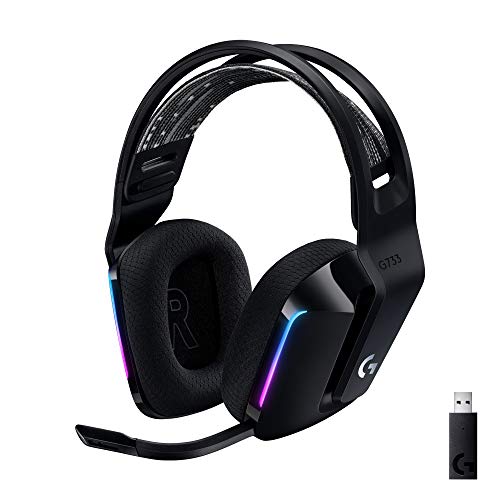
The Logitech G733 Lightspeed is designed for gamers who want wireless freedom without a heavy feel. Its suspension headband spreads pressure across the top of the head. The headset also includes a Blue VO!CE microphone and Logitech PRO-G audio. It supports PC, PS5, PS4, and Switch, although the exact connection method can depend on the platform and included wireless receiver.
This model fits players who spend many hours in chat, multiplayer games, and casual listening. A suspension band can feel more comfortable than a firm padded band for some users, though fit always depends on head size and shape. The removable microphone and wireless design also make the G733 easy to use away from the desk. It is a practical middle-ground pick for PC and PlayStation gaming.
Pros:
- Light-focused design suits long gaming sessions
- Suspension headband helps spread contact pressure
- Blue VO!CE microphone tools support clearer voice chat
- Lightspeed wireless avoids a cable across the desk
- Compatible with PC, PS5, PS4, and Switch
- PRO-G audio is useful for games and everyday media
Cons:
- Wireless platform support may differ between systems
- Suspension bands do not fit every head shape equally
- It lacks the advanced multi-system switching of the Astro A50
What Amazon Buyers Are Saying
Buyers often mention the light feel, wireless range, and comfort of the suspension headband. The microphone also receives attention from users who spend a lot of time in voice chat. Many owners see it as an easy upgrade from a basic wired headset.
Some customer comments raise concerns about software settings, microphone tuning, or wireless behavior after long use. A few users may also want stronger low-end sound or a more solid fit. These experiences can vary with computer drivers, console settings, and individual preferences, so I would check current reviews for the latest pattern.
My Recommendation
I recommend the Logitech G733 for PC and PlayStation gamers who value comfort and a light wireless design. It does not offer the same premium switching or noise control as the top models here, but it covers the core gaming needs well. It is a good value choice when its current price sits below premium wireless headsets.
| Category | Rating |
|---|---|
| Comfort | 4.6/5 |
| Wireless use | 4.4/5 |
| Microphone | 4.3/5 |
| Platform support | 4.2/5 |
| Value for money | 4.4/5 |
| Overall rating | 4.4/5 |
Razer BlackShark V2 X Gaming Headset

The Razer BlackShark V2 X is the most budget-friendly option in this comparison. It uses a 3.5mm audio jack, so you do not need to charge it or pair it with a wireless receiver. The headset has 50mm drivers, memory foam cushions, and listed 7.1 surround sound support. It is made for PC, PS4, PS5, and Switch use.
A wired design can be a smart choice for a first headset or a backup pair. It keeps the audio path simple and removes battery worries during a long match. The 3.5mm plug also makes it easy to move between supported devices with a compatible headset jack. You will not get app-based wireless features here, but you get a direct and low-cost way to add game audio and voice chat.
Pros:
- Usually costs less than wireless gaming headsets
- 3.5mm connection needs no charging
- 50mm drivers provide a full gaming sound profile
- Memory foam cushions improve contact comfort
- Works with PC, PS4, PS5, and Switch
- Simple plug-and-play setup for supported devices
Cons:
- The cable can limit movement at a gaming desk
- It does not provide wireless Bluetooth convenience
- 7.1 surround features may depend on software and platform support
What Amazon Buyers Are Saying
Budget headset buyers often praise the BlackShark V2 X for its low price, light feel, and clear improvement over built-in speakers. The plug-in setup also appeals to people who do not want to manage battery charging. Many users choose it for school, casual gaming, or a first multiplayer headset.
Common complaints in feedback for low-cost wired models include cable wear, fit differences, and microphone quality that may not match a more expensive headset. Some users also need to adjust game or chat settings to balance voice and game audio. Those are important trade-offs to consider when choosing a budget model.
My Recommendation
The Razer BlackShark V2 X is my budget pick. I would choose it for a new gamer, a spare headset, or anyone who wants reliable wired audio at a modest cost. It is not the best gaming headset for wireless comfort or multi-device control, but it offers strong basic value when you want simple plug-in performance.
| Category | Rating |
|---|---|
| Sound quality | 4.1/5 |
| Comfort | 4.2/5 |
| Microphone | 3.9/5 |
| Ease of use | 4.7/5 |
| Value for money | 4.7/5 |
| Overall rating | 4.3/5 |
Turtle Beach Stealth 700 Wireless Headset
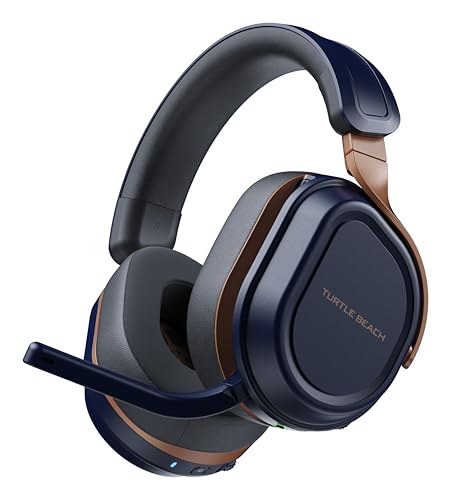
The Turtle Beach Stealth 700 is a flexible wireless headset for console and mobile gamers. The listed model supports Xbox Series X|S, Xbox One, PlayStation, PC, and mobile devices. It includes Bluetooth, 60mm dual drivers, and a flip-to-mute microphone. Its advertised battery life reaches up to 80 hours, which is one of the longest figures in this group.
The long battery rating is useful for players who dislike frequent charging. Bluetooth also lets you connect to a phone for calls or music, depending on your setup. The flip-to-mute mic makes quick voice control easy during a match. This headset is a good fit for someone who wants broad platform support and long wireless use rather than a small, lightweight design.
Pros:
- Up to 80 hours of listed battery life
- 60mm dual drivers support a large sound presentation
- Bluetooth adds mobile device flexibility
- Flip-to-mute microphone is quick to use
- Supports Xbox, PlayStation, PC, and mobile platforms
- Wireless design keeps the play area free of cables
Cons:
- Larger drivers may create a bulkier fit for some users
- Wireless compatibility can vary by platform and connection mode
- Long battery life may matter less to players who game for short sessions
What Amazon Buyers Are Saying
Feedback for the Stealth 700 range often centers on battery life, wireless convenience, and the ability to use one headset with several devices. Console owners also tend to like the flip-to-mute microphone. Users who play long sessions may find the large battery rating especially helpful.
Some buyers may report fit, weight, pairing, or software concerns. Bluetooth and console connections can also work in different ways, so buyers should read the current compatibility notes closely. I would confirm the exact Xbox or PlayStation version before checkout, especially when platform support is a key reason for buying.
My Recommendation
I recommend the Turtle Beach Stealth 700 to players who want long battery life and broad device support. It is especially appealing for Xbox and console users who also connect a phone. The fit may not suit everyone, but its battery and connection range make it one of the most practical wireless options here.
| Category | Rating |
|---|---|
| Battery life | 4.9/5 |
| Sound quality | 4.4/5 |
| Platform range | 4.6/5 |
| Microphone | 4.3/5 |
| Value for money | 4.4/5 |
| Overall rating | 4.5/5 |
How to Choose the Best Gaming Headset
Choosing the best gaming headset means matching the headset to your console, games, room, and daily habits. A high price does not guarantee the right fit. I focus first on connection type, then comfort, microphone quality, sound control, and long-term value. The points below can help you avoid a headset that looks impressive but does not work well with your setup.
1. Match the Connection to Your Gaming Platform
Start by checking how the headset connects. A 3.5mm wired headset is simple and works with many controllers, laptops, and handheld systems. It does not need a battery, but the cable can limit movement and may create desk clutter.
Wireless headsets use a USB receiver, a console wireless system, Bluetooth, or a mix of these options. A 2.4GHz receiver often suits gaming because it is designed for a direct wireless link. Bluetooth is useful for phones, but it may not provide the same game and chat features on every console. Always check the exact model and platform version before buying.
Multi-platform users should look for clear switching tools. The Astro A50 stands out because its PLAYSYNC feature targets this need. Other headsets may support many systems but still require a different receiver, cable, or setup for each one. Compatibility is not just a brand claim; it depends on the ports, console version, software, and included accessories.
2. Check Comfort, Fit, and Microphone Design
Comfort affects every gaming session. Look for soft ear cushions, a headband that does not press too hard, and ear cups that surround the ears without touching them. A light headset can feel better for long use, while a larger headset may offer more room and deeper padding. The best choice depends on your head size, glasses, hair, and room temperature.
A suspension headband, like the one on the Logitech G733, spreads contact across the top of the head. It can reduce pressure for some users. A padded fixed band may feel more stable for others. If possible, buy from a seller with a clear return policy because fit is personal.
Microphone design matters if you play team games. A flip-to-mute mic gives fast control. A removable mic helps when you use the headset for music. Software tools such as Blue VO!CE or AI noise rejection can improve voice clarity, but they cannot fix a poor room setup or a microphone placed too far from your mouth. Test chat balance before a serious match.
3. Compare Sound Features, Battery, and Real Value
Do not judge sound by driver size alone. A 60mm driver is not automatically better than a 50mm driver. Tuning, ear cup shape, software, and fit all change what you hear. Competitive players may want clear mids and treble for footsteps and voices. Story-game fans may prefer a wider sound with stronger bass.
Surround sound can help create a sense of direction, but the result depends on the game and software. Some games already provide spatial audio. In other cases, extra processing may make sound less natural. Try different modes instead of assuming that a surround label guarantees better positioning.
Battery life should match your routine. A short battery can work if you charge after every session. A long rating, such as the Stealth 700’s listed up-to-80-hour figure, reduces charging for frequent players. Remember that volume, wireless mode, lighting, microphone use, and firmware can affect real battery results.
Finally, compare what you will use. Premium ANC, high-resolution audio, app controls, and multi-platform switching can be valuable. They can also raise the price. If you only play on one console, the Razer BlackShark V2 X may deliver better value than an expensive wireless model. The best gaming headset is the one that solves your actual problems without charging you for features you will ignore.
Final Verdict: Which Should You Buy?
The Logitech G Astro A50 is my best gaming headset overall because it combines strong wireless features, broad platform support, and useful PLAYSYNC switching. Choose the SteelSeries Nova Pro Omni for advanced audio control, or the Razer BlackShark V2 X for the best budget value.
For long battery life, choose the Turtle Beach Stealth 700. For a light wireless fit, choose the Logitech G733. Check current compatibility and price before ordering.
FAQs Of Best Gaming Headset
What is the best gaming headset overall?
The Logitech G Astro A50 is the best overall pick in this review. Its wireless connection, Bluetooth support, charging base, and PLAYSYNC switching suit multi-platform gamers.
Is a wired or wireless gaming headset better?
A wired headset avoids charging and often costs less. A wireless headset offers more freedom and a cleaner desk. The better choice depends on your budget, platform, and play style.
What is the best budget gaming headset?
The Razer BlackShark V2 X is the best budget option here. It uses a simple 3.5mm connection, needs no battery, and supports several gaming platforms.
Which gaming headset has the longest battery life?
The Turtle Beach Stealth 700 has the longest listed battery rating in this comparison, with up to 80 hours. Actual battery life may change with settings and use.
Do gaming headsets work with PS5 and Xbox?
Compatibility varies by model and connection method. Check the exact product listing before buying. The Astro A50, SteelSeries Nova Pro Omni, and Turtle Beach Stealth 700 are designed for broad platform use, but setup details still matter.