Best Thermal Label Printer: Smart Buying Guide
The best thermal label printer combines clear prints, easy setup, wide app support, and low long-term printing costs.
If you run a small shop, sell on Etsy, ship through Amazon, or simply mail packages often, handwritten labels quickly become a chore. A good thermal label printer can print sharp shipping labels without ink or toner. I compared five popular 4×6 models for setup, connection options, label support, speed, ease of use, and value. These printers suit home offices, online sellers, warehouses, and busy work desks.
See the differences between my top picks at a glance.
Thermal Shipping Label Printer

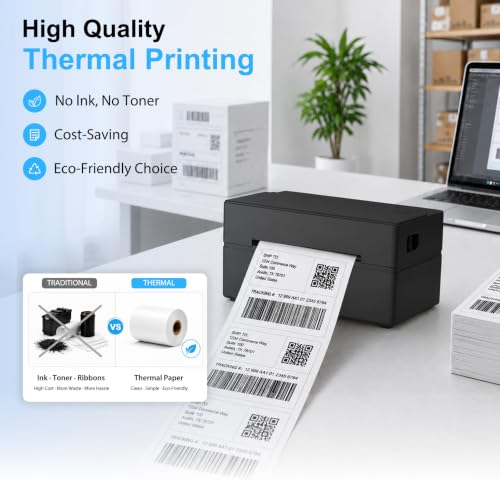
This compact thermal shipping label printer targets small businesses that need a simple way to print 4×6 labels. Its wireless design can work well for sellers who move between a phone, tablet, and computer. It supports common selling and shipping services listed in the product information, including USPS, UPS, Amazon, Shopify, and Etsy. Direct thermal printing also means you do not need ink cartridges or toner.
I like the broad device focus here because many new sellers do not use just one screen. You can prepare an order on a phone and print from a nearby desk. The black housing should blend into most office spaces, while the small footprint helps on a crowded table. As with any Bluetooth label printer, correct app setup and label calibration matter before a large print run.
Pros:
- Wireless design suits phones and tablets
- Made for common 4×6 shipping labels
- Works with major online selling platforms listed by the maker
- No ink or toner is needed
- Useful for home offices and small businesses
- Black finish looks neat on a work desk
Cons:
- Bluetooth setup may take extra steps for some users
- Best suited to direct thermal labels, not ordinary paper
- Wireless printing can depend on device and app compatibility
What Amazon Buyers Are Saying
Buyer feedback for this type of listing tends to focus on fast label output, a small footprint, and the savings from avoiding ink. Users who follow the setup steps often value the ability to print from mobile devices. Common concerns with Bluetooth printers include pairing, label alignment, and learning the correct software. I recommend checking the current customer comments for the latest setup experience before ordering.
My Recommendation
This is a strong all-around option for a new seller or home business that wants mobile flexibility. It earns a good score for platform support and convenience, but buyers who print all day may prefer a commercial-style USB model.
JADENS Bluetooth Thermal Label Printer

The JADENS Bluetooth thermal shipping label printer is built for sellers who want phone-friendly printing in a familiar 4×6 format. The product information lists support for Android, iPhone, Windows, and Mac. It also names several common services, such as Amazon, Shopify, Etsy, and USPS. That mix makes it a practical choice for small online stores that use more than one sales channel.
The blue body gives it a more visible look than the usual black office printer. In daily use, the main benefit is less waste from ink and less time spent cutting regular paper labels. New users should still install the recommended driver or app and test one label first. A short test helps confirm the size, orientation, and barcode position before printing a full batch.
Pros:
- Supports iPhone and Android devices
- Also suits Windows and Mac computers
- Designed for standard 4×6 shipping labels
- Works with several major marketplace and carrier systems
- Direct thermal printing lowers supply needs
- Distinct blue design is easy to spot
Cons:
- Wireless setup may feel less simple than USB printing
- Software and driver support should be checked for your device
- It may not be the first choice for very high-volume warehouse work
What Amazon Buyers Are Saying
Common review themes for the JADENS printer include praise for its compact shape, mobile connection, and clear shipping labels after setup. Buyers often like the lower running cost compared with inkjet printing. The complaints seen with this class of product usually involve pairing, driver installation, or labels that need calibration. Since software updates can change the experience, I suggest reading recent buyer comments for your operating system.
My Recommendation
I recommend the JADENS for Etsy sellers, casual e-commerce users, and home shippers who want phone support. It offers a useful balance of price, flexibility, and simple 4×6 output. It is worth buying when mobile printing matters more than advanced high-volume controls.
Arkscan 2054A Shipping Label Printer
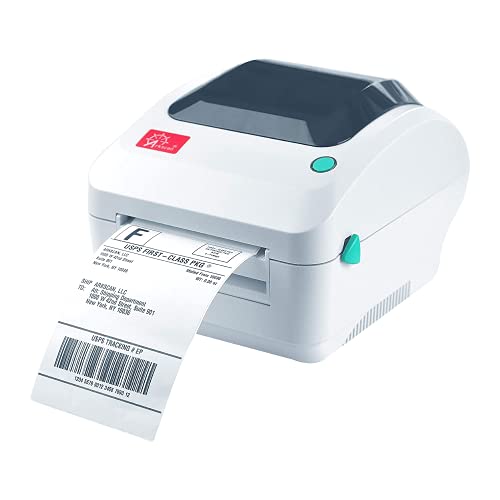
The Arkscan 2054A stands out for its wide software and carrier focus. Its listing names Windows, Mac, Chromebook, and Android, along with Amazon, eBay, PayPal, Etsy, Shopify, ShipStation, Stamps, UPS, USPS, FedEx, and DHL. That broad support can help sellers who manage orders across several stores or shipping services. It supports both roll and fanfold 4×6 direct thermal labels, which gives users more supply choices.
This printer makes the most sense in a work area where shipping tasks happen often. Fanfold labels can sit behind the printer, while rolls suit users who prefer a compact supply format. The larger list of supported platforms may reduce the need for separate tools, but it also means setup deserves care. I would keep the driver, label settings, and shipping software updated for the smoothest workflow.
Pros:
- Supports roll and fanfold 4×6 labels
- Works with Windows, Mac, Chromebook, and Android
- Wide list of marketplaces and carrier services
- Good fit for multi-channel sellers
- Direct thermal operation avoids ink cartridges
- Flexible supply format helps different desk layouts
Cons:
- More software options can make setup feel complex
- Not as mobile-first as a Bluetooth-focused printer
- Users should confirm their preferred platform before purchase
What Amazon Buyers Are Saying
Review patterns for the Arkscan often center on platform coverage and the ability to use both roll and fanfold media. Buyers with varied shipping needs may value that flexibility. Some users report a learning curve during driver installation or label calibration, which is common with printers that support many systems. I would treat setup time as part of the buying decision rather than expect instant plug-and-print use.
My Recommendation
The Arkscan 2054A is a smart choice for a seller who uses many marketplaces, carriers, or label types. It offers more workflow flexibility than a basic home printer. I recommend it for growing businesses, but casual users may prefer a simpler Bluetooth model.
Rollo USB Shipping Label Printer

The Rollo USB shipping label printer takes a focused approach. It uses a wired USB connection and targets commercial-grade 4×6 label printing for small businesses. The listing highlights high-speed output, custom stickers, and Windows and Mac support. For a fixed desk where a computer stays nearby, this design can feel more stable than wireless printing.
Rollo is especially appealing to people who print many packages and want a straightforward desktop workflow. USB avoids Bluetooth pairing and can reduce the number of connection steps at the start of a work session. The trade-off is less freedom to print from a phone or tablet. I would choose this model when speed, consistency, and a dedicated computer matter more than mobile access.
Pros:
- Commercial-grade positioning suits regular shipping work
- USB connection offers a direct desktop workflow
- Supports Windows and Mac computers
- Designed for 4×6 shipping labels
- Useful for small-business package volume
- Can create custom stickers as well as shipping labels
Cons:
- No Bluetooth connection is listed for this model
- Less convenient for phone-only workflows
- Users need a nearby compatible computer and USB setup
What Amazon Buyers Are Saying
Buyers commonly focus on the Rollo’s direct connection, fast workflow, and ability to handle frequent shipping tasks. Many users like avoiding ink and keeping label production on a computer. The most likely complaints concern USB dependence, driver setup, or labels that need correct sizing in the shipping program. These points do not make it a poor choice; they show that it suits a dedicated desktop station best.
My Recommendation
I recommend the Rollo for online sellers who print many labels from Windows or Mac. It is the strongest pick here for a stable, desk-based workflow. Choose another model if you need Bluetooth or frequent mobile printing.
D450BT Bluetooth Shipping Label Printer

The D450BT is a compact Bluetooth shipping label printer with a built-in label bin and 30 included labels. That starter supply can help a new user test the printer before buying a larger label pack. The listing says it works with Android, iPhone, Windows, and macOS. It also mentions shipping use with UPS, making it a practical option for home and small-office desks.
The built-in bin is the feature I notice most because it can keep labels from sliding across a small work surface. Bluetooth adds freedom for users who do not want another cable on the desk. Still, a compact printer needs careful label loading and size selection. I would use the included labels for setup, then compare ongoing label costs before making it the main printer for a busy store.
Pros:
- Built-in label bin helps keep supplies organized
- Includes 30 labels for initial testing
- Supports iPhone and Android devices
- Works with Windows and macOS
- Compact design suits small desks
- Bluetooth reduces cable clutter
Cons:
- Included labels provide only a small starter supply
- Bluetooth setup may require app or driver steps
- It may be less suitable for large daily shipping volume
What Amazon Buyers Are Saying
Buyer interest in the D450BT centers on its small size, wireless use, built-in storage, and included starter labels. Those features can make it appealing to a first-time home shipper. As with other Bluetooth models, some users may need help with pairing, label loading, or print alignment. I suggest testing several labels and checking the current app instructions before relying on it for a large order batch.
My Recommendation
The D450BT is worth considering for a compact starter station. It offers useful extras without asking users to manage a large desktop setup. I would choose it for light or moderate shipping, not for a warehouse that needs nonstop output.
How to Choose Best Thermal Label Printer
Choosing the Best Thermal Label Printer starts with your real shipping routine. A casual seller needs a simple setup. A busy store needs stable connections, broad software support, and a printer that fits a full workday. Thermal printers use heat-sensitive labels, so they avoid ink and toner. That can lower supply costs, but you still need the right labels, device support, and print settings.
1. Match the Connection to Your Work Style
Choose Bluetooth if you often print from an iPhone or Android phone. Wireless access gives you more freedom around the desk. It can also help when several people share the printer. However, Bluetooth pairing may take more setup than a cable.
Choose USB when you keep a Windows or Mac computer beside the printer. A wired connection can offer a simple and steady path from shipping software to label. The Rollo is the clearest fit for this style. Before buying, check the product page for your exact operating system and review any required driver.
2. Check Label Type, Size, and Supply Cost
Most shipping platforms use a 4×6 label. Confirm that the printer supports this size before you order. Also check whether it accepts roll labels, fanfold labels, or both. The Arkscan 2054A offers more choice in this area, while other models focus on a common roll format.
Look for direct thermal labels made for shipping printers. Ordinary copy paper will not give the same result. Test the barcode and address after loading a new label pack. A clean barcode matters more than a fancy design. Compare the price of replacement labels as well as the printer price.
3. Consider Volume, Software, and Desk Space
Think about how many labels you print in a normal day. A compact Bluetooth model works well for light and moderate use. A wired commercial-style model may suit a seller who prints orders in large batches. Do not pay for features you will not use, but do not undersize your printer if orders grow each month.
Next, list the services you use. Amazon, Etsy, Shopify, eBay, PayPal, ShipStation, UPS, USPS, FedEx, and DHL may not all follow the same setup process. A printer with wider platform support can save time. Finally, measure your desk. Leave room for labels, a computer, and easy access to the paper path.
Final Verdict: Which Should You Buy?
The Rollo USB is my top pick for frequent desktop shipping. The JADENS is the better mobile choice, while the Arkscan suits multi-platform sellers. The D450BT works well for compact starter setups.
The Best Thermal Label Printer is the one that matches your device, label type, and daily volume. Pick the connection and media format first, then compare price and support.
FAQs Of Best Thermal Label Printer
Do thermal label printers need ink?
No. Direct thermal printers use heat-sensitive labels, so they do not need ink cartridges or toner. You must buy compatible thermal labels.
What is the best thermal label printer for shipping?
The Rollo USB is a strong choice for frequent computer-based shipping. The JADENS and the first wireless model work better when you need mobile printing.
Can I print 4×6 labels from an iPhone?
Yes, compatible Bluetooth models can print from an iPhone when you use the required app or supported shipping software. Check the current device requirements first.
Are thermal printers compatible with Etsy and Amazon?
Many models support Etsy and Amazon label workflows. Compatibility depends on the printer software, device, and label-print settings, so confirm support before purchase.
Should I choose Bluetooth or USB?
Choose Bluetooth for phone and tablet freedom. Choose USB for a fixed computer desk and a direct connection that suits regular batch printing.