Best Windows Laptop: Smart Buying Guide
The best Windows laptop balances speed, screen quality, battery life, comfort, and value for your daily needs.
Buying a Windows laptop can feel hard when every listing promises fast performance and long battery life. You may need a computer for work, school, video calls, browsing, or home tasks, yet still want a fair price. I compared four useful options with different strengths. The Lenovo V15 Gen 4 is the strongest overall choice for most buyers, while the HP 17-inch model offers a large screen and the budget laptop suits light student work.
See the differences between my top picks at a glance.
HP 17-Inch Ryzen 5 Business Laptop

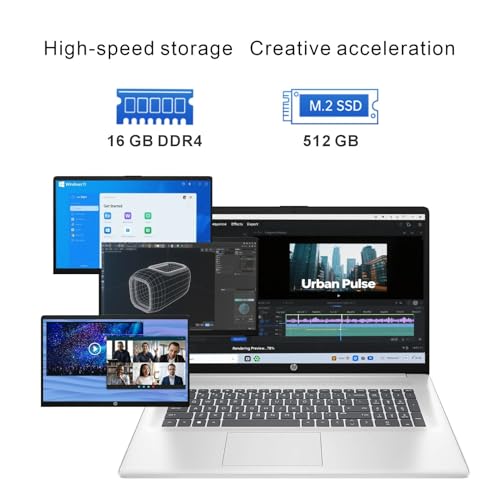
The HP 17-inch business laptop is made for buyers who want a roomy work area. Its 17.3-inch Full HD screen gives documents, spreadsheets, and web pages more space than a small laptop. The listed AMD Ryzen 5 processor and 16GB of RAM also give it a useful level of everyday power. A 512GB SSD provides quick file access and enough room for common apps and documents.
I see the numeric keypad as a real benefit for office work. It helps users who enter prices, figures, or data often. The large body may also feel more comfortable for long typing sessions, though it will not be as easy to carry as a compact model. Windows 11 and web-based Office tools make this a practical choice for home offices, remote work, and general productivity.
Pros:
- Large 17.3-inch Full HD display
- 16GB RAM supports multitasking
- 512GB SSD offers fast storage
- Numeric keypad helps with data entry
- Ryzen 5 processor suits everyday work
- Comfortable screen size for documents and video calls
Cons:
- Larger and heavier than most 15.6-inch laptops
- Not the best fit for frequent travel
- Integrated graphics are not designed for demanding gaming
What Amazon Buyers Are Saying
Buyer feedback for laptops in this class often focuses on the large screen, simple setup, and smooth performance during basic work. Users who spend time with spreadsheets or several browser tabs tend to value the extra display space. The numeric keypad also appeals to office users and students who work with numbers. As with many large budget laptops, some buyers may find the size less convenient when moving between rooms or carrying it to class.
My Recommendation
I recommend this HP when screen size matters more than portability. It has the memory and SSD capacity I like to see in a practical Windows laptop. It is worth considering for home offices, bookkeeping, online classes, and family use. I would not choose it for heavy video editing or serious gaming.
| Category | Rating |
|---|---|
| Everyday Performance | 4.4/5 |
| Display and Comfort | 4.7/5 |
| Portability | 3.5/5 |
| Work Features | 4.5/5 |
| Overall Rating | 4.4/5 |
Lenovo V15 Ryzen 5 Laptop

This Lenovo V15 is a balanced choice for work, study, and home use. It uses an AMD Ryzen 5 5500U hexa-core processor, 16GB of RAM, and a 512GB SSD. That combination should feel responsive during web browsing, email, word processing, video meetings, and light creative work. The 15.6-inch Full HD display keeps the laptop easier to place on a desk than a 17-inch model.
I also like its useful port selection. HDMI helps connect an external screen, while RJ45 gives you a wired network option when Wi-Fi is weak or unavailable. The numeric keypad adds value for spreadsheets and finance tasks. Windows 11 Pro may appeal to business users who want features aimed at workplace management, but buyers should still confirm the exact software edition and seller details before ordering.
Pros:
- Strong everyday balance of speed and price
- 16GB RAM helps with multitasking
- 512GB SSD gives quick boot and file loading
- Full HD screen suits office and school work
- HDMI and RJ45 ports improve desk flexibility
- Numeric keypad supports number entry
- 15.6-inch size offers a useful mix of space and portability
Cons:
- Older Ryzen 5 platform may not suit demanding modern workloads
- Business-style design may feel plain to some buyers
- Integrated graphics are limited for advanced games and 3D work
What Amazon Buyers Are Saying
Common buyer themes for this Lenovo V15 configuration include good value, easy setup, and useful performance for office tasks. Buyers who need a practical computer often like the combination of 16GB memory and solid-state storage. The keyboard layout, number pad, and selection of ports also tend to matter to work users. Some buyers may want a brighter display, a lighter design, or more graphics power, so expectations should match the laptop’s business focus.
My Recommendation
This is one of my favorite value options in this comparison. It gives you the parts that matter most for daily work without moving into a premium price class. I recommend it for students, remote workers, small business owners, and families. It is worth buying when you need dependable Windows performance rather than gaming power or luxury materials.
| Category | Rating |
|---|---|
| Everyday Performance | 4.5/5 |
| Storage and Memory | 4.7/5 |
| Connectivity | 4.6/5 |
| Portability | 4.1/5 |
| Overall Rating | 4.5/5 |
15.6-Inch Budget Windows 11 Laptop

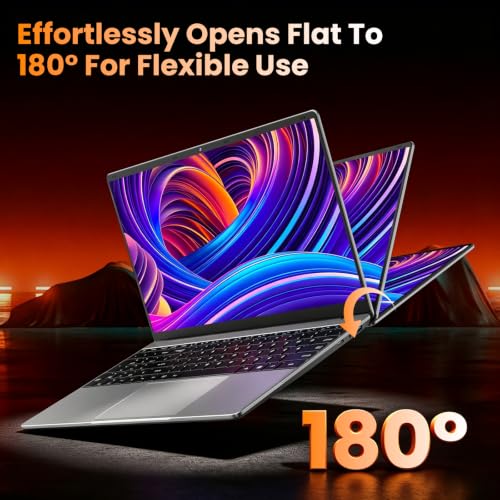
This 15.6-inch laptop targets buyers who need a low-cost Windows computer for simple tasks. Its Intel N4020 processor, 4GB of RAM, and 128GB eMMC storage are aimed at browsing, writing, online learning, and basic media use. The Full HD display gives the screen a clear resolution for its price class. Its silver gray finish, 180-degree lay-flat hinge, and lightweight design add practical touches for students.
The included Office 365 for the web can help users begin with common documents and school tasks. Dual-band Wi-Fi supports standard wireless connections, while the listed 38Wh battery and 45W fast charging features may help with daily convenience. Still, 4GB of memory leaves less room for heavy multitasking. I would keep browser tabs and background apps under control to get the best experience.
Pros:
- Usually suited to a tight budget
- 15.6-inch Full HD display offers useful workspace
- Lightweight design is helpful for students
- 180-degree hinge supports flexible viewing positions
- Windows 11 provides a familiar desktop experience
- Dual-band Wi-Fi supports common home networks
- Office web access helps with basic documents
Cons:
- 4GB RAM limits multitasking
- 128GB eMMC storage is smaller and slower than an SSD
- Intel N4020 is intended for light workloads
- Not a good pick for demanding editing or gaming
What Amazon Buyers Are Saying
Budget laptop buyers often praise this type of computer for simple setup, low cost, and school basics. Users who mainly browse, write short documents, and join light online classes may find it adequate. The large display and flexible hinge can also make it useful around the home. The most common concern with entry-level hardware is limited speed when many tabs or apps run at once, so this model works best when buyers keep their needs modest.
My Recommendation
I recommend this laptop only for light use and strict budgets. It can work well as a first laptop, a school backup, or a basic family computer. I would not buy it for a professional workload, frequent multitasking, or long-term power needs. It earns a good value score because it focuses on essentials, but the 4GB RAM and eMMC storage require realistic expectations.
| Category | Rating |
|---|---|
| Basic Performance | 3.3/5 |
| Display | 4.0/5 |
| Portability | 4.2/5 |
| Value for Light Use | 4.1/5 |
| Overall Rating | 3.9/5 |
Lenovo V15 Gen 4 Core i5 Laptop

The Lenovo V15 Gen 4 is the strongest all-around laptop in this group. It pairs an Intel Core i5-13420H processor with 16GB of RAM and a 512GB SSD. That setup gives it more headroom for demanding office work, larger spreadsheets, many browser tabs, and heavier daily use. Its 15.6-inch Full HD display keeps the design practical for both desk use and occasional travel.
This model also includes the features I expect from a useful business laptop. HDMI supports an external monitor, RJ45 supports wired internet, and the numeric keypad helps with number-heavy work. Windows 11 Pro adds a business-oriented operating system environment. It is still not a dedicated gaming laptop, but its newer processor makes it the easiest recommendation here for buyers who want stronger performance and better room to grow.
Pros:
- Strong Core i5-13420H processor
- 16GB RAM handles serious multitasking better
- 512GB SSD gives fast and useful storage
- Full HD display fits work and study needs
- HDMI and RJ45 ports support office setups
- Numeric keypad improves spreadsheet work
- Windows 11 Pro suits many business users
Cons:
- Business design may look basic
- Integrated graphics are not ideal for modern AAA games
- Performance-focused hardware may use more power under heavy loads
What Amazon Buyers Are Saying
Buyers who choose a Lenovo V15 Gen 4 configuration usually look for speed, storage, and practical business features. Feedback for this type of model often highlights quick startup, smooth office work, and the value of 16GB RAM. The port selection and number pad can make it feel more useful than a thin consumer laptop. Some users may wish for a brighter panel, better speakers, or a more premium case, but those are common trade-offs in a business-value design.
My Recommendation
I recommend this Lenovo as the best Windows laptop in this comparison for most work and study buyers. Its processor, memory, SSD, ports, and Windows 11 Pro support give it the broadest use range. It is worth buying if you want a laptop that can handle today’s tasks and stay useful as your workload grows. I would choose another class of computer only for gaming, professional video work, or a premium travel design.
| Category | Rating |
|---|---|
| Performance | 4.8/5 |
| Multitasking | 4.8/5 |
| Business Features | 4.7/5 |
| Value | 4.6/5 |
| Overall Rating | 4.7/5 |
How to Choose the Best Windows Laptop
The best Windows laptop depends on how you work, study, travel, and store files. A low price does not always mean good value. The right model should match your workload without paying for power you will never use. I suggest checking these three areas before you place an order.
1. Match the Processor and RAM to Your Work
The processor controls how quickly a laptop handles tasks. For email, web browsing, and simple documents, an entry-level Intel chip can be enough. For office work with many tabs, large spreadsheets, or regular meetings, a Ryzen 5 or Core i5 model makes more sense.
RAM matters just as much. Four gigabytes can handle basic tasks, but it leaves little room for multitasking. I prefer 16GB for a main Windows computer because it gives apps more working space. It also reduces the need to close tabs during normal work. If you want the best Windows laptop for several years of use, 16GB is a safer target than 4GB.
2. Choose the Right Screen, Size, and Ports
A 15.6-inch Full HD screen is a strong middle ground. It gives enough space for documents while staying easier to carry than a 17.3-inch laptop. A large HP screen may suit a desk-based user who values comfort. A student or commuter may prefer the smaller body of a 15.6-inch model.
Look at the ports as well. HDMI helps connect a monitor or television. RJ45 supports wired internet and can help in an office or dorm. A numeric keypad is useful for accounting, spreadsheets, and data entry. These small features can affect daily comfort more than a minor processor speed difference.
3. Compare Storage, Software, and Long-Term Value
An SSD usually feels faster than eMMC storage. It can improve startup time and app loading. A 512GB SSD also gives you more room for photos, school files, and work programs. The 128GB eMMC option in the budget model may work for light use, but you will need to manage storage more carefully.
Check the Windows edition before buying. Windows 11 Home fits many personal users. Windows 11 Pro may suit business buyers who need its added management features. Also check whether Office access means a web version or a full desktop subscription. Finally, review the seller, warranty terms, return policy, and current price. These details help turn a low-cost laptop into a smart purchase.
Final Verdict: Which Should You Buy?
The Lenovo V15 Gen 4 is my top pick and the best Windows laptop here. Its Core i5 processor, 16GB RAM, 512GB SSD, useful ports, and Windows 11 Pro offer the strongest overall package.
Choose the HP for a large screen, or the budget model for light tasks. Compare the latest price and seller details before ordering.
FAQs Of Best Windows Laptop
What is the best Windows laptop in this comparison?
The Lenovo V15 Gen 4 is the best overall choice. It offers the strongest processor, 16GB RAM, 512GB SSD, useful ports, and Windows 11 Pro.
Is 16GB RAM enough for a Windows laptop?
Yes. Sixteen gigabytes is enough for office work, browsing, video calls, school tasks, and regular multitasking. It is a better long-term choice than 4GB.
Is a 17.3-inch laptop better than a 15.6-inch model?
It depends on your needs. A 17.3-inch screen gives more workspace, while a 15.6-inch laptop is easier to move and store.
Can these Windows laptops run games?
They can run simple or older games, but their integrated graphics are not designed for demanding modern games. Serious gamers should look for a dedicated graphics card.
Is 128GB eMMC storage enough for school?
It can be enough for web classes, light documents, and basic browsing. However, 512GB SSD storage gives better speed and more room for files and apps.