Best Business Laptop: Smart Buying Guide
The best business laptop balances fast daily work, clear displays, strong ports, and dependable value.
Many work laptops look similar at first glance. Yet small details matter when you answer emails, join meetings, manage files, or work with spreadsheets all day. A weak screen can strain your eyes. A slow drive can waste time. A poor keyboard can make long work sessions tiring. I reviewed five business-focused laptops with different strengths, including large HP models, practical Lenovo V15 and 16-inch options, and a powerful ThinkPad E16. My goal is to help you find the right fit for your work, budget, and daily routine.
See the differences between my top picks at a glance.
HP 17-Inch Ryzen 5 Business Laptop

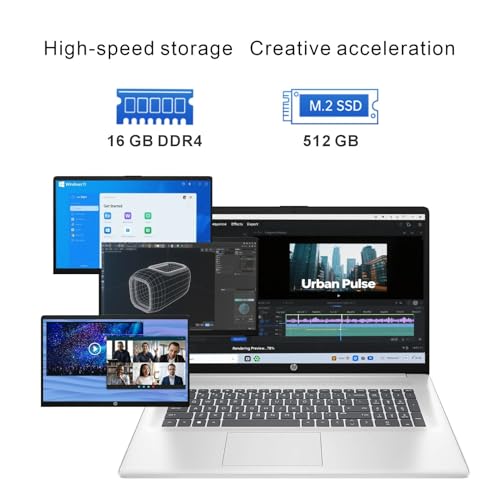
This HP business laptop uses an AMD Ryzen 5 processor, 16GB of RAM, and a 512GB SSD. That combination suits email, documents, web apps, video calls, and large spreadsheets. The 17.3-inch Full HD display gives you more room than most 15-inch laptops. It also includes a numeric keypad, which can help people who work with figures.
I see this model as a strong choice for a home office or a fixed desk. The large screen can reduce the need for constant zooming in documents and sheets. Windows 11 and Office 365 for the web support common work tasks, but buyers should note that web-based Office access is not the same as a full desktop Office license. If you want a large display and useful memory at a sensible price, this HP deserves close attention.
Pros:
- Large 17.3-inch Full HD display
- 16GB RAM supports steady multitasking
- 512GB SSD offers useful file space
- Numeric keypad helps with finance and data entry
- Ryzen 5 platform suits common office work
- Windows 11 provides a familiar work environment
Cons:
- The large body may feel less portable
- Office access is listed for the web, not clearly as a full desktop license
- The listing does not provide a full port layout in the supplied details
What Amazon Buyers Are Saying
When checking buyer feedback for this model, focus on comments about screen size, keyboard comfort, startup speed, and battery use. These are the points that matter most in real office work. Buyers should also compare the latest listing details, since seller bundles and software offers can change. I would not treat a single review as proof of long-term battery life or build quality.
My Recommendation
I recommend this HP to home-office users who value a big screen more than a light travel design. It has the right core setup for normal business tasks and includes a helpful number pad. It is not my first pick for frequent travel, but it is a practical desk laptop with good everyday value.
| Category | Rating |
|---|---|
| Work performance | 4.3/5 |
| Display and keyboard | 4.5/5 |
| Business features | 4.1/5 |
| Portability | 3.6/5 |
| Overall Rating | 4.2/5 |
Lenovo V15 Gen 4 Business Laptop

The Lenovo V15 Gen 4 takes a more traditional business laptop approach. It has a 15.6-inch Full HD display, an Intel Core i5-13420H processor, 16GB of RAM, and a 512GB SSD. The listing also names HDMI, RJ45 Ethernet, a webcam, Wi-Fi, and a numeric keypad. That mix makes it useful for workers who still connect to wired networks, projectors, or office monitors.
I like the practical layout of this Lenovo. The 15.6-inch size gives a good balance between workspace and portability, while the number pad adds value for spreadsheet users. Windows 11 Pro may suit people who need business-oriented Windows features, though exact setup needs can vary by workplace. This is one of the safer all-around choices in the group for routine office use.
Pros:
- Intel Core i5-13420H processor for demanding daily tasks
- 16GB RAM and 512GB SSD form a balanced work setup
- RJ45 Ethernet supports wired office networks
- HDMI helps connect to external displays
- Numeric keypad supports number-heavy work
- Windows 11 Pro is included in the listing
Cons:
- The design may look plain to users who want a premium finish
- It is less spacious than a 16- or 17-inch laptop
- Buyers should confirm the exact keyboard layout before ordering
What Amazon Buyers Are Saying
For this Lenovo, buyer feedback is most useful when it covers keyboard feel, display clarity, fan noise, and setup. Comments about HDMI and Ethernet can also show how well the laptop fits a desk-based work setup. Check recent reviews and the current product page before purchase. Configuration names can look similar, and the seller listing remains the best place to confirm the exact package.
My Recommendation
This is my pick for buyers who want a balanced business laptop with useful office ports. It avoids the extra size of a 17-inch model while keeping a number pad and strong core hardware. For mixed office tasks, home work, and wired connections, it offers very good value.
| Category | Rating |
|---|---|
| Work performance | 4.5/5 |
| Connectivity | 4.6/5 |
| Keyboard and usability | 4.4/5 |
| Portability | 4.0/5 |
| Overall Rating | 4.4/5 |
Lenovo 16-Inch i5 Business Laptop
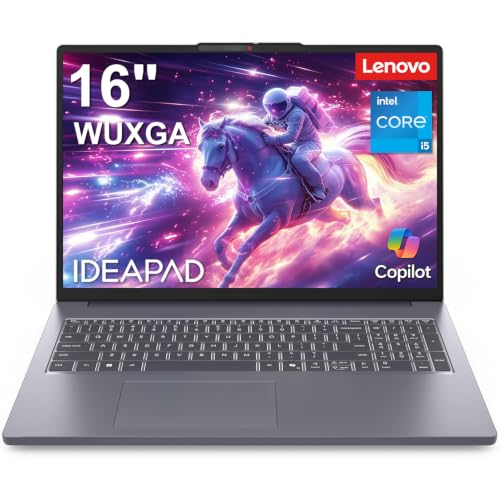
This Lenovo gives office users a little more screen space than a typical 15.6-inch laptop. It uses an Intel i5-13420H processor with 16GB of DDR5 memory and a 512GB SSD. The listing also includes Wi-Fi 6, Bluetooth 5.2, fast charge, an HD webcam, and a numeric keypad. Office 365, Copilot AI, and Windows 11 are also named in the product details.
The 16-inch format makes sense for people who split windows, review reports, or work with wide sheets. Wi-Fi 6 can be useful on a compatible network, while Bluetooth 5.2 supports modern wireless accessories. I like the feature mix, but buyers should read the current listing closely to understand the exact software terms. This model fits users who want modern extras without moving to a much larger 17-inch computer.
Pros:
- 16-inch Full HD display gives useful work space
- Intel Core i5-13420H handles common business workloads
- 16GB DDR5 memory supports multitasking
- Wi-Fi 6 offers modern wireless connectivity
- Fast-charge support can help busy users
- Numeric keypad suits spreadsheets and accounting work
Cons:
- The listing includes several software terms that buyers should verify
- HD webcam may not satisfy users seeking a higher-resolution camera
- The 16-inch body may still feel large for frequent commuters
What Amazon Buyers Are Saying
When reading buyer comments, look for reports on wireless performance, charging, webcam quality, and the feel of the number pad. These details often matter more than processor labels during normal work. Also check whether recent buyers received the same memory, storage, and software configuration shown on the current page. Product bundles can change over time.
My Recommendation
I recommend this Lenovo for users who want a roomy screen and current connectivity features. It has a strong work-focused specification without the extra footprint of a 17-inch laptop. It is worth considering for home offices, students in business programs, and small teams that need capable general-purpose computers.
| Category | Rating |
|---|---|
| Work performance | 4.4/5 |
| Display workspace | 4.4/5 |
| Modern connectivity | 4.5/5 |
| Software clarity | 4.0/5 |
| Overall Rating | 4.3/5 |
Lenovo ThinkPad E16 Core Ultra 7

The ThinkPad E16 is the most work-focused option in this comparison. It pairs an Intel Core Ultra 7 255H processor with 32GB of DDR5 RAM and a 1TB SSD. The listing also includes a 500GB external hard drive, a 16-inch display, and a backlit keyboard. This setup gives heavy multitaskers more headroom than the 16GB models here.
I would look at this laptop for data analysis, large workbooks, research, and users who keep many apps open. The backlit keyboard can help in dim rooms, and the large storage setup gives room for files and backups. Still, buyers should confirm the exact display resolution, battery details, and external-drive package on the live listing. More power can also mean more weight, heat, or battery demand than a basic office laptop.
Pros:
- 32GB DDR5 RAM is excellent for heavy multitasking
- 1TB SSD provides generous primary storage
- 500GB external HDD adds extra file capacity
- Core Ultra 7 255H targets demanding work
- Backlit keyboard supports low-light typing
- ThinkPad E16 branding suits a business setting
Cons:
- Higher-end hardware may cost more than needed for email and documents
- The listing does not state every display detail in the supplied information
- A larger performance laptop may be less convenient for daily travel
What Amazon Buyers Are Saying
For this configuration, read buyer feedback about speed under load, keyboard comfort, screen quality, and storage setup. Pay close attention to comments that identify the exact processor and memory package. Buyers should also check whether the external hard drive arrives as part of the same bundle. Review experiences can differ when sellers offer similar-looking configurations.
My Recommendation
This is my top choice for demanding business work. The 32GB RAM and 1TB SSD make it better suited to data-heavy workflows than the other models reviewed here. It may be more laptop than a casual user needs, but professionals who value speed and storage can justify the extra investment.
| Category | Rating |
|---|---|
| Processing potential | 4.8/5 |
| Memory and storage | 4.9/5 |
| Business usability | 4.6/5 |
| Portability and value | 4.0/5 |
| Overall Rating | 4.6/5 |
HP Ryzen 5 7430U 17.3-Inch Laptop

This HP focuses on a large, comfortable work area and a capable AMD processor. It uses the Ryzen 5 7430U, 16GB of RAM, and a 512GB PCIe drive. The 17.3-inch Full HD screen gives plenty of room for documents and side-by-side windows. The listing also names Wi-Fi 6, long battery life, Windows 11, and Microsoft 365 for the web.
The Ryzen 5 7430U should suit common business tasks such as browsing, writing, online meetings, and spreadsheet work. I like the inclusion of Wi-Fi 6 because many newer routers support it. However, a large display usually makes more sense on a desk than in a travel bag. As with the other HP model, check the software wording carefully if you need installed Office applications instead of browser-based tools.
Pros:
- Large 17.3-inch Full HD display
- Ryzen 5 7430U supports everyday productivity
- 16GB RAM offers smooth basic multitasking
- 512GB PCIe storage gives fast file access
- Wi-Fi 6 supports modern wireless networks
- Good fit for a home-office desk
Cons:
- Large size reduces travel convenience
- Microsoft 365 is listed for the web, so buyers should verify the license
- The supplied details do not list a full set of physical ports
What Amazon Buyers Are Saying
Recent buyer comments are most helpful when they discuss screen comfort, battery behavior, Wi-Fi connection, and setup. Look for several reviews that mention the same point rather than relying on one short comment. Also verify the current seller, warranty information, and included software before ordering. Those details can change with a new listing or bundle.
My Recommendation
I recommend this HP for people who want a wide screen and simple office performance at home. It offers a useful mix of memory, storage, and wireless features. Choose it over a smaller model if screen comfort matters more than travel weight.
| Category | Rating |
|---|---|
| Everyday performance | 4.3/5 |
| Screen comfort | 4.5/5 |
| Wireless features | 4.3/5 |
| Travel value | 3.6/5 |
| Overall Rating | 4.2/5 |
How to Choose the Best Business Laptop
Choosing the best business laptop means matching the computer to your real work. Do not pay for power you will never use. At the same time, do not save money by choosing a small drive or weak memory that slows you down each day. I focus on the processor, RAM, storage, display, ports, keyboard, software, and support before I recommend a laptop.
1. Match the Processor and RAM to Your Work
For email, browser tabs, word processing, and video calls, a current Ryzen 5 or Intel Core i5 laptop can be enough. Aim for at least 16GB of RAM if you often switch between several apps. More memory helps when you use large spreadsheets, research tools, image software, or many browser tabs. The ThinkPad E16 stands out here because its 32GB of RAM better suits demanding work.
Do not judge a laptop by the Core i5 or Ryzen 5 name alone. Check the exact processor model. H-series chips often target stronger performance, while U-series chips often focus on efficient daily use. Your best choice depends on whether you value speed under load, lower power use, or a balance of both.
2. Pick the Right Screen, Keyboard, and Work Size
A 15.6-inch laptop remains a useful middle ground. It gives enough room for normal work and stays easier to carry than a 17-inch model. A 16-inch screen can feel better for split-screen work. A 17.3-inch display works well at a desk, especially for spreadsheets and long documents.
Look for a Full HD display when possible. It gives text and images a sharper look than a low-resolution panel. A numeric keypad can save time for accounting, sales, and data entry. A backlit keyboard helps if you work in a dim room. Also consider the keyboard layout, touchpad, webcam, and hinge before you buy.
3. Review Ports, Software, Storage, and Value
Business users often need more than wireless connections. HDMI helps connect a monitor or projector. RJ45 Ethernet helps in offices with wired networks. Wi-Fi 6 can be useful with a compatible router. Confirm the complete port list on the current product page because configurations can vary.
A 512GB SSD works well for many users. Choose 1TB if you keep large files, media, or work archives on the laptop. Check whether Office means a full installed license or web access. Finally, compare warranty terms, return rules, seller details, and current pricing. The lowest price is not always the best value if the laptop lacks the features your work needs.
Final Verdict: Which Should You Buy?
The Lenovo ThinkPad E16 is my overall winner for demanding work, thanks to its Core Ultra 7 processor, 32GB RAM, and 1TB SSD. For general office use, the Lenovo V15 Gen 4 offers the best balance of ports, size, and value.
The best business laptop is the one that fits your workload. Confirm the current price, software, warranty, and configuration before ordering.
FAQs Of Best Business Laptop
What is the best business laptop for everyday office work?
The Lenovo V15 Gen 4 is a strong everyday choice. It combines an Intel Core i5 processor, 16GB RAM, 512GB SSD, HDMI, RJ45 Ethernet, and a numeric keypad.
Is 16GB RAM enough for a business laptop?
Yes. 16GB RAM is enough for email, documents, web apps, video calls, and most spreadsheets. Choose 32GB for heavy multitasking or data work.
Are 17-inch business laptops good for travel?
They can work for travel, but their larger bodies take up more space. A 15.6-inch or 16-inch model usually offers a better balance for commuting.
Do these laptops include Microsoft Office?
Several listings mention Office 365 or Microsoft 365 for the web. Check the current Amazon page to confirm whether the package includes web access or a full desktop license.
Which business laptop is best for data analysis?
The Lenovo ThinkPad E16 is the strongest fit in this comparison. Its listed 32GB RAM, 1TB SSD, and Core Ultra 7 processor provide more capacity for demanding work.