Best Laptop For Students: Affordable Picks For Study
The best laptop for students balances low cost, smooth daily work, long battery life, and easy portability.
College life can mean writing papers in a library, joining online classes from a dorm, and carrying a laptop across campus all day. A good student laptop should handle web research, documents, video calls, streaming, and cloud work without adding stress. I reviewed five affordable Windows laptops and Chromebooks with different strengths. This guide helps you compare screen size, memory, storage, operating system, battery claims, and overall value before you buy.
See the differences between my top picks at a glance.
DRKAKO 15.6-inch FHD Student Laptop

The DRKAKO stands out with a 15.6-inch Full HD IPS display. That larger panel gives students more room for essays, spreadsheets, research tabs, and online lessons. Its listed 12GB of RAM should also help when several browser tabs and common school apps are open at once. The laptop uses a J4105 quad-core processor and a 256GB SSD.
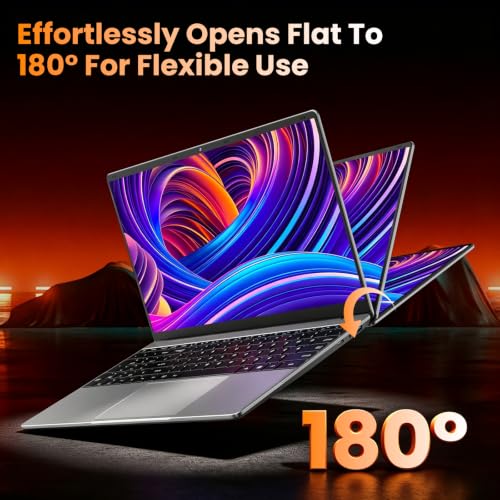
This model also includes Office 365 and an AI assistant, according to the product listing. Its 180-degree lay-flat hinge can help when you share notes or adjust the screen in a tight study space. Wi-Fi 5, Bluetooth, USB 3.2, and the 53.2Wh battery add useful everyday features. I see it as a practical pick for students who want a roomy display without moving to a high-priced performance laptop.
Pros:
- Large 15.6-inch Full HD IPS screen
- 12GB RAM suits multitasking better than many entry models
- 256GB SSD offers faster file access than eMMC storage
- 180-degree hinge gives flexible viewing positions
- Office 365 and AI assistant are included in the listing
- USB 3.2, Bluetooth, and Wi-Fi support common school needs
- 53.2Wh battery provides a useful capacity for daily work
Cons:
- The J4105 processor is designed for basic work, not demanding editing
- The 15.6-inch body may feel less convenient in a small backpack
- Wi-Fi 5 is older than Wi-Fi 6
What Amazon Buyers Are Saying
Customer feedback can change over time, so I recommend checking the latest verified reviews before ordering. The main points to look for are screen quality, setup ease, keyboard feel, battery life, and whether the included software activates as expected. Buyers should also read comments about charging, packaging, and performance with their own school apps.
Because this laptop offers more memory and a larger SSD than several low-cost alternatives, it may appeal to students who want a stronger basic setup. Still, the processor places a clear limit on heavy creative work. Review comments about real battery runtime matter more than the listed battery capacity, since use, brightness, and Wi-Fi can change results.
My Recommendation
I recommend the DRKAKO for students who value a big screen, useful RAM, and simple Windows productivity. It is worth considering for writing, research, video calls, and online learning. I would not choose it for advanced gaming, 4K video editing, or demanding engineering software. Its strongest value comes from its practical student package.
| Category | Rating |
|---|---|
| Student Performance | 3.8/5 |
| Display | 4.4/5 |
| Memory and Storage | 4.2/5 |
| Portability | 3.7/5 |
| Value | 4.1/5 |
| Overall Rating | 4.1/5 |
HP Everyday Student Laptop

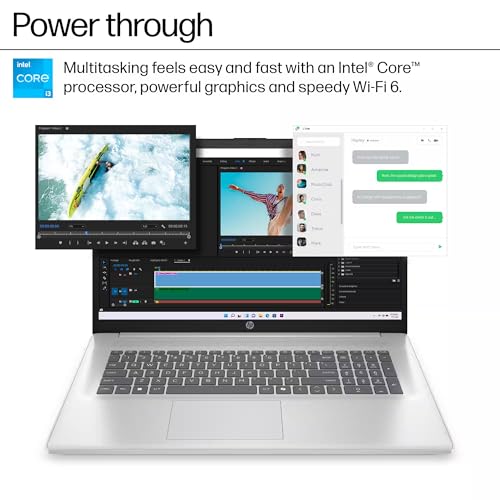
This HP everyday laptop targets students who need a Windows computer for common office and school tasks. The listing includes a 128GB internal storage option and a 500GB external hard drive. That combination can help separate active school files from older documents, photos, and backups. It also includes a one-year Office 365 subscription according to the product details.
Copilot AI, Wi-Fi 6, Windows 11, and a thin portable design add appeal for modern study routines. Wi-Fi 6 can be useful on compatible networks, though your router and campus network still affect speed. The Intel processor is aimed at everyday use, so I would keep expectations realistic. This is a sensible choice for papers, email, presentations, browsing, and remote classes.
Pros:
- Windows 11 supports a wide range of school programs
- 500GB external hard drive adds room for files and backups
- 128GB internal storage can hold core apps and documents
- One-year Office 365 is listed with the package
- Wi-Fi 6 offers a newer wireless standard
- Copilot AI may help with supported daily tasks
- Thin design should suit students who carry a laptop often
Cons:
- The listing does not make the exact screen size clear in the supplied details
- External storage is less convenient than a large internal SSD
- The Intel processor may struggle with demanding creative software
What Amazon Buyers Are Saying
Before buying, I suggest reading recent reviews for the exact configuration shown on Amazon. Pay close attention to comments about the external hard drive, Office 365 activation, keyboard comfort, and battery life. Bundled accessories and storage devices can vary, so the current product page matters.
Reviewers often focus on setup, portability, and whether the laptop meets basic work needs. Those are the right areas to check here. The product looks best for buyers who want a familiar HP Windows setup and extra file space, but buyers who need fast internal storage should compare SSD capacity carefully.
My Recommendation
This HP is worth considering when Office 365, Windows compatibility, Wi-Fi 6, and bundled storage matter most. I like its flexible file-storage setup, but the external drive adds another item to carry. Choose it for office work and school tasks, not high-end gaming or professional media production.
| Category | Rating |
|---|---|
| Student Performance | 3.8/5 |
| Windows Compatibility | 4.3/5 |
| Storage Package | 4.0/5 |
| Portability | 4.0/5 |
| Value | 4.0/5 |
| Overall Rating | 4.0/5 |
HP 14-inch Chromebook for Students

This HP Chromebook is made for students who spend much of their time online. It has a 14-inch HD display, 4GB of RAM, and 64GB of eMMC storage. ChromeOS starts with a simple interface and works well with browser tools, web email, online documents, and video meetings. The quad-core processor listed for this model is intended for light daily tasks.
The product includes a webcam, HDMI, USB-A, and USB-C ports. The listing also claims up to 14 hours of battery life, but real use can vary with screen brightness, apps, network strength, and battery health. ChromeOS can feel quick for basic browsing even on modest hardware. This laptop makes the most sense for students whose school work lives in Google Workspace or other web apps.
Pros:
- ChromeOS is simple to learn and manage
- 14-inch screen offers a useful balance of space and size
- USB-A, USB-C, HDMI, and webcam support common class needs
- Listed battery life is strong for an entry Chromebook
- Light web work does not require a complex setup
- Good fit for Google Docs, email, research, and online classes
- Chromebook format can reduce unwanted software clutter
Cons:
- 4GB RAM limits heavy multitasking
- 64GB eMMC storage is small for large local files
- ChromeOS cannot run every Windows or Mac application
- HD resolution is less sharp than a Full HD screen
What Amazon Buyers Are Saying
For this Chromebook, I would focus on recent comments about speed, battery results, screen quality, and ChromeOS setup. Buyers should also confirm that their school uses web apps or Android-compatible tools. A Chromebook can be an excellent value, but it is not a direct replacement for a Windows laptop when a course requires special desktop software.
Customer reviews are most useful when they explain real class use. Look for notes about Zoom or Google Meet, typing comfort, Wi-Fi stability, and how much storage remains after updates. The supplied bundle may include accessories, so verify the current listing if those extras matter to you.
My Recommendation
I recommend this HP Chromebook for younger students, web-first college work, and buyers who want a simple laptop for browsing and classes. It is not my first choice for software-heavy majors. If your school mainly uses Google Workspace, email, web portals, and video calls, this model can offer strong basic value.
| Category | Rating |
|---|---|
| Web Performance | 4.0/5 |
| Battery Potential | 4.3/5 |
| Port Selection | 4.2/5 |
| Local Storage | 2.9/5 |
| Value for Web Work | 4.2/5 |
| Overall Rating | 3.9/5 |
HP 14-inch N150 Student Laptop

This 14-inch HP laptop is a strong match for students who want Windows in a compact form. It uses an Intel N150 processor and includes Office 365 according to the listing. The product page also highlights Copilot AI, Wi-Fi 6, and Windows 11 Home. Its 1TB cloud storage offer may help students keep documents available across devices.
A 14-inch screen can fit well on a dorm desk, classroom table, or coffee shop workspace. The smaller design should also be easier to carry than a large 15.6-inch model. Cloud storage works best when you have reliable internet and understand the plan terms. I would check the exact memory, local storage, and Office details before placing an order because those specifications affect long-term value.
Pros:
- Compact 14-inch design suits mobile study
- Windows 11 supports many school and office programs
- Intel N150 is aimed at everyday productivity
- Wi-Fi 6 provides a current wireless connection standard
- Office 365 is listed for student work
- Copilot AI is included in the advertised feature set
- Cloud storage can make file access easier across devices
Cons:
- Cloud storage is not the same as large local storage
- Exact RAM and local storage details should be checked before purchase
- It is not designed for demanding games or professional editing
What Amazon Buyers Are Saying
When reading Amazon reviews, I would compare comments from buyers who use the laptop for school, work, and travel. Look for feedback on startup time, keyboard comfort, display brightness, charging, and Windows updates. Since cloud storage and bundled software may depend on account terms, review the current listing and recent buyer notes with care.
The most useful feedback will show whether the laptop handles several tabs, office files, and video calls at the same time. Buyers should also confirm the storage they receive on the device itself. This HP has a good concept for mobile students, but exact configuration details matter more than a broad product title.
My Recommendation
I recommend this HP for students who want a compact Windows laptop with modern wireless support and cloud-focused storage. It is a good option for papers, presentations, browsing, and remote classes. I would choose it over a Chromebook when Windows software is required, but I would confirm RAM and local storage before buying.
| Category | Rating |
|---|---|
| Everyday Performance | 4.0/5 |
| Portability | 4.4/5 |
| Software Support | 4.2/5 |
| Storage Flexibility | 3.8/5 |
| Value | 4.1/5 |
| Overall Rating | 4.1/5 |
HP 14-inch Ultra-Light Student Laptop

This ultra-light HP laptop focuses on basic work and easy travel. It has a 14-inch display, an Intel Celeron N4500 processor, 4GB of RAM, and 64GB of eMMC storage. The package also lists a 64GB SD card, which gives students extra space for selected files. Windows 11 Home in S mode provides a familiar system with added app-install limits.
The listing claims up to 12 hours of battery life and includes fast charge support. Actual runtime will depend on how you use the laptop, so I would treat the number as a best-case estimate. A webcam, Wi-Fi 6, and one-year Office 365 support basic school routines. This model is best for light writing, web research, email, and online learning rather than large programs.
Pros:
- Ultra-light design suits daily commuting
- 14-inch screen offers more room than a very small notebook
- Wi-Fi 6 supports newer wireless networks
- Fast charge can help between classes
- Listed 12-hour battery claim fits all-day study goals
- Includes a 64GB SD card for extra file space
- One-year Office 365 is listed with the laptop
Cons:
- 4GB RAM can limit multitasking
- 64GB eMMC storage is small for local files and apps
- Celeron N4500 is not suited to demanding software
- S mode may restrict app installation until changed
What Amazon Buyers Are Saying
For this model, recent buyer reviews should guide your decision on battery life, keyboard quality, setup, and speed. I would also look for comments about Windows S mode and the included SD card. Those details can affect how easy the laptop feels during the first week of school.
The product’s main appeal is clear: low weight, basic Windows support, and a simple storage boost. Buyers who need only browser tabs and documents may find that enough. Students who use large PDFs, many browser tabs, coding tools, or creative apps should look for more RAM and a larger SSD.
My Recommendation
I recommend this HP for students who want a light and simple Windows laptop at an entry level. It can handle basic school work, but its 4GB RAM and small eMMC drive require careful use. It is worth buying for light tasks and travel, not for demanding courses or long-term power use.
| Category | Rating |
|---|---|
| Basic Student Work | 3.6/5 |
| Portability | 4.5/5 |
| Battery Features | 4.1/5 |
| Storage | 3.1/5 |
| Entry-Level Value | 3.9/5 |
| Overall Rating | 3.8/5 |
How to Choose the Best Laptop For Students
Choosing the best laptop for students starts with the work you need to do. A student who writes papers and joins video calls has different needs from a design student or computer science major. I suggest checking the full configuration, not just the brand name. Processor type, RAM, storage, operating system, ports, and battery design all affect daily use.
1. Match the Laptop to Your School Software
First, check your school’s software list. Many students need only a browser, word processor, PDF reader, video meeting app, and cloud drive. A Chromebook can work well for that setup. However, some courses require Windows-only tools for accounting, engineering, coding, statistics, or design.
If your school names a specific program, check its system requirements before you buy. ChromeOS cannot run every Windows desktop app. Windows 11 gives broader software support, but an entry-level Windows laptop can still feel slow with heavy programs. The best laptop for students should match your course needs for the whole school year.
2. Choose Enough RAM and the Right Storage
RAM helps a laptop keep apps and browser tabs open. Four gigabytes can work for simple tasks, but it leaves less room for multitasking. Twelve gigabytes, like the DRKAKO model offers, gives more breathing room for research tabs, documents, music, and video calls.
Storage also matters. An SSD usually feels faster than eMMC storage when starting apps and opening files. A 64GB drive can fill quickly after system updates and downloads. Cloud storage helps, but it depends on internet access and account terms. If you store many videos, photos, or class files locally, look for more internal storage or a simple expansion option.
3. Check Screen Comfort, Battery Use, and Portability
A 14-inch laptop often gives the best balance for campus life. It fits most desks and remains easy to carry. A 15.6-inch screen gives more space for split-screen work, but it may take more room in a backpack. Full HD resolution can make text and windows look sharper than basic HD.
Battery claims come from controlled tests. Your real result may be lower. Screen brightness, video calls, Wi-Fi, updates, and background apps all use power. Look for a comfortable keyboard, a usable webcam, and ports that match your accessories. USB-A, USB-C, and HDMI can save you from carrying extra adapters.
Final Verdict: Which Should You Buy?
The DRKAKO 15.6-inch model is my top pick for its Full HD IPS screen, 12GB RAM, and 256GB SSD. Choose the HP Chromebook for web-first learning, or the HP N150 for a compact Windows setup.
The best laptop for students is the one that fits your course software, travel needs, and budget. Check the current Amazon configuration and recent buyer feedback before ordering.
FAQs Of Best Laptop For Students
What is the best laptop for students in 2026?
The DRKAKO 15.6-inch student laptop is the strongest overall pick in this guide. It combines a Full HD IPS screen, 12GB RAM, and a 256GB SSD for common school work.
Is a Chromebook good enough for college students?
Yes, if your classes use browser tools, Google Workspace, email, and video meetings. Check first that your major does not require Windows-only software.
How much RAM should a student laptop have?
Four gigabytes can handle light work, but 8GB or more gives better room for browser tabs and multitasking. More RAM helps students who use several apps at once.
Is 64GB storage enough for a student laptop?
It may work for cloud-based schoolwork, but 64GB fills quickly. Students who save large files locally should choose more storage or use a dependable external drive.
Should students buy a Windows laptop or Chromebook?
Choose Windows for wider software support. Choose a Chromebook for simple web work, easy setup, and cloud-based classes.