Best MacBook: Find Your Ideal Apple Laptop
The best MacBook for most people is the 13-inch MacBook Air with the M5 chip, 16GB memory, and 512GB SSD.
Buying a laptop can feel hard when you need one device for work, school, travel, photos, video calls, and streaming. A MacBook should feel fast without feeling heavy. It should also last for years, stay quiet during daily use, and offer enough storage for your files. I reviewed five current Apple models listed for 2026, including two MacBook Air sizes and a powerful MacBook Pro. My goal is to help you find the best MacBook for your budget, work style, and screen needs.
See the differences between my top picks at a glance.
Apple MacBook Air 13-inch M5, Midnight

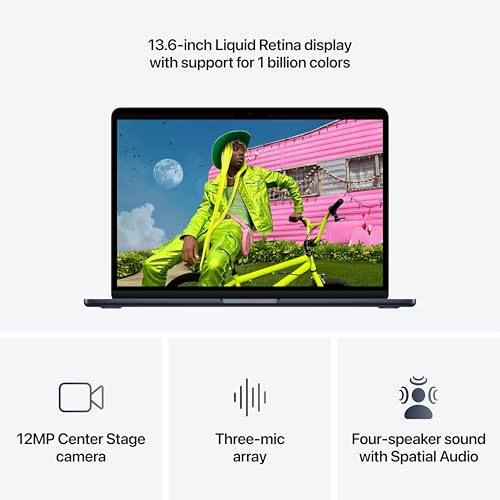
The 13-inch MacBook Air with the M5 chip is the strongest all-around choice in this group. It combines a compact body with a 13.6-inch Liquid Retina display. The listed configuration includes 16GB of unified memory and a 512GB SSD. That gives most users a smooth setup for writing, web work, school apps, video calls, and photo tasks.
The Midnight finish looks sleek and serious. The 12MP Center Stage camera should help keep you in view during supported video calls. Touch ID makes sign-in quick and simple. Wi-Fi 7 is also listed, but your real wireless speed will depend on your router and internet plan. This is the model I would choose for a student, remote worker, family member, or frequent traveler.
Pros:
- Strong balance of speed, size, and price
- 16GB unified memory suits daily multitasking
- 512GB SSD gives useful room for apps and files
- Sharp 13.6-inch Liquid Retina display
- 12MP Center Stage camera for video calls
- Touch ID adds quick and useful security
- Midnight finish looks modern and professional
Cons:
- 13.6 inches may feel small for large spreadsheets
- Midnight can show fingerprints more than lighter finishes
- Air models are not aimed at the heaviest long renders
What Amazon Buyers Are Saying
Customer feedback can change as listings gain new reviews, so I always suggest checking the current rating, recent comments, and seller details before ordering. Buyers who choose this type of MacBook Air commonly focus on its light design, quiet daily use, display quality, and fast response. The main points to watch are storage needs, the smaller screen, and the higher price compared with older MacBook models.
My Recommendation
This is my top pick for the best MacBook for most buyers. It has the right mix of speed, memory, storage, and portability. I would buy it for general work, school, browsing, light creative work, and travel.
Apple MacBook Air 13-inch M5, Starlight

This Starlight version offers the same core setup as the Midnight model. It lists the M5 chip, 16GB unified memory, and a 512GB SSD. The 13.6-inch Liquid Retina display gives you a comfortable view for documents, websites, streaming, and creative apps. Its smaller body makes it easy to place in a backpack or carry-on bag.
The main difference here is the finish, not the performance. Starlight has a softer look and may suit users who do not want a dark laptop. The 12MP Center Stage camera supports a more modern video-call setup, while Touch ID keeps access simple. Wi-Fi 7 appears in the listed features, though network equipment still controls the final connection speed.
Pros:
- Same useful M5 and 16GB memory setup as the other 13-inch Air
- 512GB SSD works well for normal work and school files
- Light, compact format suits daily travel
- Starlight finish has a clean and subtle look
- Bright Liquid Retina display for text and media
- Center Stage camera supports video meetings
- Touch ID makes sign-in fast
Cons:
- Screen size may feel limited beside a large monitor
- Not the best fit for users who need 1TB of storage
- Color choice does not change the core performance
What Amazon Buyers Are Saying
When buyers review a configuration like this, they often pay close attention to build quality, ease of setup, battery use, and portability. Those are sensible points to check in recent Amazon comments. I would also scan for notes about the display size and storage before buying. Since customer experiences vary by workload and software, one review may not represent every user.
My Recommendation
I recommend this version to shoppers who want the best MacBook in a light, simple design but prefer the Starlight color. It is a practical pick for school, office tasks, communication, and home use. Choose it over the Midnight model only if you prefer this finish.
Apple MacBook Pro 16-inch M5 Pro

The 16-inch MacBook Pro is the performance leader in this comparison. Its listed M5 Pro chip has an 18-core CPU and a 20-core GPU. It also includes 24GB of unified memory and a 1TB SSD. That combination targets demanding users who work with large projects, complex code, advanced creative apps, or long export tasks.
The 16.2-inch Liquid Retina XDR display is a major reason to choose this model. The larger panel gives more room for timelines, code, panels, and detailed images. The Space Black finish adds a bold look, while Wi-Fi 7 supports newer wireless networks. This laptop costs more and weighs more than a MacBook Air, but it makes more sense when your work can use the extra power.
Pros:
- M5 Pro chip targets demanding professional work
- 18-core CPU and 20-core GPU provide strong listed hardware
- 24GB unified memory supports larger multitasking loads
- 1TB SSD gives more local storage than the Air models here
- Large 16.2-inch Liquid Retina XDR display
- Better fit for code, editing, design, and heavy projects
- Space Black finish looks premium and serious
Cons:
- Higher cost than every MacBook Air in this review
- Large size is less convenient for small bags and tight desks
- More power may be unnecessary for email and web browsing
What Amazon Buyers Are Saying
Buyers considering a MacBook Pro usually care about screen quality, sustained performance, memory, storage, and build feel. I suggest reading recent reviews for comments about the exact apps you use. Look for feedback from video editors, developers, photographers, and other high-load users. Also check the current return terms, since professional buyers should test their key software early.
My Recommendation
This is the best MacBook for professional users who can use its extra power and larger display. It is not my first choice for a casual buyer because the extra cost and size may bring little benefit. For demanding work, however, the M5 Pro configuration is the most capable option here.
Apple MacBook Air 15-inch M5, Midnight

The 15-inch MacBook Air uses the M5 chip but gives you a larger work area. Its 15.3-inch Liquid Retina display is useful for split-screen work, wide spreadsheets, presentations, and streaming. The listed 16GB of unified memory and 512GB SSD match the practical setup found on the smaller Air. You get a larger view without stepping up to the Pro line.
This Midnight model suits users who value screen space but still want the simpler Air design. It should work well for office tasks, research, schoolwork, creative hobbies, and home use. The 12MP Center Stage camera helps with supported calls, and Touch ID offers easy access. Keep in mind that a larger laptop takes more room in a bag and on a small desk.
Pros:
- 15.3-inch display gives more room for work
- M5 chip supports a broad range of daily tasks
- 16GB memory is a sensible modern starting point
- 512GB SSD offers useful space for normal files
- Better for split-screen apps than a 13-inch laptop
- 12MP Center Stage camera suits remote meetings
- Midnight finish has a polished look
Cons:
- Larger body is less portable than the 13-inch Air
- Midnight may show marks and fingerprints
- Users who need sustained heavy work may prefer the Pro
What Amazon Buyers Are Saying
People shopping for a larger MacBook Air often compare screen comfort with travel size. Recent Amazon reviews are worth checking for comments about keyboard feel, display space, setup, and daily portability. Buyers should also review the exact storage need before ordering. A 512GB drive can suit many users, but large media libraries may require external storage or cloud storage.
My Recommendation
I recommend this model to anyone who wants the best MacBook Air with a big screen. It is a better fit than the 13-inch Air for spreadsheets, research, and side-by-side windows. Choose the Pro instead if your work needs more graphics power or sustained heavy performance.
Apple MacBook Air 13-inch M5, Sky Blue
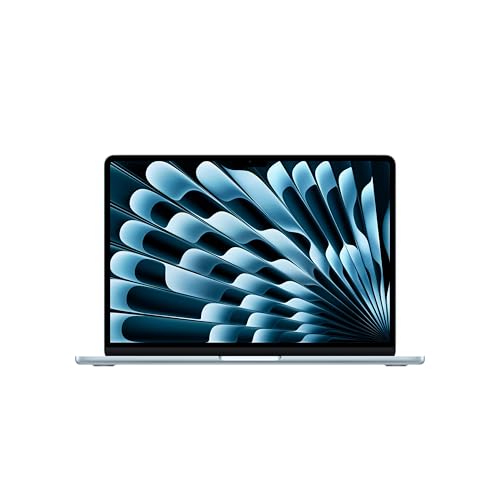
The Sky Blue 13-inch MacBook Air offers the same listed core hardware as the other 13-inch M5 Air models. It includes 16GB of unified memory, a 512GB SSD, and a 13.6-inch Liquid Retina display. That makes it a good match for users who want a compact laptop for work, school, communication, and entertainment. The color gives the design a more personal and relaxed feel.
I see this model as a style-focused alternative, not a performance upgrade. It has the same useful 12MP Center Stage camera, Touch ID, and Wi-Fi 7 listing. The small size works well for travel and coffee-shop work. If you use many large windows, a desk monitor can help you get more from the compact screen.
Pros:
- Compact size works well for travel
- M5 chip handles common work and school tasks
- 16GB memory supports everyday multitasking
- 512GB SSD gives a useful base for files and apps
- Sky Blue finish offers a distinct look
- Sharp 13.6-inch Liquid Retina display
- Touch ID and Center Stage camera add daily convenience
Cons:
- Small screen may not suit wide workspaces
- Color does not add performance over other 13-inch versions
- Heavy creators may need the MacBook Pro line
What Amazon Buyers Are Saying
For this type of MacBook Air, buyers usually look at size, speed, battery experience, setup, and finish. I recommend reading the newest reviews because colors and availability can change by listing. Pay close attention to feedback from users with similar apps and file needs. Also confirm that the seller lists the correct M5, memory, storage, and color before you place an order.
My Recommendation
This is a good buy for users who want a colorful, portable MacBook with modern hardware. It is also a strong gift choice when the recipient values design. Performance should be similar to the other 13-inch M5 Air options listed here, so choose the color and price that suit you best.
How to Choose Best MacBook
Choosing the best MacBook starts with your real work, not just the chip name. Think about where you use the laptop, how many apps you open, and how much storage your files need. The best option should feel fast today and still fit your needs later. A good choice also balances screen size, portability, memory, storage, and price.
1. Match the Chip to Your Work
The M5 MacBook Air models suit most daily tasks. They are a good fit for browsing, writing, school apps, office work, video calls, streaming, and light photo work. The M5 Pro MacBook Pro makes more sense for heavy editing, demanding code projects, complex graphics, and other tasks that use many CPU or GPU cores.
Do not pay for Pro power if you only use email and web apps. On the other hand, do not choose an Air only to save money if your work includes long, complex exports. A little extra power can save time when you use professional software every day.
2. Pick the Right Screen and Size
A 13.6-inch MacBook Air is easier to carry. It fits smaller bags and works well on small desks. It also makes a smart choice for students and people who move between home, school, and work.
The 15.3-inch Air gives more room for split-screen work. It can make spreadsheets, research, and timelines easier to manage. The 16.2-inch Pro offers the most space in this group and pairs that space with a Liquid Retina XDR display. Choose the larger screen only if you value the room enough to accept the added size.
3. Compare Memory, Storage, and Long-Term Value
Memory helps your MacBook handle several open apps. The 16GB configurations in the Air models offer a stronger base than a very small-memory laptop. The Pro model adds 24GB, which better suits larger projects and heavier multitasking.
Storage holds your apps, photos, videos, and documents. A 512GB SSD can work well for general use. The 1TB SSD in the Pro gives more space for large projects. You can also use external storage, but built-in space feels easier when you travel or work away from home.
Finally, compare the full package. Check the current price, seller, return policy, warranty details, color, and exact configuration. Amazon listings can change, so confirm the model before checkout. This simple step helps you avoid ordering the wrong size or storage level.
Final Verdict: Which Should You Buy?
For most people, I recommend the 13-inch MacBook Air with the M5 chip, 16GB memory, and 512GB SSD. Choose the 15-inch Air for more screen room, or the 16-inch MacBook Pro for demanding professional work.
The best MacBook is the one that matches your daily tasks. Check the exact listing, price, storage, and return terms before buying for the best long-term value.
FAQs Of Best MacBook
Which MacBook is best for most people?
The 13-inch MacBook Air with the M5 chip, 16GB unified memory, and 512GB SSD is the best fit for most people. It balances speed, size, storage, and portability.
Is the 15-inch MacBook Air better than the 13-inch model?
The 15-inch MacBook Air is better if you want more screen space. The 13-inch model is easier to carry and suits smaller desks and bags.
Who should buy the 16-inch MacBook Pro?
Choose the 16-inch MacBook Pro if you use demanding creative, coding, graphics, or other professional apps. Its M5 Pro chip, 24GB memory, 1TB SSD, and large display target heavy workloads.
Is 512GB enough storage for a MacBook?
512GB is enough for many users who store normal documents, apps, and photos. Users with large video, design, or media libraries may prefer 1TB or external storage.
Does MacBook color affect performance?
No. The Midnight, Starlight, and Sky Blue finishes do not change the listed chip, memory, storage, or display features.