Best Ultrawide Monitor: 2026 Buying Guide
My top pick for the best ultrawide monitor is the Samsung Odyssey G9 for immersive gaming and serious multitasking.
A cramped desk can make work feel slow and gaming feel less exciting. An ultrawide monitor fixes that by giving you more room for apps, timelines, spreadsheets, and games without placing two screens side by side. I reviewed five strong options for 2026, from the huge 49-inch Samsung Odyssey G9 to practical 34-inch models for work and play. Each screen has a different purpose, so the right choice depends on your desk, computer, budget, and preferred tasks.
See the differences between my top picks at a glance.
Samsung Odyssey G9 G91F 49-Inch Gaming Monitor

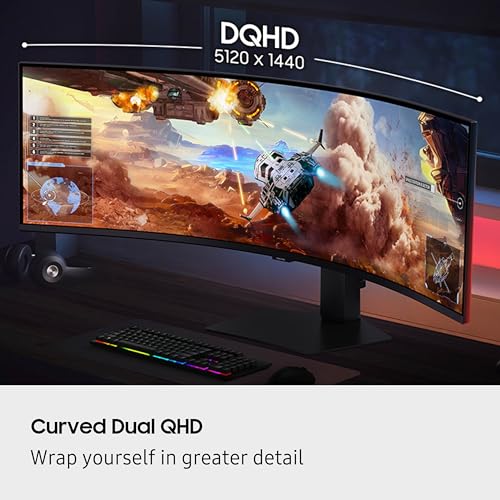
The Samsung Odyssey G9 G91F is the most dramatic monitor in this group. Its 49-inch DQHD panel uses a very wide 32:9 format. That gives you the space of two 27-inch QHD screens in one curved display. The 144Hz refresh rate also makes fast games feel smooth, while AMD FreeSync Premium Pro helps reduce tearing with a compatible graphics card.
This monitor suits people who want a large, single-screen setup. The DisplayHDR 600 rating can add more impact to bright effects and dark scenes than a basic office display. Its ergonomic stand helps you set a better viewing position, but you still need a deep and wide desk. I also recommend checking your computer’s graphics output before buying because DQHD gaming at high refresh rates needs a powerful system.
Pros:
- Huge 49-inch 32:9 workspace
- DQHD resolution gives two-screen-like space
- 144Hz refresh rate supports smooth gaming
- DisplayHDR 600 adds stronger contrast and highlights
- AMD FreeSync Premium Pro helps limit screen tearing
- Curved design keeps the wide panel easier to view
- Ergonomic stand supports a more comfortable setup
Cons:
- Needs a large desk and plenty of room
- High-resolution gaming can require a powerful GPU
- Large size may feel excessive for simple office work
What Amazon Buyers Are Saying
Buyer feedback for large Odyssey G9 displays commonly focuses on the wide, immersive view. Users often like having several windows open at once and report that compatible games look more engaging on the curved panel. The high refresh rate also appeals to PC gamers who want fluid motion.
Common concerns include the monitor’s size, desk fit, and the need to adjust game settings for the unusual 32:9 aspect ratio. Some buyers also mention that setup takes care because the panel and stand are large. Since individual experiences can vary, I suggest checking current Amazon reviews for recent comments about packaging, pixels, and firmware before ordering.
My Recommendation
I recommend the G91F for gamers, streamers, video editors, and power users who want one huge screen. It is not the most practical choice for a small desk or a basic laptop. If your computer can drive DQHD smoothly, this is my top choice for the best ultrawide monitor experience in this comparison.
Dell S3425DW 34-Inch WQHD Monitor

The Dell S3425DW takes a more balanced approach. Its 34-inch WQHD VA panel offers a useful 21:9 workspace without taking over the room. The 120Hz refresh rate feels smooth for scrolling, video, and casual gaming. Dell also lists HDR10 support, a 3,000:1 contrast ratio, and 300 cd/m² brightness for a stronger picture than many basic monitors.
One of its biggest strengths is the USB-C connection with 65W power delivery. A compatible laptop can receive power and send video through one cable, which helps keep a desk tidy. The built-in 2x10W speakers can also reduce the need for separate desktop speakers. This monitor is a strong fit for remote work, study, content viewing, and light gaming.
Pros:
- Comfortable 34-inch WQHD size
- 120Hz refresh rate feels smooth in daily use
- USB-C supports up to 65W power delivery
- VA panel offers a stated 3,000:1 contrast ratio
- HDR10 support improves compatible content
- Built-in 2x10W speakers add desk convenience
- 95% DCI-P3 coverage suits many creative and media tasks
- Anti-glare surface helps in bright rooms
Cons:
- 65W USB-C power may not fully charge some demanding laptops
- VA panels can show more motion blur than fast gaming panels
- 34 inches still needs more desk width than a standard monitor
What Amazon Buyers Are Saying
Amazon shoppers who choose Dell ultrawide monitors often value the clean setup and practical size. The S3425DW’s USB-C connection is especially useful for laptop owners who want fewer cables. Buyers also tend to appreciate the built-in speakers, wide screen, and smoother 120Hz refresh rate for work and general entertainment.
Typical concerns in this class include questions about USB-C compatibility, laptop charging needs, and the limits of built-in speakers compared with a dedicated sound system. Some users may also prefer a sharper gaming response than a VA panel can provide. I advise buyers to confirm their laptop supports USB-C video output and to check the current listing for included cables.
My Recommendation
I recommend the Dell S3425DW as the best all-rounder here for office work and home use. It offers a useful mix of size, resolution, connectivity, contrast, and sound. It may not satisfy competitive gamers, but it gives most people a refined ultrawide setup without the extreme footprint of a 49-inch screen.
Samsung ViewFinity S50GC 34-Inch Monitor

The Samsung ViewFinity S50GC is made for people who want a clean, wide work area at a sensible size. Its 34-inch Ultra-WQHD resolution gives you room for documents, browser windows, and creative tools. The 100Hz refresh rate makes movement feel more natural than 60Hz on many everyday tasks. Its borderless design also gives the desk a modern look.
Samsung includes HDR10, AMD FreeSync, and eye-care features for a more comfortable daily experience. Picture-in-picture and picture-by-picture modes can help when you connect two sources. That makes this model useful for a work laptop and a desktop computer, or for comparing two files. It lacks the higher refresh rate and USB-C power delivery of some newer rivals, but it remains a capable productivity display.
Pros:
- 34-inch Ultra-WQHD workspace
- 100Hz refresh rate for smoother daily motion
- HDR10 support for compatible content
- AMD FreeSync helps reduce tearing with compatible hardware
- Eye-care features support long work sessions
- Borderless design looks neat in a multi-monitor setup
- PIP and PBP modes support two-source workflows
Cons:
- No USB-C power delivery listed
- 100Hz is less suited to high-refresh competitive gaming
- Stand adjustment options may be more limited than premium office models
What Amazon Buyers Are Saying
Buyers commonly look to the ViewFinity S50GC for its wide workspace and clean appearance. Positive review themes often include easy window management, good value, and the benefit of a 34-inch curved display for work. Users who connect more than one source may also find PIP and PBP useful.
Some shoppers may expect USB-C or a more flexible stand after seeing newer monitors with those features. Others may want stronger gaming performance than 100Hz provides. As with any monitor, buyers should review current comments about ports, included accessories, and their preferred connection method before purchase.
My Recommendation
The S50GC is a good choice for office work, study, browsing, and light gaming. I would choose it over a standard 27-inch display when I wanted more width without paying for extreme gaming features. It offers strong everyday value, but laptop users who need one-cable charging should consider the Dell instead.
Sceptre C345B-QUT168 34-Inch Gaming Monitor

The Sceptre C345B-QUT168 targets gamers who want a wide screen without moving to a 49-inch setup. It has a 34-inch curved WQHD panel with a 3440 × 1440 resolution. The listed refresh rate reaches up to 180Hz/165Hz, depending on the connection and selected mode. A 1ms response claim and AMD FreeSync support make its feature list appealing for fast games.
This model also lists 99% sRGB coverage, two DisplayPort inputs, and built-in speakers. Those features give it useful flexibility for a gaming PC and everyday media. The R1500 curve can make the sides easier to follow during play, though curved screens remain a matter of personal taste. I see this monitor as a performance-first value option rather than a premium creator display.
Pros:
- 34-inch WQHD resolution balances space and sharpness
- High refresh modes suit fast-paced gaming
- 1ms response specification targets quick motion
- AMD FreeSync helps limit tearing with supported hardware
- 99% sRGB coverage supports everyday color work
- Two DisplayPort inputs add connection flexibility
- Built-in speakers provide basic audio without extra hardware
- Curved R1500 screen adds gaming immersion
Cons:
- Actual maximum refresh rate can depend on the connection and settings
- Built-in speakers may not replace a dedicated headset or speaker set
- Color accuracy may not meet the needs of high-end professional work
What Amazon Buyers Are Saying
Amazon buyers who choose Sceptre gaming monitors often focus on the wide format, high refresh rate, and price. Users commonly like the extra screen area for games and multitasking. The built-in speakers and multiple DisplayPort inputs can also make the monitor easy to add to a gaming setup.
Common buyer concerns in this category include stand quality, setup details, and getting the advertised refresh rate to work with the right cable and graphics output. Some users may also compare the panel’s color and brightness with more expensive gaming monitors. I recommend checking the current listing and your GPU specifications before expecting the highest refresh mode.
My Recommendation
I recommend the Sceptre C345B-QUT168 for budget-minded PC gamers who care about speed and screen width. It gives you an impressive feature list for a 34-inch display. I would not choose it first for color-critical editing, but it is a compelling gaming value when the price is right.
LG 34U530A-W 34-Inch UltraWide Monitor
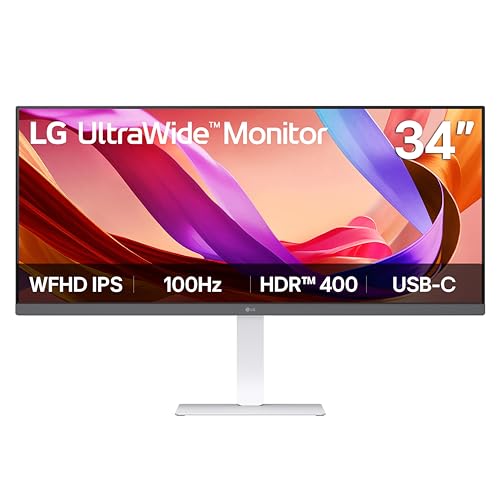
The LG 34U530A-W is a simple and practical 34-inch ultrawide monitor. Its IPS panel uses a 2560 × 1080 WFHD resolution and a 100Hz refresh rate. IPS technology can offer consistent viewing angles, which helps when more than one person looks at the screen. The white design also gives it a lighter look than the black gaming models in this guide.
LG adds USB-C, HDMI, and DisplayPort connections, along with a stand that supports tilt, height, and swivel adjustments. Those stand controls matter because a wide screen should sit at the right eye level. DisplayHDR 400 support can help compatible content, but this is not a high-end HDR display. I see it as a good fit for general office work, browsing, video, and light gaming.
Pros:
- 34-inch ultrawide workspace for simple multitasking
- IPS panel offers broad viewing angles
- 100Hz refresh rate improves smoothness over basic 60Hz use
- USB-C, HDMI, and DisplayPort provide useful connections
- Height, tilt, and swivel adjustments improve ergonomics
- DisplayHDR 400 supports compatible HDR content
- White finish offers a distinctive desk style
Cons:
- WFHD resolution is less sharp than 3440 × 1440 at 34 inches
- Not designed for high-refresh competitive gaming
- HDR effect may be modest compared with brighter HDR displays
What Amazon Buyers Are Saying
Shoppers often consider this LG because it combines a wide 34-inch format with an IPS panel and an adjustable stand. Buyers who want a clean office display may like the white finish and practical port selection. The 100Hz refresh rate also makes normal scrolling and video feel more fluid.
The main point to consider is resolution. At 34 inches, 2560 × 1080 provides useful width but less detail than a 3440 × 1440 monitor. Buyers who sit close to the screen or work with small text may prefer the sharper options in this guide. I also suggest confirming the USB-C feature you need, since USB-C monitor functions can vary by computer and cable.
My Recommendation
I recommend the LG 34U530A-W for office users who want a wide screen, a flexible stand, and broad device support. It is not my first choice for demanding gaming or detailed design work. For documents, email, web tabs, and video, it offers a sensible and comfortable layout.
How to Choose the Best Ultrawide Monitor
Choosing the best ultrawide monitor takes more than checking the screen size. You also need to match the resolution, aspect ratio, refresh rate, ports, and stand to your daily use. A good monitor should fit both your desk and your computer. The points below can help you avoid paying for features you will not use.
1. Match the Screen Size and Resolution to Your Desk
Most ultrawide monitors in this guide use a 34-inch 21:9 format. This size gives you extra room without the extreme footprint of a 49-inch model. A 34-inch display with 3440 × 1440 resolution offers a sharp balance for work and gaming. It gives more detail than 2560 × 1080, especially when you sit close to the screen or read small text.
The Samsung Odyssey G9 uses a much wider 49-inch 32:9 design. It can replace two monitors, but it needs a large desk and a strong stand. Measure your desk depth and width before ordering. Also check where the screen will sit in relation to your eyes. A huge display can feel tiring if you must turn your head too often.
Resolution also affects graphics load. DQHD and Ultra-WQHD screens push more pixels than WFHD panels. Your computer may need a stronger graphics card to run modern games at a high refresh rate. For office apps, most modern computers can handle the desktop resolution, but you should still check your laptop or graphics card outputs.
2. Choose Refresh Rate, Panel Type, and Sync Features for Your Use
Refresh rate tells you how often the monitor updates the image. A 100Hz or 120Hz screen can make scrolling and movement feel smoother than a 60Hz display. Gamers may prefer 144Hz or higher. The Sceptre model targets this group with its listed high refresh modes, while the Samsung G9 offers 144Hz.
Do not judge a monitor by refresh rate alone. Your computer must send enough frames to use that speed. The cable, port, game settings, and graphics card all matter. Check the manual and product listing for the exact connection needed for the top refresh mode.
Panel type also shapes the experience. VA panels often provide strong contrast, which can help dark scenes look deeper. IPS panels often offer wide viewing angles and consistent color across the screen. Neither type wins every task. Choose VA for contrast and value, or IPS when viewing angles and general color consistency matter more.
Adaptive sync can help reduce tearing when the monitor and graphics card work together. AMD FreeSync appears on several models here. It can help games look smoother, but it does not replace a suitable graphics card. For creative work, review color coverage and factory settings rather than focusing only on gaming features.
3. Check Ports, Ergonomics, and Total Value
Ports can change how useful your monitor feels each day. USB-C with power delivery is valuable for laptop users because one cable may carry video and charge the computer. The Dell S3425DW lists 65W power delivery. That may suit many thin laptops, but some powerful laptops need more power. Confirm your laptop’s charging needs before you rely on this feature.
HDMI and DisplayPort remain important for desktops, game consoles, and graphics cards. If you want the highest refresh rate, check which port supports it. Picture-in-picture and picture-by-picture modes can help users who switch between two computers. Built-in speakers add convenience, but a headset or external speakers may sound better.
Do not ignore the stand. Height adjustment helps you place the top of the display near eye level. Tilt and swivel controls can reduce neck strain. A VESA mount can offer more options if the included stand does not fit your desk. You should also check the monitor’s weight and base depth before purchase.
Finally, compare the whole package. A lower-cost monitor may save money but lack USB-C, a sharper resolution, or a flexible stand. A premium model may offer features you never use. The best ultrawide monitor gives you the right mix of image quality, speed, comfort, ports, and price for your own setup.
Final Verdict: Which Should You Buy?
The Samsung Odyssey G9 G91F is my top pick for the best ultrawide monitor because its 49-inch DQHD screen, 144Hz speed, and HDR support deliver an outstanding gaming and multitasking experience. For most office users, the Dell S3425DW is the smarter all-round choice.
Choose the Sceptre for affordable gaming, the Samsung ViewFinity for daily work, or the LG for simple office use. Measure your desk, check your computer ports, and confirm the current Amazon price before ordering.
FAQs Of Best Ultrawide Monitor
What is the best ultrawide monitor for gaming?
The Samsung Odyssey G9 G91F is the strongest gaming choice in this guide. Its 49-inch DQHD screen, 144Hz refresh rate, curved design, and FreeSync Premium Pro support suit immersive PC gaming.
Is a 34-inch ultrawide monitor good for work?
Yes. A 34-inch 21:9 monitor gives you room for several windows without taking as much space as a 49-inch display. Models with 3440 × 1440 resolution can also keep text and work tools sharp.
Is 3440 × 1440 better than 2560 × 1080?
For a 34-inch monitor, 3440 × 1440 usually gives sharper text and more detail. However, it also places a higher load on your computer, especially during gaming.
Do I need USB-C on an ultrawide monitor?
You need USB-C only if you want a simple laptop connection or charging through the monitor. Check that your laptop supports USB-C video output and that the monitor provides enough power for your device.
What refresh rate should an ultrawide monitor have?
A 100Hz or 120Hz refresh rate works well for office use and casual gaming. Competitive players may prefer 144Hz or higher, but the computer must support the chosen resolution and refresh rate.