Best Monitor Arms: Ergonomic Desk Setup Guide
The best monitor arms improve desk space, posture, screen control, and comfort for work or gaming.
A crowded desk can make even a good monitor feel hard to use. The screen may sit too low, take up too much room, or force your neck into an awkward position. A strong monitor arm solves these issues by lifting the display off the desk and giving you better control over height, tilt, swivel, and viewing distance. I reviewed five popular options for single monitors, dual-screen setups, and large ultrawide displays. These picks cover budget-friendly needs, flexible home offices, gaming desks, and heavy screens.
See the differences between my top picks at a glance.
HUANUO FlowLift Dual Monitor Stand

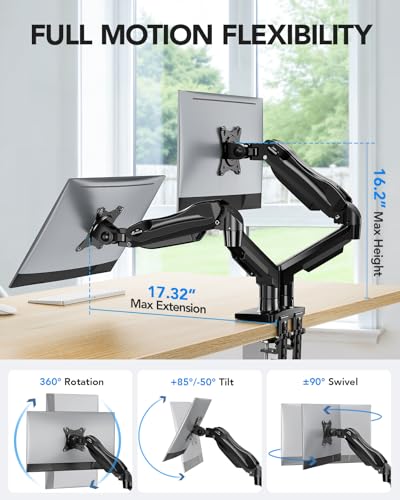
The HUANUO FlowLift Dual is a practical choice for anyone who wants two screens without using two separate desk stands. It supports 13- to 32-inch monitors, with each arm rated for 4.4 to 19.8 pounds. That range covers many common office monitors and gaming displays. The full-motion design lets you adjust each screen instead of keeping both panels locked in one position.
This model includes both a C-clamp and a grommet base, so it can suit more than one desk setup. Its VESA support covers the common 75×75 and 100×100 patterns. I like this flexibility because dual-screen users often change their desk layout over time. Built-in cable management also helps keep the area behind the monitors cleaner.
Pros:
- Supports two monitors from 13 to 32 inches
- Strong 4.4- to 19.8-pound capacity per arm
- Includes C-clamp and grommet mounting options
- Works with common VESA 75×75 and 100×100 patterns
- Full-motion adjustment helps align two screens
- Cable management reduces visible wire clutter
Cons:
- Two-screen alignment may take time during setup
- Desk space must allow room for a dual-arm base
- Very heavy displays should stay within the stated arm limit
What Amazon Buyers Are Saying
Amazon buyers commonly focus on the space this dual monitor arm saves and the useful range of screen movement. Many users like having both clamp and grommet options, especially when their desk has a thick or unusual rear edge. Buyers also tend to value the clean look created by lifting two monitors off the desktop. Common concerns with dual-arm mounts include the time needed to balance and align both screens, so careful installation matters.
My Recommendation
I recommend the FlowLift Dual for office work, streaming, coding, and gaming setups that use two medium-size monitors. It offers useful mounting choices and a solid capacity range without adding a second stand. Measure your desk first, then confirm the weight of each monitor without guessing. Overall, it is one of the best monitor arms here for a flexible dual-screen workspace.
| Category | Rating |
|---|---|
| Build and stability | 4.5/5 |
| Adjustability | 4.5/5 |
| Dual-screen value | 4.5/5 |
| Installation ease | 4/5 |
| Overall Rating | 4.4/5 |
ErGear Single Monitor Arm

The ErGear Single Monitor Arm targets users who want one adjustable screen mount with a simple setup. It supports displays from 13 to 34 inches and holds up to 19.8 pounds. That makes it a good fit for many standard monitors and some larger desktop screens. The wider screen range gives it a little more room than basic 13- to 32-inch models.
A tool-free VESA mount can make attaching a compatible monitor less frustrating. The arm also includes cable management, which helps keep power and display cables close to the mount. Its single-arm layout takes less visual space than a dual monitor system. I would consider it for a home office, study desk, or gaming setup that uses one main display.
Pros:
- Supports monitors from 13 to 34 inches
- Holds up to 19.8 pounds
- Tool-free VESA mounting helps speed up attachment
- Single-arm design leaves more room for desk accessories
- Cable management helps reduce loose wires
- Good choice for a first monitor arm
Cons:
- It supports only one monitor
- Users must check monitor weight before installation
- The included range does not cover every extra-large ultrawide display
What Amazon Buyers Are Saying
Amazon shoppers often look for quick installation when choosing a single monitor mount, and this model stands out for its tool-free VESA approach. Buyers commonly appreciate the clean result and the ability to move the display away from its original stand. As with most monitor arms, some users may need to fine-tune the tension for their particular screen. Reviews and setup experiences can vary, so I suggest checking the current listing details and confirming VESA compatibility before ordering.
My Recommendation
The ErGear Single Monitor Arm is a sensible pick when you want broad screen support and a simple single-display setup. It is especially useful if you do not need the extra hardware of a dual arm. The 19.8-pound limit is helpful, but you should compare it with your monitor’s actual weight. I rate it highly for convenience and everyday value.
| Category | Rating |
|---|---|
| Build and stability | 4.3/5 |
| Single-screen adjustment | 4.4/5 |
| Installation convenience | 4.5/5 |
| Value | 4.4/5 |
| Overall Rating | 4.4/5 |
HUANUO FlowLift Single Monitor Mount

The HUANUO FlowLift Single is a straightforward monitor arm for people who want more desk space and better screen positioning. It fits 13- to 32-inch LCD monitors and supports 4.4 to 19.8 pounds. This gives it a useful range for many everyday office and gaming displays. It also avoids the added cost and extra footprint of a dual-monitor mount.
The mount supports VESA attachment and includes both clamp and grommet bases. That matters because not every desk has the same edge shape or rear clearance. You can raise, lower, tilt, swivel, or rotate a compatible screen to match your chair and work style. The result can feel much cleaner than a factory monitor stand, especially on a small desk.
Pros:
- Fits many 13- to 32-inch monitors
- Supports a broad 4.4- to 19.8-pound range
- Includes clamp and grommet base choices
- Useful for small or crowded desks
- Supports screen tilt, swivel, and rotation
- Works well for office, study, and casual gaming use
Cons:
- Designed for one monitor only
- It does not target very large ultrawide screens
- Heavy screens need careful tension adjustment
What Amazon Buyers Are Saying
Amazon buyers often like this model because it gives them a simple way to clear the original monitor stand from the desk. The clamp and grommet choices also help users fit the arm to different work surfaces. Common setup comments for this type of mount center on finding the right tension and tightening the base securely. Buyers should also check the monitor’s VESA pattern and weight before purchase rather than relying on screen size alone.
My Recommendation
I recommend the FlowLift Single for a normal-size monitor and a buyer who wants dependable basic flexibility. It offers the key features most people need without making the desk setup complex. This is a strong value choice for a home office or study area. I rate it 4.3 out of 5 because it balances useful movement, mounting flexibility, and broad compatibility.
| Category | Rating |
|---|---|
| Compatibility | 4.4/5 |
| Adjustability | 4.3/5 |
| Mounting flexibility | 4.5/5 |
| Small-desk value | 4.4/5 |
| Overall Rating | 4.3/5 |
HUANUO TitanLift Heavy Duty Arm

The HUANUO TitanLift is the clear specialist in this group. It is made for large screens up to 49 inches and can hold up to 44 pounds. That capacity makes it a better match for a large ultrawide monitor than a standard single arm. Its aluminum construction and heavy-duty dual C-clamp base are aimed at supporting a demanding desk setup.
Large monitors need more than a high weight rating. They also need a secure base, correct VESA fit, and enough desk depth for the arm to move safely. This model supports a maximum VESA size of 100x100mm. I would check every measurement before ordering, but users with a compatible 49-inch display will find this design far more suitable than a regular office arm.
Pros:
- Supports screens up to 49 inches
- Holds up to 44 pounds
- Heavy-duty dual C-clamp base adds support
- Designed for large ultrawide monitors
- Aluminum construction offers a solid premium feel
- Fully adjustable design helps position a wide screen
Cons:
- Overbuilt for a small or lightweight monitor
- Large screens require careful installation and balancing
- Users must confirm desk strength, VESA fit, and clearance
What Amazon Buyers Are Saying
Buyers shopping for heavy-duty monitor arms usually care most about support, desk stability, and whether the arm can handle a large ultrawide screen. Feedback commonly centers on the relief of removing a large factory stand and gaining more control over viewing height. The main concern with any heavy monitor mount is installation. Users should follow the instructions, use the correct VESA screws, and avoid exceeding the stated load rating.
My Recommendation
The TitanLift is my top pick for a large ultrawide monitor. Its 44-pound capacity and support for screens up to 49 inches set it apart from the other products here. It is not the best value for a basic 24-inch display, but it makes sense when ordinary arms cannot safely carry your screen. I rate it 4.6 out of 5 for heavy-duty use.
| Category | Rating |
|---|---|
| Heavy-screen support | 4.8/5 |
| Base design | 4.6/5 |
| Large-screen compatibility | 4.7/5 |
| Value for ultrawide users | 4.4/5 |
| Overall Rating | 4.6/5 |
HUANUO FlowLift Pro Monitor Arm

The HUANUO FlowLift Pro is built for users who adjust their monitor often. It supports 13- to 32-inch screens and carries up to 15.4 pounds. The mecha-spring design aims to make movement smooth and controlled. That can help when you switch between sitting, standing, sharing a screen, or turning the display toward another person.
This arm includes tilt, swivel, and rotation, plus a tool-free VESA mount. It comes with C-clamp and grommet base choices, so you can match it to the desk. The lower load limit means you should check your monitor weight with extra care. For a light or medium display, though, the focus on easy adjustment makes this model appealing.
Pros:
- Mecha-spring design supports frequent adjustments
- Fits 13- to 32-inch monitors
- Supports tilt, swivel, and rotation
- Tool-free VESA mount improves convenience
- Includes C-clamp and grommet base options
- Useful for sit-stand work and shared viewing
Cons:
- 15.4-pound capacity is lower than several other picks
- Not intended for very heavy displays
- Users may need to tune the spring for their monitor
What Amazon Buyers Are Saying
Amazon buyers who choose a spring-style monitor arm often value smooth movement and easy changes during the workday. Users commonly look for a mount that can hold its position after adjustment, while others appreciate the cleaner desk appearance. The most important point to confirm is the actual monitor weight, since this model has a 15.4-pound maximum. Installation results also depend on a secure desk clamp and correct tension adjustment.
My Recommendation
I recommend the FlowLift Pro for a lighter monitor and a user who wants more movement than a basic fixed stand provides. Its tool-free VESA feature and spring design add daily convenience. It is not the right choice for a heavy gaming display or large ultrawide screen. I rate it 4.4 out of 5 for smooth adjustment and practical features.
| Category | Rating |
|---|---|
| Movement control | 4.6/5 |
| Monitor compatibility | 4.2/5 |
| Adjustment convenience | 4.6/5 |
| Desk-mount flexibility | 4.4/5 |
| Overall Rating | 4.4/5 |
How to Choose Best Monitor Arms
Choosing the best monitor arms starts with your monitor, desk, and daily routine. A low price does not help if the arm cannot hold the screen or fit the desk. Before you buy, check the monitor’s weight, VESA pattern, and size. Then consider how often you plan to move the display. These simple steps prevent most installation problems.
1. Match the Arm to Monitor Weight and VESA Size
Screen size alone does not tell you whether a monitor arm will work. A 32-inch monitor can weigh very differently from another 32-inch model. Find the display weight without its original stand, then compare it with the arm’s rated capacity. Always stay below the maximum load rather than treating that number as a target.
Next, check the VESA holes on the back of the monitor. The most common patterns include 75x75mm and 100x100mm. The HUANUO FlowLift models in this review list those common patterns, while the TitanLift lists a maximum VESA size of 100x100mm. If your monitor has a different pattern, you may need an adapter or another mount.
2. Check Your Desk Before You Install
A C-clamp needs enough room at the back or side of the desk. Measure the desk thickness and look for shelves, wall panels, cable trays, and other obstacles. A grommet mount needs a suitable hole through the desk. Do not assume every desktop can support a heavy ultrawide monitor.
Desk material also matters. A strong wood or metal desk usually gives the clamp a firm surface, while thin or weak boards may flex. Large screens place more leverage on the mount than small screens. If the desktop feels soft or bends under pressure, reinforce it before installing a heavy arm.
3. Choose Movement, Capacity, and Value for Your Routine
Think about how you use the screen. A fixed work setup may need only height and tilt adjustment. A shared desk may benefit from swivel and rotation. A sit-stand user should look for an arm that moves smoothly and holds the monitor in place at different heights.
For two screens, a dual arm saves space and helps create a clean side-by-side layout. For a large ultrawide, choose a heavy-duty model such as the TitanLift instead of a standard office arm. For a lighter monitor that moves often, the FlowLift Pro offers useful adjustment features. The best monitor arms provide the right capacity and movement without charging you for features you will not use.
Final Verdict: Which Should You Buy?
The HUANUO TitanLift is best for large ultrawide screens, while the FlowLift Dual is my top pick for two-monitor users. For one standard monitor, choose the ErGear or FlowLift Single. The FlowLift Pro suits lighter screens that need frequent movement.
The best monitor arms clear desk space and improve screen control. Confirm weight, VESA fit, and desk strength before ordering for a safer, better setup.
FAQs Of Best Monitor Arms
Are monitor arms better than the stand included with a monitor?
A monitor arm usually offers more height, tilt, swivel, and rotation control. It also frees desk space. The original stand may remain better if you prefer a simple setup and never adjust the screen.
How do I know if a monitor arm fits my monitor?
Check three details: screen size, monitor weight without the stand, and VESA hole pattern. The arm must support all three. Never exceed its stated weight limit.
Can a monitor arm damage my desk?
A poorly placed or overtightened clamp can damage a weak desktop. Use a firm mounting area, follow the instructions, and add a reinforcement plate when needed. Large monitors need extra care.
Is a dual monitor arm hard to install?
It can take longer than a single arm because both screens need alignment and balance. Install the base firmly, attach one monitor at a time, and adjust each arm slowly.
What is the best monitor arm for a 49-inch ultrawide?
The HUANUO TitanLift is the strongest match in this review because it supports screens up to 49 inches and holds up to 44 pounds. Confirm your monitor’s VESA pattern and actual weight first.