Best Chromebook Laptop: Smart Buying Guide
For most buyers, the HP Chromebook 15 offers the best mix of screen space, memory, storage, and daily comfort.
A slow laptop can make school work, email, web browsing, and video calls feel harder than they should. A Chromebook keeps things simple. It starts fast, updates in the background, and works well with Google apps. I reviewed five useful options for different needs, from a large 15.6-inch student laptop to a small, low-cost Dell model. My picks focus on daily speed, screen size, storage, battery use, keyboard comfort, and overall value.
See the differences between my top picks at a glance.
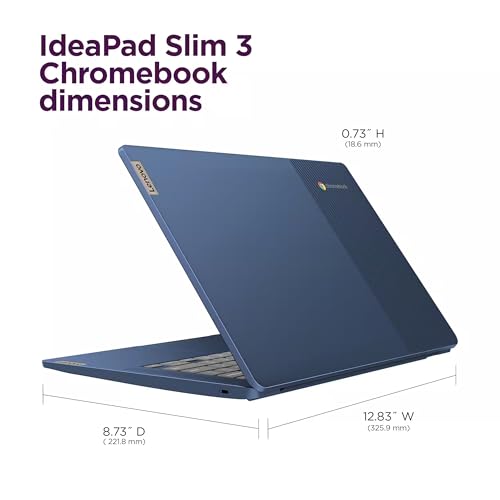
Lenovo 14-Inch FHD Touch Chromebook

This Lenovo Chromebook stands out with a 14-inch Full HD touchscreen. The touch panel makes scrolling, tapping, and simple Android app use feel natural. Its MediaTek Kompanio 520 processor has eight cores and suits light daily tasks. The Abyss Blue finish also gives this slim laptop a more personal look than many plain budget models.
The 4GB of RAM and 64GB eMMC storage fit web browsing, Google Docs, email, and online classes. Wi-Fi 6 can help provide a more modern wireless connection when paired with a compatible router. ChromeOS keeps the interface clean and easy to learn. I see this model as a strong pick for buyers who want a touch display without moving into a high price range.
Pros:
- Sharp 14-inch Full HD touchscreen
- Eight-core MediaTek Kompanio 520 processor
- Wi-Fi 6 support for compatible networks
- Thin design suits travel and school bags
- ChromeOS offers a simple and clean user experience
- Touch input helps with browsing and app use
Cons:
- 4GB of RAM can limit heavy multitasking
- 64GB eMMC storage leaves less room for large files
- Not designed for demanding desktop software or serious gaming
What Amazon Buyers Are Saying
Buyer feedback for this type of Lenovo Chromebook often centers on the light design, touchscreen, and easy setup. Users who need a basic machine for browsing, school portals, and streaming tend to value its simple ChromeOS workflow. Some buyers may find the 4GB memory and eMMC storage less suitable when many tabs or local files stay open at once. As with any listing, I recommend checking the latest review details and seller information before ordering.
My Recommendation
I recommend this Lenovo to students, casual users, and anyone who wants a Full HD touchscreen at a sensible price. It gives you more screen detail than the HD models below, but its modest memory calls for realistic expectations. Buy it for cloud work and light daily use, not for demanding programs.
| Category | Rating |
|---|---|
| Display and design | 4.5/5 |
| Everyday performance | 4/5 |
| Portability | 4.5/5 |
| Storage and memory | 3.5/5 |
| Overall Rating | 4.1/5 |
HP Chromebook 15 with 8GB RAM

The HP Chromebook 15 is the most comfortable choice here for users who prefer a large screen. Its 15.6-inch anti-glare display gives you more room for documents, web pages, and split-screen work. The Intel N200 processor targets everyday computing rather than high-end creative work. An 8GB DDR5 memory setup is a welcome step up for users who keep more tabs open.
The listing describes 192GB of total storage through 64GB of eMMC storage and a 128GB SD card. That setup offers more usable space than the other standard HP models in this guide. A numeric keyboard can help with budgets, forms, and number-heavy tasks. The webcam shutter adds a small but useful privacy feature for home and student use.
Pros:
- Large 15.6-inch anti-glare screen
- 8GB DDR5 RAM supports better multitasking
- Intel N200 processor suits common ChromeOS tasks
- Listed 192GB storage offers useful file space
- Numeric keyboard helps with numbers and spreadsheets
- Webcam shutter adds a simple privacy measure
Cons:
- Larger body is less convenient for small bags
- Anti-glare HD resolution should not be confused with Full HD detail
- SD card storage may be less convenient than built-in storage
What Amazon Buyers Are Saying
Customer discussions around large HP Chromebooks commonly mention the roomy display, full-size keyboard feel, and value for school or home work. Buyers who use many browser tabs may appreciate the 8GB memory more than users of 4GB models. Some shoppers may note that a 15.6-inch laptop feels less portable than a 14-inch unit. I would also confirm the current listing details, including the included SD card, before purchase because bundle contents can change.
My Recommendation
This is my top overall choice in this guide. The screen, 8GB RAM, storage bundle, numeric keyboard, and privacy shutter create a useful package for families and students. It is worth buying if you want comfort and multitasking more than extreme portability. I rate it highest because it solves more common daily problems than the smaller options.
| Category | Rating |
|---|---|
| Screen and comfort | 4.5/5 |
| Multitasking | 4.5/5 |
| Storage value | 4.5/5 |
| Portability | 3.5/5 |
| Overall Rating | 4.4/5 |
HP 14-Inch Chromebook for Students

This HP 14-inch Chromebook targets students who need a straightforward computer for class work. The 14-inch display gives a good middle ground between a small travel screen and a large desktop replacement. Its Intel Celeron N4120 or related N-series configuration is suited to browsing, word processing, video meetings, and web-based school tools. The package also lists USB-A, USB-C, HDMI, and a webcam.
The 4GB RAM and 64GB eMMC storage are entry-level specifications. They work best when your files stay in Google Drive or another cloud service. The listing also highlights up to 14 hours of battery life, but real use can vary with brightness, video playback, Wi-Fi, and app load. CUE accessories may add practical value, yet I suggest checking the exact bundle shown at checkout.
Pros:
- Useful 14-inch size for school and home
- Includes HDMI for an external display
- Offers both USB-A and USB-C connectivity
- Webcam supports online classes and meetings
- ChromeOS works well with Google education tools
- Listed long battery estimate suits a school day
Cons:
- 4GB RAM is best for light multitasking
- 64GB eMMC storage can fill quickly with downloads
- HD resolution is less sharp than a Full HD screen
What Amazon Buyers Are Saying
Buyers looking at student Chromebooks usually value quick setup, a manageable size, and easy access to school websites. Feedback can also point to the limits of entry-level memory when users open many tabs or run several web apps at once. Battery results often depend on screen brightness and the type of work being done. I advise reading recent reviews for the exact bundle and checking whether the supplied accessories meet your needs.
My Recommendation
I recommend this HP for a student who mainly uses Google Classroom, Docs, email, research sites, and video calls. It is a practical buy when the price is clearly below higher-memory models. Choose a different option if you need many tabs open all day or plan to store lots of video files on the laptop.
| Category | Rating |
|---|---|
| Student features | 4/5 |
| Ports and access | 4.2/5 |
| Daily performance | 3.7/5 |
| Battery claim | 4/5 |
| Overall Rating | 4/5 |
HP Chromebook 14 with Celeron N4120
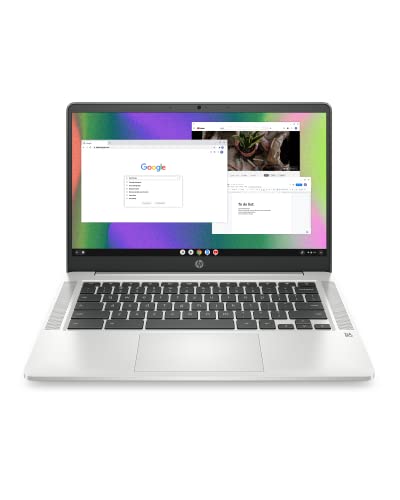
This HP Chromebook 14 is a simple choice for email, browsing, streaming, and light office work. It uses an Intel Celeron N4120 processor with 4GB RAM and 64GB eMMC storage. The 14-inch HD display gives more working space than an 11.6-inch model while keeping the laptop fairly easy to carry. Its thin design fits users who want a basic home computer without a complex setup.
The listing also notes 4K graphics support, but that does not turn this into a high-end editing or gaming laptop. ChromeOS handles the core experience, including browser work and Google apps. The keyboard area includes an ash gray design on the listed model. Long battery life can help with casual use, but actual results depend on settings and workload.
Pros:
- Balanced 14-inch size for home and travel
- Intel Celeron N4120 handles basic ChromeOS tasks
- Thin design is easy to place on a small desk
- Simple ChromeOS setup suits first-time users
- 64GB storage works for cloud-first users
- Suitable for email, web pages, and online video
Cons:
- Only 4GB RAM for multitasking
- HD display offers less detail than Full HD
- 64GB storage may feel small for offline files
What Amazon Buyers Are Saying
Feedback on this kind of HP Chromebook often focuses on ease of use and value for basic tasks. Buyers who want a laptop for email, school websites, and streaming may find the 14-inch format comfortable. The most common concern with entry-level models is usually the limit of 4GB memory and modest storage. I would treat it as a cloud-first laptop and review current comments about speed, battery use, and condition before buying.
My Recommendation
This model is worth considering when you want a dependable basic Chromebook at a low cost. It makes sense for a parent, casual user, or older student who does not need advanced software. I would pay more for the HP 15 if you need stronger multitasking, more space, or a larger keyboard.
| Category | Rating |
|---|---|
| Basic performance | 3.8/5 |
| Portability | 4.1/5 |
| Ease of use | 4.2/5 |
| Storage and memory | 3.5/5 |
| Overall Rating | 3.9/5 |
Dell Chromebook 11 3100

The Dell Chromebook 11 3100 is the smallest and most budget-focused option in this review. Its 11.6-inch display makes it easy to carry between rooms, classrooms, and travel bags. The Intel Celeron N4020 processor and 4GB RAM are aimed at basic ChromeOS tasks. This renewed model may appeal to buyers who want a low-cost laptop for web access rather than a large work screen.
Its 16GB flash storage is the clearest trade-off. You will need to keep most files online and avoid treating this model like a full desktop replacement. Bluetooth support helps with compatible accessories, while the English US keyboard suits local typing needs. Since it is renewed, condition and included accessories can vary by listing, so inspect the seller terms and warranty details before ordering.
Pros:
- Small 11.6-inch size is easy to carry
- Low-cost format suits simple web tasks
- 4GB RAM supports basic ChromeOS use
- Bluetooth works with compatible devices
- English US keyboard fits standard US typing
- ChromeOS is simple for browsing and email
Cons:
- 16GB flash storage is very limited
- Small screen may feel cramped for long work
- Renewed condition can vary by seller and unit
- Not a good fit for large downloads or heavy multitasking
What Amazon Buyers Are Saying
Renewed Chromebook buyers often like the low price, compact size, and simple setup. This format can work well for a child, travel use, or a second laptop for quick web tasks. At the same time, limited storage and the small screen can lead to complaints when buyers expect full laptop capacity. I strongly suggest checking recent seller feedback, the return policy, and the stated condition before purchase.
My Recommendation
I recommend the Dell only when portability and price matter more than storage or screen comfort. It can serve as a basic browser, email machine, or travel laptop. It is not my first choice for school papers, long work sessions, or many saved files. The renewed status makes careful seller review especially important.
| Category | Rating |
|---|---|
| Portability | 4.6/5 |
| Basic speed | 3.4/5 |
| Storage | 2.5/5 |
| Value when renewed | 3.8/5 |
| Overall Rating | 3.6/5 |
How to Choose Best Chromebook Laptop
Choosing the Best Chromebook Laptop starts with your real daily tasks. ChromeOS works through the Chrome browser, Google apps, and approved apps from the Google Play Store on supported models. It does not run every Windows or Mac program. Before you buy, think about how many tabs you open, where you save files, how much screen space you need, and how often you carry the laptop.
1. Match the Processor and RAM to Your Work
A Chromebook for email and one document does not need the same power as a laptop for many tabs and video calls. Entry-level Intel Celeron chips and MediaTek processors can handle light browsing, writing, streaming, and school portals. They may slow down when you open many tabs or several web apps at once.
RAM matters during multitasking. The 4GB models in this guide suit simple use. The HP Chromebook 15 has 8GB DDR5 RAM, so it gives you more room for tabs and web apps. If you often work with large documents, online meetings, and research pages at the same time, I would favor 8GB over 4GB.
2. Pick the Right Screen, Keyboard, and Size
Screen size changes how comfortable a Chromebook feels. An 11.6-inch Dell is easy to carry but may feel tight for long papers. A 14-inch model offers a useful middle ground. The Lenovo adds Full HD detail and touch input, which can make browsing and app use more pleasant.
A 15.6-inch HP gives you the most room for documents and split-screen work. It also makes the laptop less compact. Check the keyboard style as well. A numeric keypad can help with budgets and forms. An anti-glare panel may reduce reflections, but you should still check the listed resolution and your room lighting.
3. Check Storage, Ports, Updates, and Seller Terms
Chromebooks often use eMMC or flash storage. This storage works well for ChromeOS, but it can be smaller and slower than the solid-state drives found in many premium laptops. A 64GB model can work if you keep photos and documents in the cloud. A 16GB renewed model needs even more care because offline space is very limited.
Review the ports before checkout. HDMI helps connect an external monitor. USB-A supports older accessories. USB-C can support newer devices, but the exact functions depend on the model. Also check the Chromebook’s remaining update support on Google’s official Auto Update Expiration page. This step matters more than a low price.
For renewed products, read the condition notes, seller rating, return period, and warranty terms. Product bundles can change, too. If a listing includes an SD card or accessories, confirm that the current offer still includes them. These simple checks help you choose better value and avoid surprises.
Final Verdict: Which Should You Buy?
The HP Chromebook 15 is my top Best Chromebook Laptop pick because it combines 8GB RAM, a large screen, useful storage, and a numeric keyboard. Choose the Lenovo if you want a Full HD touchscreen and a lighter format.
For basic school work, the HP 14 models offer good value. The Dell Chromebook 11 is best only for tight budgets, small bags, and simple online tasks.
FAQs Of Best Chromebook Laptop
Is a Chromebook good for school work?
Yes. A Chromebook works well for Google Docs, Classroom, email, research, web portals, and video meetings. Check school software needs first.
How much RAM should the Best Chromebook Laptop have?
4GB works for light use. I prefer 8GB for many tabs, video calls, and regular multitasking.
Is 64GB storage enough on a Chromebook?
It can be enough if you store files in the cloud. It may feel small if you save many videos, photos, or offline documents.
Should I buy a renewed Chromebook?
A renewed Chromebook can offer good value. Check the seller, condition, return policy, warranty, and remaining ChromeOS update support before buying.
Can a Chromebook replace a Windows laptop?
It can replace one for browsing, documents, email, and web apps. It may not replace Windows for specialized software, advanced games, or some professional programs.