Best Graphics Card: Find Your Ideal GPU In 2026
The best graphics card balances gaming speed, memory, cooling, features, power use, and price for your PC.
Choosing a new graphics card can feel hard when every model claims to deliver smooth 4K gaming. You may want high frame rates, quiet fans, strong ray tracing, or enough VRAM for new games. Yet your case size, power supply, monitor, and budget also matter. I compared five current AMD and NVIDIA cards for different needs. This review looks at real buying factors, not just large numbers on a box. My goal is simple: help you find the best graphics card for your games, creative work, and upgrade plans.
See the differences between my top picks at a glance.
ASUS Prime RX 9070 XT 16GB

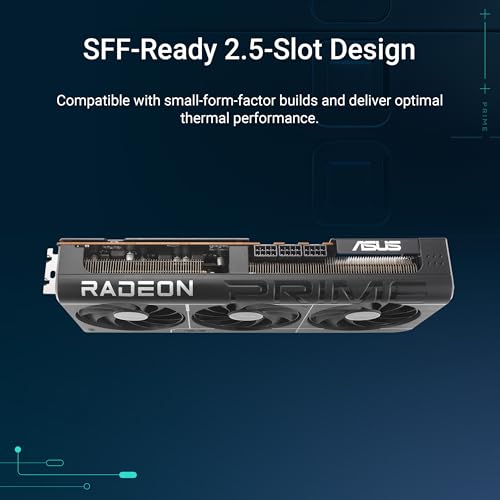
The ASUS Prime Radeon RX 9070 XT is my strongest all-around pick for people who want high-end gaming without jumping to an ultra-premium flagship. It pairs 16GB of GDDR6 memory with AMD’s RDNA 4 graphics design and a factory-overclocked setup. That memory capacity suits modern 1440p play and many 4K games. The card also uses PCIe 5.0 and modern HDMI and DisplayPort 2.1 connections.
ASUS adds a 2.5-slot cooler, axial-tech fans, and dual-ball fan bearings. Those details matter during long gaming sessions because steady cooling helps the card hold its speed. Dual BIOS gives you another useful option for balancing performance and noise. I also like the GPU Guard feature, which adds extra attention to card protection during installation and daily use.
Pros:
- Strong choice for high-refresh 1440p gaming
- 16GB of VRAM gives modern games useful headroom
- PCIe 5.0 and HDMI/DisplayPort 2.1 support
- 2.5-slot design fits more cases than very large cards
- Axial-tech fans and dual-ball bearings support long-term cooling
- Dual BIOS offers a practical tuning choice
Cons:
- It still needs a spacious case and suitable power supply
- Ray tracing and upscaling results depend on the game and settings
- Some compact cases may not provide enough airflow
What Amazon Buyers Are Saying
Buyer feedback for this type of ASUS Prime card commonly focuses on gaming speed, build quality, and cooler behavior. Owners who like it tend to value the 16GB memory, clean design, and smooth performance at high resolutions. Some buyers also appreciate the quiet fan behavior when the card is not under heavy load.
As with most large performance cards, common concerns include card size, power needs, and price changes. Actual temperatures and noise can vary with the case, room temperature, fan curve, and game load. I would check current customer feedback and the latest price before ordering.
My Recommendation
I recommend this model as the best graphics card for a balanced high-end gaming PC. It offers a strong feature mix and avoids the extreme size and cost of a flagship card. It is worth buying when its price stays close to other RX 9070 XT models.
ASRock RX 9070 Challenger 16GB

The ASRock Radeon RX 9070 Challenger is a good fit for buyers who want the core RX 9070 platform at a sensible price. It includes 16GB of GDDR6 memory on a 256-bit memory interface. Its listed boost speed reaches 2520MHz, although real clock behavior can change with workload and cooling. The RDNA 4 design gives this card a modern base for current games.
ASRock uses three fans to spread cooling across the heatsink. The 0dB silent feature can stop the fans during light work, which helps reduce idle noise. An LED indicator adds a simple way to view card status. This model makes more sense for a value-focused build than for someone who wants premium lighting or a large collection of extra features.
Pros:
- 16GB VRAM supports demanding games and creative apps
- 256-bit memory interface is useful for high-resolution workloads
- Triple-fan cooler spreads heat across the card
- 0dB mode can keep light desktop work quiet
- Listed 2520MHz boost clock offers strong stock performance
- Simple design may suit a practical, no-frills build
Cons:
- Triple-fan designs may be long for small cases
- It may offer fewer premium extras than higher-end custom models
- Noise and temperature depend on case airflow
What Amazon Buyers Are Saying
Common buyer themes for the ASRock Challenger line include good performance for the money, a useful three-fan cooler, and quiet behavior at low load. Buyers who prefer a simple gaming card often like the lack of unnecessary extras. The 16GB capacity also attracts users who plan to keep the card for several years.
Some shoppers may raise concerns about fit, fan noise under a heavy load, or software setup. These points can vary from one PC to another. I suggest reading recent reviews that mention the buyer’s case, monitor resolution, and power supply rather than relying only on short star ratings.
My Recommendation
This is a smart alternative to the ASUS Prime RX 9070 XT when the ASRock model costs less. It gives you the same broad memory class and a capable cooler, but the final choice should include case clearance and local pricing. I rate it highly for value.
| Category | Rating |
|---|---|
| Gaming performance | 4.6/5 |
| Cooling and noise | 4.3/5 |
| Memory capacity | 4.6/5 |
| Overall value | 4.6/5 |
| Overall rating | 4.5/5 |
ASUS Dual RTX 5060 Ti 16GB
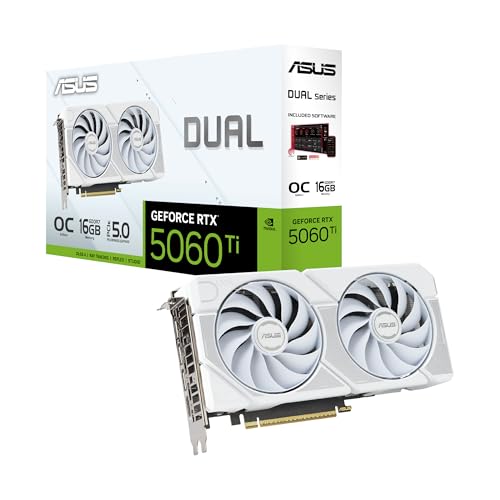
The ASUS Dual GeForce RTX 5060 Ti is aimed at buyers who want a smaller, efficient card for 1080p and 1440p gaming. This white OC Edition includes 16GB of newer GDDR7 memory. It also supports PCIe 5.0, HDMI 2.1b, and DisplayPort 2.1b. Those ports make it a useful match for modern gaming monitors and multi-display setups.
The 2.5-slot design gives the cooler more room than a very slim card, while axial-tech fans help move air through the heatsink. ASUS also lists 0dB technology for quieter light use. NVIDIA’s software features may appeal to buyers who want broad support for ray tracing, upscaling, streaming, and creator tools. Still, I would match this card to the monitor and games you use most.
Pros:
- 16GB GDDR7 memory provides useful capacity for its class
- Modern HDMI 2.1b and DisplayPort 2.1b outputs
- 2.5-slot size suits many mid-size gaming cases
- 0dB technology can reduce idle fan noise
- White design works well in a light-colored PC build
- NVIDIA software support adds value for gaming and streaming
Cons:
- It is not designed to replace flagship cards for 4K gaming
- 2.5 slots still require careful motherboard and case planning
- The white finish may show dust more easily
What Amazon Buyers Are Saying
Buyers who choose ASUS Dual cards often mention the compact build, clean appearance, and easy installation. Users also tend to value low noise during desktop tasks and the extra memory capacity. The white cooler attracts people building a matching white or silver PC.
Typical concerns center on price, driver setup, and the gap between midrange and high-end performance. A buyer may also expect too much from the card if they plan to play every new title at maximum 4K settings. I recommend checking recent buyer comments for the exact game settings and resolution they used.
My Recommendation
I recommend the ASUS Dual RTX 5060 Ti for efficient 1080p or 1440p systems, especially when you want NVIDIA features and a 16GB model. It is not the best graphics card for extreme 4K play, but it is a well-rounded option for many mainstream PCs.
| Category | Rating |
|---|---|
| 1080p/1440p performance | 4.4/5 |
| Memory and connectivity | 4.6/5 |
| Size and cooling | 4.4/5 |
| Overall value | 4.2/5 |
| Overall rating | 4.4/5 |
ASUS ROG Astral RTX 5090 32GB

The ASUS ROG Astral GeForce RTX 5090 is the performance leader in this group. It carries 32GB of GDDR7 memory and a large custom cooler built for a very powerful GPU. The card uses a 3.8-slot design, so it targets full-size enthusiast PCs. It also includes PCIe 5.0, HDMI 2.1, and DisplayPort 2.1 connections.
ASUS gives this model four fans, axial-tech fan blades, a vapor chamber, and a phase-change GPU thermal pad. These parts aim to manage heat during long and demanding workloads. This card suits 4K gaming, high-end video work, 3D creation, and other tasks that can use a large amount of GPU power. Before buying, I would confirm case clearance, support bracket needs, and power supply capacity.
Pros:
- 32GB of GDDR7 memory gives exceptional capacity
- Designed for demanding 4K and high-refresh workloads
- Four-fan cooling system supports heavy sustained use
- Vapor chamber helps spread heat across the cooler
- Phase-change thermal pad targets long-term thermal contact
- Strong fit for advanced gaming and professional GPU work
Cons:
- 3.8-slot thickness can block several expansion slots
- It needs a large case with excellent airflow
- High-end performance comes with a very high purchase cost
- Power supply and cable planning need extra care
What Amazon Buyers Are Saying
Enthusiast buyers usually focus on the Astral model’s build quality, cooling hardware, and extreme performance. Users with high-resolution displays and demanding workloads often value the large memory pool. The premium construction also appeals to buyers who want a flagship card with a substantial cooler.
The most common practical concerns relate to size, cost, heat, and power. Some buyers may also discuss installation support or clearance near the motherboard. These concerns are important because a card this large can create problems even in a powerful PC if the case is not ready for it.
My Recommendation
Buy the ASUS ROG Astral RTX 5090 only if you need its top-tier performance and can support its size and power demands. It is the best graphics card here for maximum performance, but it is not the best value for most gamers. I rate it as an outstanding specialist choice.
| Category | Rating |
|---|---|
| Maximum performance | 5/5 |
| Cooling hardware | 4.8/5 |
| Memory capacity | 5/5 |
| Size and value | 3.7/5 |
| Overall rating | 4.6/5 |
XFX Swift RX 9060 XT 16GB

The XFX Swift RX 9060 XT is a practical pick for a mainstream gaming computer. It combines AMD RDNA 4 graphics with 16GB of GDDR6 memory. The triple-fan design aims to keep the card cool during extended play. It also provides one HDMI connection and two DisplayPort connections, which suits common gaming and work setups.
This card makes the most sense for 1080p gaming and sensible 1440p settings. Its 16GB memory helps it stay useful as texture sizes grow, but the GPU class still sets the limit in demanding games. XFX designs the Swift range around simple cooling and broad desktop compatibility. As always, check the card length and power needs against your case before you order.
Pros:
- 16GB memory is generous for a mainstream gaming card
- Triple-fan cooler supports extended gaming sessions
- RDNA 4 platform offers a current feature base
- Good fit for 1080p and selected 1440p gaming
- Two DisplayPort outputs support multi-monitor setups
- Simple design works well in many standard desktop builds
Cons:
- It is not intended for maximum 4K settings
- Triple-fan cards can be longer than basic dual-fan models
- GDDR6 is older than the GDDR7 used by some newer rivals
What Amazon Buyers Are Saying
Buyers often look at the XFX Swift line for its cooler, 16GB memory, and practical price. Users who upgrade from older entry-level cards may notice a clear improvement in game smoothness. The three-fan layout also appeals to people who prefer a cooler with more airflow capacity.
Feedback can differ based on the game, resolution, and system balance. Some owners may mention the card’s physical length or fan sound during demanding scenes. I would compare recent reviews with your target games and confirm that your case has enough room before purchase.
My Recommendation
The XFX Swift RX 9060 XT is a good choice for an affordable 1080p or entry-level 1440p build. It is not the fastest graphics card in this review, but its 16GB memory and triple-fan cooler give it strong everyday appeal. I recommend it when the price fits your budget.
| Category | Rating |
|---|---|
| 1080p gaming | 4.4/5 |
| 1440p potential | 4.1/5 |
| Cooling and memory | 4.4/5 |
| Budget value | 4.4/5 |
| Overall rating | 4.3/5 |
How to Choose the Best Graphics Card
The right graphics card depends on more than the GPU name. I always check the target resolution, power supply, case space, cooling, memory, and current price. A card that works well in one PC may be a poor fit in another. Use the points below to narrow your choices before you buy.
1. Match the Card to Your Monitor
Start with your monitor resolution and refresh rate. A 1080p display does not need the same card as a 4K 144Hz display. For 1080p play, the RX 9060 XT or RTX 5060 Ti can make sense. For high-refresh 1440p play, the RX 9070 models offer more room.
Think about the games you play too. Competitive games often benefit from high frame rates and low input delay. Large open-world games may need more memory and stronger texture performance. For 4K gaming, a stronger card such as the RTX 5090 gives you the most headroom, but the cost and system demands rise sharply.
2. Check VRAM, Ports, and Software Features
VRAM stores game textures and other graphics data. More VRAM does not make every card fast, but it can help with large textures, high resolutions, and creative work. The cards in this guide offer 16GB or 32GB. That gives buyers more choice than older low-memory designs.
Also check the ports you need. HDMI and DisplayPort versions affect monitor support, though the cable and display must support the same features. NVIDIA and AMD also offer different software tools. Consider ray tracing, upscaling, video encoding, streaming, and creator apps before you choose a brand.
3. Confirm Power, Size, and Cooling
Measure the space inside your case. Do not check only length. Check card thickness and whether the card will cover nearby expansion slots. The ASUS ROG Astral RTX 5090 uses 3.8 slots, while the other cards use smaller designs. A support bracket may also help with a large card.
Next, review your power supply. Use the manufacturer’s recommended power guidance for the exact model. Leave room for the CPU and other parts. Good case airflow also matters. Axial fans, triple fans, vapor chambers, and 0dB modes can help, but no cooler can fix a sealed case with poor airflow.
4. Compare Real Value, Not Just the Launch Price
Graphics card prices change often. Compare current prices, warranty terms, cooler design, memory, and included features. A cheaper card may be the better buy if it gives similar performance and fits your case. A premium model may be worth more if it offers a better cooler, stronger build, or useful ports.
I also suggest checking independent tests for the games you play. Look for average frame rate, one-percent lows, power use, temperature, and noise. One benchmark cannot describe every game. These details help you choose the best graphics card for your own use rather than for a generic test system.
Final Verdict: Which Should You Buy?
For most high-end gamers, I recommend the ASUS Prime RX 9070 XT as the best graphics card here. Choose the RTX 5090 for maximum power, the RTX 5060 Ti for efficient mainstream play, or the RX 9060 XT for a tighter budget.
Check fit, power, monitor resolution, and current price before buying. The best graphics card is the one that matches your PC and games without wasting money.
FAQs Of Best Graphics Card
What is the best graphics card for 1440p gaming?
The ASUS Prime RX 9070 XT is a strong choice for high-refresh 1440p gaming. It offers 16GB of memory and a capable 2.5-slot cooler.
Is 16GB VRAM enough for modern PC games?
For many 1080p and 1440p games, 16GB provides useful headroom. Actual needs vary by game, texture settings, resolution, and future software updates.
Which graphics card is best for 4K gaming?
The ASUS ROG Astral RTX 5090 targets maximum 4K performance in this group. It needs a large case, strong airflow, and a suitable power supply.
How do I know if a graphics card will fit my PC?
Check the card’s length, thickness, slot width, power connectors, and recommended power supply. Also confirm that front fans or drive cages will not block the card.
Should I choose AMD or NVIDIA for my next graphics card?
Choose AMD for a strong memory and performance value mix. Choose NVIDIA if its ray tracing, upscaling, encoding, or creator features match your needs.