Best Mini LED Monitor: Ultimate Buying Guide
The best Mini LED monitor combines deep contrast, bright HDR, fast refresh rates, and smooth gaming performance.
You may want one screen for fast games, movies, work, and creative tasks, yet many monitors force you to choose between speed and image quality. Mini LED technology helps solve that problem with many small backlight zones, brighter highlights, and darker shadows than a basic IPS display. I reviewed four promising 27-inch models to compare their panel specs, gaming tools, stand design, ports, and overall value. These monitors do not fit every desk or budget, but each one offers a strong mix of features for 2026 buyers.
See the differences between my top picks at a glance.
| Monitor | Resolution | Refresh Rate | HDR Claim | Stand and Ports | Buy |
|---|---|---|---|---|---|
| AOC Q27G3XMN | 3440×1440 listed | 180Hz | HDR1000 listed | Height adjustable; DP, HDMI, USB 3.2 | View on Amazon |
| KTC M27T6S | 2560×1440 | 210Hz listed | HDR1000 | Height, swivel, pivot; HDMI and DP | View on Amazon |
| AOC Q27G4SLM/WS | 2560×1440 | 320Hz | HDR1000 listed | Height adjustable; HDMI 2.1 and DP 1.4 | View on Amazon |
| KOORUI 27-inch Mini LED | 2560×1440 | 200Hz | HDR1000 | Height, swivel, pivot; HDMI and DP | View on Amazon |
AOC Q27G3XMN 27-Inch Mini LED Monitor
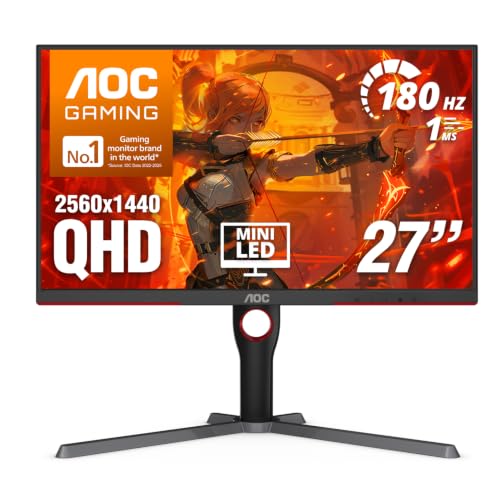
The AOC Q27G3XMN stands out as a strong all-round gaming monitor. Its listing combines Mini LED backlighting, a 180Hz refresh rate, and a QHD-class wide resolution. The monitor also lists HDR1000, which points to a bright HDR presentation when the game or movie supports it. Its 0.3ms response claim targets players who want quick on-screen motion.
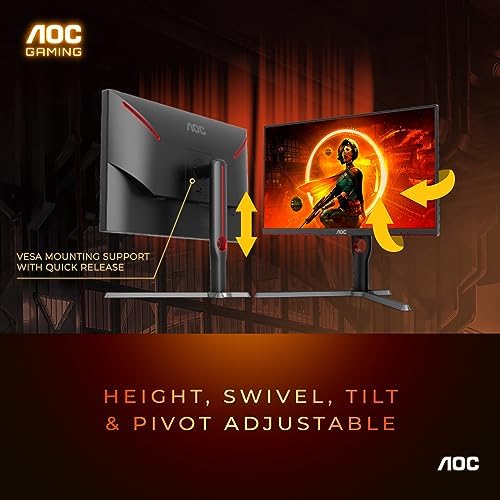
I also like the practical design. The height-adjustable stand helps you set a better viewing position, while VESA support gives you another mounting option. DisplayPort, HDMI, USB 3.2, and audio out make it more useful for a mixed desk. Before buying, check the current listing carefully because the product title shows both 3440×1440 and other specification terms that may need confirmation for the exact configuration.
Pros:
- Mini LED backlight aims for stronger contrast than a basic edge-lit screen
- 180Hz refresh rate supports smooth PC gaming
- HDR1000 listing targets bright highlights in HDR content
- Height-adjustable stand improves desk comfort
- USB 3.2 adds useful connectivity for compatible devices
- DisplayPort and HDMI support common gaming setups
- VESA mounting gives flexible placement options
Cons:
- The wide resolution may not suit every desk or game setup
- HDR performance can vary by game, settings, and backlight control
- Some buyers may prefer a faster 240Hz or 320Hz panel for esports
What Amazon Buyers Are Saying
Buyer feedback for this type of AOC gaming display often focuses on the bright picture, strong contrast, smooth motion, and useful stand. These are the key areas I would inspect in current Amazon reviews before ordering. Some buyers may also discuss backlight behavior, menu settings, dead pixels, or differences between SDR and HDR use. Those points can vary from one unit to another, so I would read the newest reviews rather than rely only on the product headline.
My Recommendation
I recommend the AOC Q27G3XMN for buyers who want a flexible Mini LED screen for games, films, and daily work. The 180Hz speed is already very smooth, and the stand and port selection add real value. I would confirm the exact resolution and input limits on the live listing before checkout. It is a good choice for mixed use, but competitive players may want a faster model.
| Category | Rating |
|---|---|
| HDR and Contrast Potential | 4.5/5 |
| Gaming Speed | 4.3/5 |
| Ergonomics and Ports | 4.4/5 |
| Everyday Versatility | 4.4/5 |
| Overall Rating | 4.4/5 |
KTC M27T6S 27-Inch 210Hz Mini LED Monitor

The KTC M27T6S targets gamers who want high speed without leaving the 27-inch QHD format. Its listing states a 1440p resolution, a 210Hz refresh rate, HDR1000, and a 1ms MPRT mode. That combination should appeal to players who enjoy shooters, racing games, and other titles with fast camera movement. The 157% sRGB claim also suggests a wide color presentation for games and general media.
This monitor has an adjustable stand with tilt, swivel, pivot, and height movement. That range is useful if you switch between landscape play, portrait work, and shared viewing. Adaptive Sync can help reduce visible tearing when the frame rate changes. The listing also includes HDMI, DisplayPort, and VESA support, but I would verify the exact number of ports and their supported refresh rates before purchase.
Pros:
- 210Hz listing offers very smooth motion for compatible gaming hardware
- QHD resolution suits a 27-inch screen well
- HDR1000 claim targets high brightness in supported content
- 1ms MPRT mode suits fast game scenes
- Height, swivel, pivot, and tilt adjustments improve positioning
- Adaptive Sync can help smooth uneven frame rates
- VESA support helps users build a clean multi-monitor desk
Cons:
- Full 210Hz performance depends on the input, cable, and graphics card
- MPRT modes may change brightness or disable other display settings
- Wide-gamut color can look too strong until you tune the picture mode
What Amazon Buyers Are Saying
When buyers assess a monitor like the KTC M27T6S, they usually pay close attention to motion clarity, color, brightness, and stand quality. Current customer comments should also help you judge the on-screen display menu and setup process. Look for repeated comments rather than one isolated review. I would give extra weight to reports that explain which cable, refresh rate, and picture mode the buyer used.
My Recommendation
The KTC M27T6S is a compelling pick for a buyer who wants fast QHD gaming and a flexible stand. It offers more refresh-rate headroom than the AOC 180Hz model while keeping a practical 27-inch size. I would choose it for mixed gaming and work, especially if the current price stays competitive. Confirm HDR behavior and port bandwidth before ordering.
| Category | Rating |
|---|---|
| Gaming Motion | 4.6/5 |
| HDR and Color Range | 4.4/5 |
| Stand Flexibility | 4.7/5 |
| Connectivity | 4.2/5 |
| Overall Rating | 4.5/5 |
AOC Q27G4SLM/WS 320Hz Mini LED Monitor

The AOC Q27G4SLM/WS is the speed-focused choice in this group. It lists a 320Hz refresh rate, QHD 2560×1440 resolution, and a 1ms GtG response time. Those specifications make it a natural fit for competitive players who value quick updates and clear movement. Its white finish also gives a gaming setup a different look from the usual black monitor.
AOC adds HDR1000 to the listing, along with HDMI 2.1 and DisplayPort 1.4. HDMI 2.1 may help console and PC users, but the actual result depends on the source device and supported mode. The height-adjustable stand and VESA mount are useful for long sessions. This monitor also includes an earphone output, so it can fit a simple desk setup without requiring a separate audio connection.
Pros:
- 320Hz refresh rate is the highest listed speed in this comparison
- QHD resolution gives games more detail than 1080p
- 1ms GtG claim targets responsive competitive play
- HDMI 2.1 supports modern gaming devices in compatible modes
- Height-adjustable stand helps create a better eye-level position
- White design suits bright or clean desk themes
- VESA mount allows arm or wall mounting
Cons:
- You need a powerful graphics card to benefit from 320Hz at QHD
- HDR quality depends on the game, source, and local dimming behavior
- The extra speed may have little value for casual players
What Amazon Buyers Are Saying
For this model, buyers are likely to focus on the high refresh rate, response feel, image sharpness, and white housing. Reviews can also reveal how easy it is to reach the advertised refresh rate and whether the stand feels stable on a busy desk. I recommend checking recent comments for input compatibility and firmware or menu behavior. As with any gaming monitor, individual experiences may differ with the user’s computer and cable.
My Recommendation
I would choose the AOC Q27G4SLM/WS for serious competitive gaming, provided your system can drive high frame rates at 1440p. The 320Hz specification gives it a clear speed advantage. It is less compelling if you mostly watch videos, browse the web, or play slow single-player games. For esports, however, it is the most purpose-built option here.
| Category | Rating |
|---|---|
| Competitive Gaming Speed | 4.9/5 |
| Resolution and Detail | 4.5/5 |
| HDR Potential | 4.3/5 |
| Desk Flexibility | 4.3/5 |
| Overall Rating | 4.6/5 |
KOORUI 27-Inch QHD Mini LED Gaming Monitor

The KOORUI 27-inch Mini LED monitor aims to balance gaming and content work. It lists QHD 1440p resolution, a 200Hz refresh rate, a 1ms response claim, and HDR1000. The product page also lists 97% DCI-P3 coverage, which may help users who want a richer color range for games, photos, and video. It uses an IPS panel according to the product title.
This model includes Adaptive Sync, PiP, and PBP. Those features can help when you connect more than one source or want to view two inputs at once. The stand supports swivel, pivot, and height adjustment, while HDMI, DisplayPort, and VESA support add setup options. I would still calibrate the display for your work because wide color does not automatically mean accurate color.
Pros:
- 200Hz refresh rate gives smooth gaming performance
- QHD resolution works well for a 27-inch productivity and gaming screen
- 97% DCI-P3 claim suits wide-color entertainment and creative use
- PiP and PBP support can help with multi-source workflows
- Height, swivel, and pivot adjustments improve ergonomic setup
- Adaptive Sync helps limit tearing with changing frame rates
- VESA support makes monitor-arm installation possible
Cons:
- Wide color may need calibration for color-critical projects
- PiP and PBP usefulness depends on the available inputs and settings
- Buyers should confirm the current panel and port details on the live page
What Amazon Buyers Are Saying
Common buying concerns for this kind of KOORUI display include color richness, motion smoothness, HDR impact, and stand stability. Amazon reviews may also show whether users find the menu easy to control and whether the monitor works well with their graphics card. I would look for consistent feedback about the actual 200Hz setup and any glow or backlight concerns. A single report should not decide your purchase.
My Recommendation
The KOORUI is a good fit for users who want a Mini LED gaming monitor that can also handle multi-window work. PiP and PBP give it an advantage for a two-source desk, while the 200Hz rate remains fast for most players. I would not buy it as a professional color-reference monitor without calibration, but it offers strong feature value for gaming and general creative work.
| Category | Rating |
|---|---|
| Gaming Performance | 4.5/5 |
| Color Features | 4.4/5 |
| Multi-Source Tools | 4.5/5 |
| Ergonomic Design | 4.6/5 |
| Overall Rating | 4.5/5 |
How to Choose Best Mini LED Monitor
Choosing the Best Mini LED Monitor means looking beyond the word “Mini LED.” A good match depends on your games, computer, room, desk, and budget. Mini LED uses many small light zones behind the LCD panel. These zones can dim parts of the screen and brighten other parts. This can improve contrast, but the result still depends on zone control, panel quality, HDR support, and software settings.
1. Match the Resolution and Refresh Rate to Your PC
For a 27-inch screen, 2560×1440 is a useful middle ground. It looks sharper than 1080p and places less load on your graphics card than 4K. It also works well with 180Hz, 200Hz, 210Hz, or 320Hz gaming modes.
Do not pay for a very high refresh rate if your computer cannot produce enough frames. A 320Hz monitor can feel very smooth in a competitive game, but you need a fast graphics card and the right connection. For casual play, 165Hz to 200Hz already feels quick. Check whether DisplayPort or HDMI supports the advertised resolution and refresh rate.
2. Examine HDR, Dimming, and Color Claims
HDR1000 on a product page is useful information, but it does not tell the whole story. Ask whether the monitor uses local dimming, how many zones it has, and how it handles small bright objects on a dark screen. Mini LED can create bright highlights and dark scenes, yet some displays may show a halo around bright text or objects. This effect is often called blooming.
Color claims also need context. A wide-gamut monitor may show more vivid colors, but it may need an sRGB mode or calibration for accurate work. If you edit photos or video, look for reliable color controls and a colorimeter-friendly workflow. If you mainly play games, watch films, and browse, vivid color may matter more than strict accuracy.
3. Check Ergonomics, Ports, and Real-World Value
A monitor should fit your body and your desk. Height adjustment matters because the top of the screen should sit near eye level. Swivel and pivot help with shared desks, portrait documents, and multi-monitor setups. VESA support gives you the option to use an arm later.
Study the ports before you buy. DisplayPort often serves as the main PC connection, while HDMI may connect a console or second computer. USB ports can reduce desk clutter, but check whether they carry data or only power. Also check audio output, stand depth, warranty terms, return rules, and the current price. The Best Mini LED Monitor is not always the one with the biggest specification number. It is the one that gives you useful performance without paying for features you will not use.
Final Verdict: Which Should You Buy?
For most users, I would choose the KTC M27T6S because it balances QHD detail, 210Hz speed, HDR support, and a flexible stand. Competitive players should choose the AOC Q27G4SLM/WS for its listed 320Hz refresh rate.
Each Best Mini LED Monitor here offers a different strength. Compare the live specifications, connection needs, and price before you order for the best 2026 value.
FAQs Of Best Mini LED Monitor
What is the best Mini LED monitor for gaming?
The KTC M27T6S is the best balanced option in this comparison. Competitive players may prefer the AOC Q27G4SLM/WS because it lists a 320Hz refresh rate.
Is Mini LED better than a standard IPS monitor?
Mini LED can provide brighter highlights and deeper contrast because it uses many dimming zones. A standard IPS monitor may still offer better value or simpler picture behavior.
Is 1440p good for a 27-inch gaming monitor?
Yes. 1440p gives a sharp image at 27 inches and usually needs less graphics power than 4K. It pairs well with high refresh rates.
Does HDR1000 guarantee excellent HDR picture quality?
No. HDR quality also depends on local dimming, contrast control, color tuning, content, and source hardware. Check detailed reviews and settings before buying.
Do I need HDMI 2.1 for a Mini LED monitor?
Not always. HDMI 2.1 helps with some modern consoles and high-bandwidth modes, while DisplayPort may be the main choice for high-refresh PC gaming.