Best NVMe SSD: Fast Storage Buying Guide
The best NVMe SSD for most users is the Samsung 990 PRO, thanks to its speed, value, and proven design.
A slow drive can make a fast computer feel old. Apps take longer to open, game loads drag on, and large files become a daily chore. NVMe SSDs solve much of that pain with fast PCIe connections and low access times. I compared five strong options for gaming PCs, workstations, laptops, and everyday upgrades. My picks include affordable PCIe 4.0 drives, a huge 4TB model, and a cutting-edge PCIe 5.0 SSD. See the differences between my top picks at a glance.
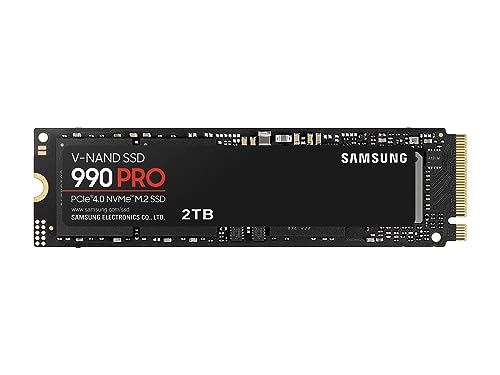
Samsung 990 PRO 2TB

The Samsung 990 PRO 2TB is the strongest all-around pick in this group. It uses a PCIe 4.0 x4 connection and an M.2 2280 design, so it fits many modern desktop boards and compatible laptops. Samsung lists read speeds of up to 7,450 MB/s, which gives it plenty of room for games, apps, and large projects. The 2TB size also feels much more useful than a small boot drive.
I like this SSD because it balances speed, capacity, and maturity. It suits a gaming PC, photo workstation, or home computer that needs a clear upgrade from a SATA SSD. It can run warm during long transfers, so a motherboard heatsink or a suitable M.2 cooler is a smart choice. Check your board manual before buying, since some systems share M.2 and expansion lanes.
Pros:
- Very fast PCIe 4.0 performance
- Useful 2TB capacity for games and apps
- Strong fit for gaming and creative work
- Compact M.2 2280 form factor
- Well-known Samsung SSD management tools
- Good balance of speed and long-term value
Cons:
- Needs a compatible M.2 slot
- Can produce heat during heavy workloads
- Costs more than entry-level PCIe 4.0 drives
What Amazon Buyers Are Saying
Amazon review themes for this model commonly focus on quick system starts, fast game loads, and easy installation. Buyers also tend to like the 2TB capacity because it reduces the need for a second drive. As with most high-speed NVMe products, some comments mention heat during long writes or the need to update firmware. Actual results depend on the computer, cooling, operating system, and workload.
My Recommendation
I recommend the Samsung 990 PRO 2TB to most buyers who want a premium PCIe 4.0 drive without moving to PCIe 5.0. It offers enough speed for nearly every home PC task, while 2TB gives you room to grow. It is worth buying when the price is competitive and your computer supports PCIe 4.0.
| Category | Rating |
|---|---|
| Speed | 5/5 |
| Capacity | 4.5/5 |
| Features | 4.5/5 |
| Value | 4.5/5 |
| Overall Rating | 4.7/5 |
Samsung 9100 PRO 2TB

The Samsung 9100 PRO 2TB targets users who want the latest high-end storage speed. It uses PCIe 5.0 x4 and has an M.2 2280 layout. Samsung lists sequential read performance of up to 14,700 MB/s, which is about twice the headline read speed of many premium PCIe 4.0 drives. That makes it appealing for heavy file work, AI tasks, advanced content creation, and top-tier gaming systems.
This drive makes the most sense in a new computer built around a PCIe 5.0 platform. It can work in some older slots, but the system may limit its speed. PCIe 5.0 drives also need careful cooling, especially during large transfers. I would pair it with a good motherboard heatsink and confirm that the board has the right slot and firmware support.
Pros:
- Extremely high advertised sequential read speed
- Modern PCIe 5.0 x4 interface
- 2TB capacity suits demanding projects
- Strong choice for new high-end workstations
- Useful for large file transfers and data-heavy tasks
- Premium option for users who want maximum bandwidth
Cons:
- Requires a PCIe 5.0-ready platform for full speed
- Needs strong cooling in demanding workloads
- Higher cost than most PCIe 4.0 alternatives
What Amazon Buyers Are Saying
Buyer interest in this drive centers on its new PCIe 5.0 design and very high listed speed. Users who build modern systems often value the large bandwidth and premium feel. A common practical concern with this class of SSD is heat, since maximum performance can depend on proper cooling. Buyers should also remember that everyday boot and game-load gains may not match the large sequential speed numbers.
My Recommendation
The Samsung 9100 PRO 2TB is a specialist choice, not the best value for every PC. I recommend it for a new PCIe 5.0 workstation, AI computer, or enthusiast build where storage bandwidth matters. For a PCIe 4.0 system, the 990 PRO may offer a better balance.
| Category | Rating |
|---|---|
| Speed | 5/5 |
| Capacity | 4.5/5 |
| Platform Fit | 4/5 |
| Value | 3.5/5 |
| Overall Rating | 4.3/5 |
Kingston NV3 1TB

The Kingston NV3 1TB is the budget-friendly pick in this review. It uses PCIe 4.0 x4 and supports the common M.2 2280 format. Kingston lists speeds of up to 6,000 MB/s, so it is far quicker on paper than a traditional SATA SSD. The 1TB capacity works well for a Windows drive, school computer, office PC, or modest gaming library.
This SSD is a practical way to add fast storage without paying for a premium model. It is also a good match for a second drive in a desktop. Still, buyers should check the exact system requirements and keep realistic expectations for long, sustained writes. Budget SSD hardware can vary by production revision, so I would use it for normal consumer work rather than a critical, write-heavy workstation.
Pros:
- Affordable path to PCIe 4.0 storage
- Up to 6,000 MB/s advertised read speed
- Compact M.2 2280 design
- 1TB offers useful everyday capacity
- Good fit for office PCs and budget gaming builds
- Simple upgrade from a hard disk drive
Cons:
- 1TB fills faster than a 2TB drive
- Not aimed at the heaviest sustained workloads
- May offer fewer premium features than flagship SSDs
What Amazon Buyers Are Saying
Amazon buyers commonly look at the NV3 because of its low price and simple installation. Review themes often include faster starts and better general response after moving from a hard drive. Some buyers discuss capacity limits when installing many large games. As always, check the current listing, warranty terms, and your computer manual before purchase because product details and customer experiences can change.
My Recommendation
I recommend the Kingston NV3 1TB when price matters most and you need a basic fast NVMe drive. It is not my first pick for a professional workstation, but it can be a sensible upgrade for everyday use. Buy it when you want PCIe 4.0 performance at a lower entry cost.
| Category | Rating |
|---|---|
| Speed | 4/5 |
| Capacity | 3.5/5 |
| Ease of Upgrade | 4.5/5 |
| Value | 4.7/5 |
| Overall Rating | 4.2/5 |
Samsung 990 PRO 4TB

The Samsung 990 PRO 4TB gives you the same premium PCIe 4.0 family speed as the 2TB version, but with twice the storage. Samsung lists sequential reads of up to 7,450 MB/s. Four terabytes can hold a large game collection, high-resolution media files, design projects, and many applications without constant cleanup. It uses the standard M.2 2280 form factor.
This model makes sense when capacity matters as much as speed. A single large SSD can simplify a desktop build and reduce the need to manage several smaller drives. It costs more at checkout, so compare the price per terabyte instead of only the total price. Like other fast NVMe drives, it benefits from good airflow and a suitable M.2 heatsink during long workloads.
Pros:
- Large 4TB capacity
- High-end PCIe 4.0 speed
- Excellent for large game libraries
- Useful for video, photo, and design files
- Reduces the need for several storage drives
- Premium performance in a compact form
Cons:
- Higher upfront purchase cost
- May be excessive for simple office use
- Requires an available compatible M.2 slot
What Amazon Buyers Are Saying
Customers who choose this capacity often value the space first. Common review themes include fewer storage warnings, room for large games, and fast file access. Some buyers note that the 4TB price needs careful comparison because promotions can change the value quickly. Users also mention the importance of checking drive health and firmware through the maker’s software.
My Recommendation
The Samsung 990 PRO 4TB is my top choice for buyers who need a lot of fast storage. It is especially useful for gaming, video work, and large software libraries. If you only need a boot drive, choose a smaller model and save money. If you dislike moving files between drives, this version is worth the premium.
| Category | Rating |
|---|---|
| Speed | 5/5 |
| Capacity | 5/5 |
| Workload Fit | 4.8/5 |
| Value | 4.3/5 |
| Overall Rating | 4.7/5 |
SanDisk Optimus 5100 1TB

The SanDisk Optimus 5100 1TB is a fast PCIe 4.0 M.2 SSD for users who want strong headline performance in a compact drive. The listing gives read speeds of up to 7,100 MB/s and write speeds of up to 6,700 MB/s. That makes it a good fit for a modern desktop, gaming PC, or general-purpose workstation. Its 1TB capacity works best for a system drive and a focused set of applications.
I see this model as a middle path between budget storage and flagship capacity. It offers high listed transfer speeds, but buyers should not judge an SSD by sequential numbers alone. Small file response, cooling, operating system settings, and the rest of the computer also affect daily use. Confirm M.2 compatibility and use a heatsink if your board supports one.
Pros:
- Fast advertised PCIe 4.0 read speed
- High listed write speed
- Compact M.2 2280 format
- Good choice for modern desktop upgrades
- Suitable for gaming and everyday creative work
- Balanced 1TB starting capacity
Cons:
- 1TB may feel small for many large games
- Full performance depends on system support and cooling
- Long-term value depends on the current sale price
What Amazon Buyers Are Saying
Reviewers who consider this drive tend to focus on its listed speed and the trusted storage brand behind it. Buyers commonly want quick application starts and a simple upgrade path. Potential concerns for any new or less familiar product include checking current warranty information and confirming software support. Read the latest buyer feedback before ordering, especially if you plan heavy daily writes.
My Recommendation
I recommend the SanDisk Optimus 5100 1TB for a modern PC that needs fast general storage but not four terabytes of space. It is a good option when its price sits below premium flagship drives. I would choose it for gaming, office work, and normal content creation after checking system compatibility.
| Category | Rating |
|---|---|
| Speed | 4.7/5 |
| Capacity | 3.8/5 |
| Everyday Use | 4.5/5 |
| Value | 4.2/5 |
| Overall Rating | 4.3/5 |
How to Choose the Best NVMe SSD
Choosing the Best NVMe SSD depends on more than the biggest speed number. Start with your computer, then match the drive to your work. A gaming PC has different needs from a video workstation. Your budget, storage size, cooling, and upgrade path all matter. These checks can help you buy with confidence.
1. Match the PCIe Generation to Your Computer
First, check the M.2 slot on your motherboard or laptop. PCIe 4.0 SSDs need a compatible PCIe connection to reach their listed speed. PCIe 5.0 drives need a newer platform for full performance. A newer drive may work in an older slot, but the system can limit its speed.
Also check the physical length. Most drives in this review use the M.2 2280 size. The number means about 22 millimeters wide and 80 millimeters long. Many desktop boards support this size, but thin laptops can use a different length or have a fixed drive. Your owner’s manual is the safest source.
2. Choose Capacity for Your Real Workload
Capacity affects comfort. A 1TB drive can suit a home PC, office system, or focused gaming build. A 2TB drive gives more space for modern games, photos, and apps. A 4TB model makes sense if you store video, raw photos, large projects, or many games.
Do not fill an SSD to the last few gigabytes. Leave free space for updates and normal drive management. If you need a large media archive, consider a second SSD or a hard drive for files you rarely use. The best NVMe SSD is not helpful if it cannot hold your daily work.
3. Compare Cooling, Endurance, and Total Value
Fast NVMe drives can create heat during long file transfers. A motherboard heatsink can help, but placement and airflow still matter. Check whether the drive sits under a graphics card or in a tight laptop bay. If the system runs hot, the drive may slow itself to protect the hardware.
Look at the warranty, rated endurance, software tools, and current price. Sequential read speed matters for large files, but normal use also depends on random access and system response. A PCIe 5.0 drive can look impressive, yet a good PCIe 4.0 model may feel just as fast for games. Compare price per terabyte and buy the speed you can use.
Final Verdict: Which Should You Buy?
For most people, the Samsung 990 PRO 2TB is the best NVMe SSD here. Choose the 4TB version for large libraries, Kingston NV3 for a budget build, and Samsung 9100 PRO for a PCIe 5.0 workstation.
The right Best NVMe SSD should match your slot, workload, capacity needs, and cooling. Check compatibility first, then choose the model that gives useful speed without paying for power you cannot use.
FAQs Of Best NVMe SSD
What is the best NVMe SSD for gaming?
The Samsung 990 PRO 2TB is an excellent gaming choice. It offers high PCIe 4.0 speed and enough room for many games.
Is a PCIe 5.0 SSD better than a PCIe 4.0 SSD?
PCIe 5.0 offers more bandwidth, but your computer must support it. For many games and daily tasks, a premium PCIe 4.0 drive offers better value.
Is 1TB enough for an NVMe SSD?
One terabyte is enough for Windows, apps, and a moderate game collection. Choose 2TB or 4TB if you store many large games or media files.
Do NVMe SSDs need a heatsink?
A heatsink is not always required, but it can help during long transfers. Check your motherboard and laptop design before adding one.
Will an NVMe SSD work in any M.2 slot?
No. The slot must support NVMe and the correct PCIe connection. Check the computer manual before installation.