Best Smart Thermostat: Smart Picks For Every Home
Finding the best smart thermostat can lower energy waste, improve comfort, and simplify daily temperature control.
Coming home to a cold house or finding the air conditioner running all day is frustrating. A smart thermostat helps solve that problem by letting you set schedules, adjust temperature from your phone, and connect heating or cooling with voice assistants. I compared five popular models for 2026, focusing on setup, app control, smart features, comfort, energy tools, and value. I also looked closely at wiring needs because compatibility matters more than flashy features. Whether you want a simple budget upgrade or a complete home comfort system, this guide can help you choose with confidence.
See the differences between my top picks at a glance.
Google Nest Thermostat Snow

The Google Nest Thermostat is a strong choice for people who want smart control without a complex learning curve. Its simple shape and clean display look good in most rooms. You can change the temperature from the Google Home app or use compatible voice commands. The thermostat also supports schedules, so your home does not need to heat or cool at full comfort settings all day.
I like this model most for its balance of price and everyday usefulness. The app can help you manage settings when you are away, while its scheduling tools support more careful energy use. The Snow finish feels bright and modern, though the best color depends on your wall and room style. Before buying, check the official compatibility information and your system wiring, especially if your HVAC setup is complex.
Pros:
- Clean design with a bright Snow finish
- Simple control through the Google Home app
- Supports scheduling for daily routines
- Works with compatible Google Assistant voice control
- Useful remote access when you are away
- Good fit for first-time smart thermostat buyers
Cons:
- Requires careful HVAC compatibility checking
- Some installations may need a compatible power solution
- Google Home is the main smart-home platform
What Amazon Buyers Are Saying
Amazon buyers commonly praise this thermostat for its modern look, clear controls, and easy app-based adjustments. Many users also like the ability to change settings without walking to the wall. The most common concerns involve installation, wiring, and system compatibility. Some buyers find setup quick, while others need more time or professional help when their existing wiring does not match the installation guide.
My Recommendation
I recommend the Google Nest Thermostat Snow for apartments, smaller homes, and users already invested in Google Home. It is not the most advanced model here, but it covers the features most households use each day. Buy it when you want a clean interface and simple scheduling at a sensible price.
Google Nest Thermostat Charcoal
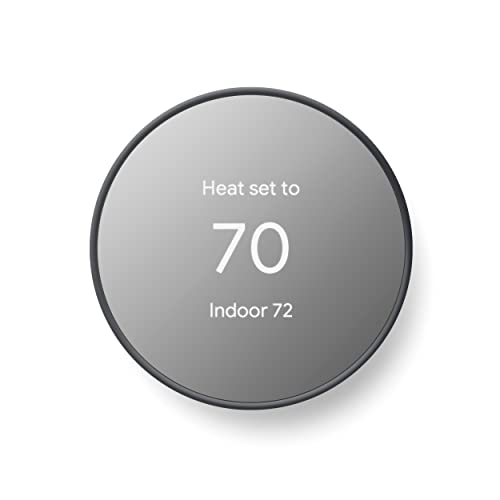
The Google Nest Thermostat Charcoal offers the same core thermostat experience as the Snow version, but with a darker finish. Its Charcoal color can blend well with gray walls, dark trim, and modern furniture. You can manage temperature settings from the thermostat, the Google Home app, or supported voice controls. It also gives you scheduling tools that can reduce the need for constant manual changes.
This version makes sense when appearance matters as much as function. The display remains easy to read in normal indoor light, and the controls feel less intimidating than those on many high-end units. I would choose it for a visible hallway or living room where a dark finish looks more natural. As with the Snow model, confirm system support before ordering and do not assume every HVAC setup uses the same wiring.
Pros:
- Stylish Charcoal finish for modern interiors
- Easy temperature changes through the Google Home app
- Supports routine-based temperature schedules
- Remote control can help manage an empty home
- Works well for users who prefer a simple interface
- Useful entry point into Google smart-home control
Cons:
- Not the best choice for every HVAC configuration
- Advanced users may want more detailed controls
- Some features depend on Google Home integration
What Amazon Buyers Are Saying
Customer reviews often highlight the attractive dark finish and the convenience of app control. Buyers tend to appreciate the clean appearance and the ability to set a schedule after installation. As with most smart thermostats, the less positive comments often focus on wiring questions, setup steps, or homes with unusual heating systems. Review patterns suggest that checking compatibility before purchase has a major effect on the installation experience.
My Recommendation
The Charcoal model is worth buying when you want the Nest experience but prefer a darker color. It performs much like the Snow model, so the choice is mainly about room style and current price. I recommend it for Google Home users who want a neat, low-fuss upgrade.
ecobee Smart Thermostat Essential

The ecobee Smart Thermostat Essential is designed for shoppers who want broad smart-home support without moving straight to a premium model. It works with the ecobee app and supports Alexa, Siri, and Google Assistant connections. Its programmable features help you set a regular comfort plan for the week. Energy Star certification also makes it appealing to buyers who want a more efficient home comfort routine.
This model stands out because it gives users more platform choice than a Google-only thermostat. That flexibility matters in homes with mixed devices or family members who use different voice assistants. The design is practical, and the controls are aimed at normal daily use rather than technical HVAC management. I still suggest checking the wiring guide before purchase, since compatibility can vary with system type, power setup, and accessories.
Pros:
- Supports Alexa, Siri, and Google Assistant
- Energy Star certified
- Programmable schedules support regular routines
- Useful ecobee app for remote adjustments
- Good value for multi-platform smart homes
- Suitable for buyers who want an affordable ecobee model
Cons:
- Advanced sensor features may not match premium ecobee models
- Setup can take time for users new to smart thermostats
- Compatibility should be checked before installation
What Amazon Buyers Are Saying
Amazon review themes commonly include praise for the app, voice assistant support, and the ability to control a home from a phone. Buyers also tend to like the balance between smart functions and price. Some complaints relate to setup, Wi-Fi connection, or uncertainty about wiring. Experiences can differ based on the HVAC system, router, and the buyer’s comfort with installation steps.
My Recommendation
I recommend the ecobee Smart Thermostat Essential for households that use Alexa, Siri, and Google devices together. It offers a flexible feature set without the higher cost of the most advanced model. If you want broad voice support and a practical energy-saving thermostat, this is one of the strongest values in this comparison.
Sensi Smart Thermostat ST55

The Sensi Smart Thermostat ST55 is a practical option for people who want a familiar wall thermostat with modern Wi-Fi control. Its design looks closer to a traditional programmable thermostat than a decorative smart-home device. You can use the Sensi app to adjust temperature, create schedules, and manage settings away from home. It also supports Alexa, which adds convenient voice control for compatible households.
I see the ST55 as a good fit for DIY-minded homeowners who want clear buttons and a simple installation path. The display and layout feel familiar, which can help older family members learn the controls quickly. It does not focus on a luxury screen or advanced comfort sensors, but it covers the core functions well. Check the wiring requirements carefully, and turn off HVAC power before working on any thermostat connections.
Pros:
- Traditional design feels familiar to many users
- Wi-Fi app enables remote temperature control
- Supports Alexa voice commands
- Programmable schedules can reduce manual changes
- Good option for DIY-focused buyers
- Energy Star certified
Cons:
- Style is less decorative than some modern models
- Smart-home support is narrower than ecobee support
- Some homes may still need wiring or compatibility help
What Amazon Buyers Are Saying
Amazon buyers often like the familiar controls, clear display, and easy access through the Sensi app. Many reviews also mention the appeal of a DIY installation for compatible systems. Common concerns include Wi-Fi setup, wiring questions, and occasional difficulty during first-time configuration. Buyers with standard systems tend to report a smoother experience than those with unusual equipment or complicated HVAC zones.
My Recommendation
The Sensi ST55 is worth considering if you prefer buttons and a traditional thermostat layout. I recommend it for homeowners who want app access but do not need a highly visual smart display. It is a sensible, practical choice, especially when its price is lower than more feature-heavy competitors.
ecobee Smart Thermostat Premium

The ecobee Smart Thermostat Premium is the most advanced option in this group. It combines Wi-Fi control, built-in voice assistant support, smart sensors, and an air quality monitor. The included sensor can help the system consider comfort in another room, rather than relying only on the thermostat location. It also supports Alexa, Siri, and Google Home, which makes it flexible for a connected household.
This model suits larger homes, families with uneven room temperatures, and buyers who want more than basic scheduling. The air quality feature adds useful information about indoor conditions, while sensor support can help address hot and cold spots. The trade-off is a higher price and a longer setup process than a simple thermostat. I would also take time to understand the app settings, sensor placement, and HVAC compatibility before installation.
Pros:
- Includes advanced smart sensor support
- Built-in voice assistant features
- Works with Alexa, Siri, and Google Home
- Air quality monitoring adds useful home information
- Helpful for homes with uneven room temperatures
- Strong remote control and scheduling tools
- Premium feature set for connected households
Cons:
- Costs more than basic smart thermostats
- More features can mean a longer learning curve
- Sensor placement and setup require extra attention
What Amazon Buyers Are Saying
Amazon reviews commonly praise the premium build, broad smart-home support, sensor system, and air quality information. Buyers often value the extra control in homes where one room feels warmer or cooler than another. The most common concerns involve price, installation, and learning the many available settings. Some customers also report that results depend on sensor placement and the specific HVAC system in the home.
My Recommendation
I recommend the ecobee Smart Thermostat Premium when comfort control matters more than the lowest purchase price. It is the best fit for larger homes, mixed smart-home platforms, and households that want air quality and room sensor features. If you only need basic scheduling, the Essential or Nest models may provide better value.
How to Choose Best Smart Thermostat
Choosing the Best Smart Thermostat starts with your HVAC system, not the screen design. A good model must work with your heating and cooling equipment. It should also match your phone, voice assistant, home size, and comfort needs. Use the points below before you place an order.
1. Check HVAC Compatibility and Wiring
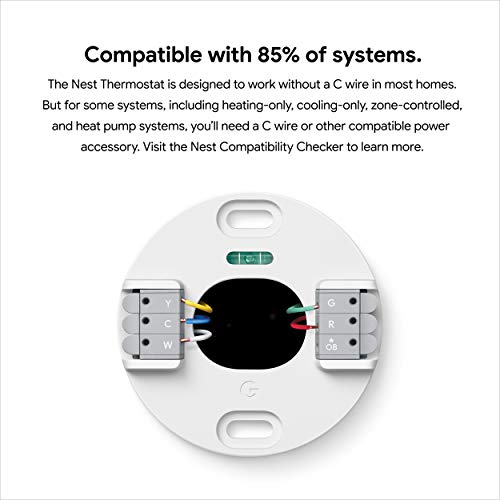
First, identify your system type. Common systems include central air, furnace heat, heat pumps, boilers, and multi-stage equipment. Some homes use a C-wire for steady thermostat power, while others use a different power setup. Do not guess from wire colors alone. Compare your current wiring with the manufacturer’s compatibility checker, or ask a qualified installer for help.
Also check whether you have separate heating and cooling zones. A thermostat made for one simple system may not control a more complex setup. If you rent, ask the property owner before replacing the wall unit. Safe installation matters more than saving a small service fee.
2. Match Smart Features to Your Daily Routine
Think about how you use your home. If you want basic remote control and a weekly schedule, the Google Nest Thermostat or Sensi ST55 may be enough. If your home uses several voice platforms, the ecobee Essential offers wider support. If one bedroom stays warm while the hallway feels cold, the ecobee Premium and its sensor features deserve closer attention.
Look for the features you will really use. App access helps when you travel. Scheduling helps when your routine stays fairly regular. Geofencing can adjust the home when you leave or return, but its value depends on phone settings and household habits. A feature list looks impressive, but simple controls often provide the best daily experience.
3. Compare Comfort, App Quality, and Long-Term Value
A thermostat is a long-term home device, so judge more than the purchase price. Check how clear the display looks, how easy the app feels, and how well the thermostat fits your wall. A model with strong smart-home support can offer better value if you already use the same platform. A lower-cost model can be smarter financially if you only need scheduling and remote control.
Energy savings also depend on your settings, insulation, weather, and HVAC condition. No thermostat can promise the same savings in every home. Choose a model that makes efficient habits easy. Review the warranty, installation help, replacement sensor cost, and software support before making your final choice.
Final Verdict: Which Should You Buy?
The ecobee Smart Thermostat Essential is my best overall pick for 2026 because it combines broad voice support, scheduling, energy features, and fair value. Choose the ecobee Premium for room sensors and air quality, or the Sensi ST55 for simple DIY control.
The Best Smart Thermostat is the one that fits your HVAC system and daily habits. Check compatibility first, then choose the features that make comfort control easier.
FAQs Of Best Smart Thermostat
What is the best smart thermostat for most homes?
The ecobee Smart Thermostat Essential is the best overall choice for many homes because it supports several voice platforms and offers useful scheduling at a reasonable level of cost.
Do smart thermostats need a C-wire?
Some smart thermostats need a C-wire or another approved power solution. Always check the model’s compatibility guide and your HVAC wiring before installation.
Which smart thermostat works with Alexa and Google Home?
The ecobee Smart Thermostat Essential and Premium support Alexa and Google Home. The Sensi ST55 supports Alexa, while Google Nest models focus on Google Home features.
Can a smart thermostat lower energy use?
It can help lower energy use by supporting schedules, remote adjustments, and more careful temperature settings. Actual results depend on your home, weather, insulation, and HVAC system.
Is the ecobee Premium worth the extra cost?
It can be worth the extra cost if you need room sensors, air quality information, and broad smart-home support. For basic scheduling, a less expensive model may be enough.