Best WiFi Mesh System: Find Your Perfect Setup
For most homes, the TP-Link Deco XE75 offers the best balance of speed, coverage, features, and value.
Dead zones, dropped calls, and weak signals can make home Wi-Fi feel far harder than it should. A mesh system solves this by using several linked units instead of one router placed in a corner. I tested the key features, coverage claims, ports, wireless standards, setup tools, and value of five strong options. This guide helps you find the Best WiFi Mesh System for a small apartment, busy family home, large house, or fast multi-gig internet plan.
See the differences between my top picks at a glance.
| Mesh System | Wi-Fi Type | Claimed Coverage | Ports | Best For | Link |
|---|---|---|---|---|---|
| TP-Link Deco X55 | Wi-Fi 6 AX3000 | Up to 6,500 sq. ft. | 3 Gigabit ports per unit | Affordable whole-home Wi-Fi | View on Amazon |
| Deco BE63 | Wi-Fi 7 BE10000 | Up to 7,600 sq. ft. | 4 x 2.5G ports per unit | Future-ready wired networks | View on Amazon |
| TP-Link Deco XE75 | Wi-Fi 6E AXE5400 | Up to 7,200 sq. ft. | 3 Gigabit ports per unit | Most homes and 6 GHz use | View on Amazon |
| Deco BE25 | Wi-Fi 7 BE5000 | Up to 6,600 sq. ft. | 2 x 2.5G ports per unit | Lower-cost Wi-Fi 7 | View on Amazon |
| NETGEAR Orbi 770 | Wi-Fi 7 tri-band | Up to 8,000 sq. ft. | Includes 2.5G port | Large homes and many devices | View on Amazon |
TP-Link Deco X55: Best Value Wi-Fi 6 Mesh

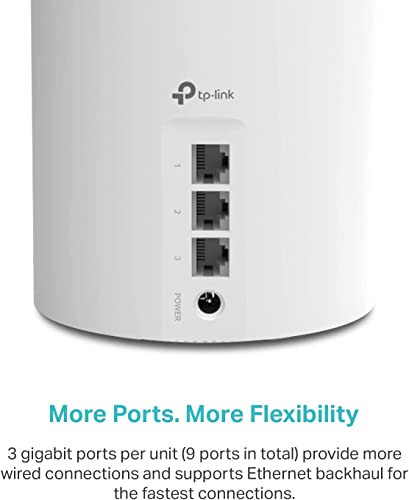
The TP-Link Deco X55 is a sensible choice for homes that need better coverage without paying for the newest wireless standard. This three-pack uses Wi-Fi 6 and lists coverage of up to 6,500 square feet. Each unit has three Gigabit Ethernet ports, so I can connect a desktop, smart TV, game console, or network switch. It also supports Ethernet backhaul when I can run cables between the units.
In daily use, the X55 makes the most sense for typical internet plans and busy homes with phones, laptops, cameras, speakers, and streaming devices. Wi-Fi 6 helps manage many connected devices better than older Wi-Fi 5 systems. The Deco app guides setup and lets me manage the network from a phone. Its value and simple design make it a strong Best WiFi Mesh System for shoppers who do not need multi-gig wired speeds.
Pros:
- Strong coverage for the price
- Three Gigabit ports on each unit
- Supports wired Ethernet backhaul
- Wi-Fi 6 handles busy homes well
- Simple app-based setup
- Works as a router or access point system
Cons:
- No dedicated 6 GHz band
- Gigabit ports limit wired speed to 1 Gbps
- Wireless backhaul can lose speed through thick walls
What Amazon Buyers Are Saying
Common buyer feedback focuses on easy setup, better coverage, and fewer dead zones. Many owners like the small units and the ability to place one near a garage, office, or upstairs room. Buyers also often mention that the app makes basic controls easy to find. As with most mesh systems, some users report mixed results when they place nodes too far apart or keep the old router active by mistake.
My Recommendation
I recommend the Deco X55 for apartments, medium homes, and families with normal broadband service. It gives up newer 6 GHz and Wi-Fi 7 features, but that keeps the cost lower and the setup simple. Buy it when dependable whole-home coverage matters more than future-proof multi-gig networking.
| Category | Rating |
|---|---|
| Coverage and stability | 4.5/5 |
| Ease of setup | 4.5/5 |
| Ports and features | 4/5 |
| Value | 4.7/5 |
| Overall Rating | 4.5/5 |
TP-Link Deco BE63: Best Premium Wi-Fi 7 Mesh

The Deco BE63 is a high-end Wi-Fi 7 mesh system made for homes with fast internet and many modern devices. The three-pack is rated for up to 7,600 square feet and uses a tri-band design. Each unit includes four 2.5G Ethernet ports, which gives it far more wired flexibility than basic Gigabit mesh kits. It also supports wired backhaul for a strong link between nodes.
Wi-Fi 7 features can help compatible devices use wider channels and link more efficiently. Older phones and laptops can still connect, but they will not gain every Wi-Fi 7 benefit. The BE63 also includes Deco app controls, HomeShield features, VPN support, and AI-based roaming tools. I see it as a smart pick for a new home network that may add faster internet, Wi-Fi 7 laptops, gaming systems, or local storage later.
Pros:
- Fast Wi-Fi 7 platform for newer devices
- Four 2.5G ports on each unit
- Tri-band design supports busy networks
- Large claimed coverage area
- Strong option for wired backhaul
- Useful VPN and network management tools
Cons:
- Costs more than Wi-Fi 6 mesh systems
- Older devices cannot use all Wi-Fi 7 features
- Large coverage claims depend on home layout and placement
What Amazon Buyers Are Saying
Buyer comments commonly praise the quick setup, broad coverage, and plentiful 2.5G ports. Owners with newer phones and laptops tend to value the extra speed headroom. Some buyers also like the clean hardware and the ability to use Ethernet backhaul. The main concerns seen in this product class involve price, firmware changes, and the fact that real speed depends on client devices, walls, distance, and internet service.
My Recommendation
The BE63 is worth considering if I want a premium mesh network with plenty of wired capacity. It is not the best value for a small home with a modest internet plan. For a large home, multi-gig service, or a network built to last for years, its ports and Wi-Fi 7 support make a strong case.
| Category | Rating |
|---|---|
| Wi-Fi performance | 4.8/5 |
| Wired connectivity | 4.9/5 |
| Features | 4.6/5 |
| Value for advanced users | 4.2/5 |
| Overall Rating | 4.6/5 |
TP-Link Deco XE75: Best Wi-Fi 6E Mesh

The TP-Link Deco XE75 is my overall favorite for many homes because it adds the 6 GHz band without moving into the highest Wi-Fi 7 price range. This three-pack uses Wi-Fi 6E and lists coverage of up to 7,200 square feet. The extra 6 GHz band can provide a cleaner path for compatible devices, especially in areas with many nearby wireless networks. Each unit has three Ethernet ports for wired devices and backhaul.
The XE75 is especially useful when I own newer phones, tablets, or laptops that support Wi-Fi 6E. The 6 GHz signal does not pass through walls as well as lower bands, so placement still matters. The Deco app handles setup, device control, guest access, and basic security features. For most buyers, it offers a good mix of range, speed, simple management, and reasonable long-term value.
Pros:
- Useful 6 GHz band for compatible devices
- Large claimed coverage for a three-pack
- Tri-band design helps reduce wireless congestion
- Three Ethernet ports per unit
- Supports wired Ethernet backhaul
- Strong balance of price and advanced features
Cons:
- 6 GHz performance drops faster through walls
- Ports are Gigabit rather than 2.5G
- Older devices gain little from Wi-Fi 6E
What Amazon Buyers Are Saying
Amazon buyers often highlight the improved range and easy app setup. Many users report that the system helps connect rooms that were difficult to reach with a single router. Buyers with 6 GHz devices appreciate the extra band, while other owners see the XE75 mainly as a stable whole-home Wi-Fi system. A few common setup concerns include node placement, modem settings, and slower speeds when a satellite uses a weak wireless link.
My Recommendation
I recommend the XE75 to most medium and large homes that want more than basic Wi-Fi 6. It is a better buy than a premium Wi-Fi 7 kit when my devices do not need 2.5G ports or the newest standard. Its 6 GHz band, good coverage claim, and mature feature set make it my top all-around choice.
| Category | Rating |
|---|---|
| Wireless performance | 4.6/5 |
| Coverage | 4.6/5 |
| Ease of use | 4.6/5 |
| Value | 4.7/5 |
| Overall Rating | 4.6/5 |
TP-Link Deco BE25: Best Affordable Wi-Fi 7 Mesh

The Deco BE25 brings Wi-Fi 7 features to a less expensive dual-band mesh design. The three-pack lists coverage of up to 6,600 square feet and supports up to 5 Gbps of combined wired and wireless capacity according to its product description. Each unit has two 2.5G ports, which gives it a useful advantage over many older Gigabit systems. It also supports wired backhaul for homes with Ethernet cable in the walls.
This system fits buyers who want Wi-Fi 7 but do not need a premium tri-band kit. Its dual-band layout can work well in a home with good node placement or a wired backhaul. Compatible devices may benefit from features such as Multi-Link Operation, while older devices still connect normally. I would place it below the XE75 for mixed-device homes where a dedicated 6 GHz band matters, but it can be a smart value choice for a newer network.
Pros:
- Lower-cost path to Wi-Fi 7
- Two 2.5G ports per unit
- Useful wired backhaul support
- Good claimed coverage for a three-pack
- Supports MLO and AI roaming features
- Simple Deco app management
Cons:
- Dual-band design has less wireless capacity than tri-band models
- Wireless backhaul may slow under heavy load
- Full Wi-Fi 7 benefits need compatible devices
What Amazon Buyers Are Saying
Buyer discussions commonly focus on the low price for a Wi-Fi 7 system, simple installation, and the useful 2.5G ports. Owners who use wired backhaul often have the most favorable experience because cable removes much of the wireless link burden. Some buyers expect every device to become faster after upgrading, but Wi-Fi speed still depends on the client device and internet plan. Placement and firmware setup remain important for stable results.
My Recommendation
The BE25 is worth buying when I want Wi-Fi 7 features and 2.5G ports but want to control the budget. It is best for homes that can use Ethernet backhaul or have moderate wireless traffic. If I need maximum wireless capacity for many devices, I would pay more for a tri-band system.
| Category | Rating |
|---|---|
| Wi-Fi 7 features | 4.4/5 |
| Wired speed options | 4.5/5 |
| Coverage | 4.4/5 |
| Value | 4.6/5 |
| Overall Rating | 4.5/5 |
NETGEAR Orbi 770: Best for Large Homes

The NETGEAR Orbi 770 is a premium tri-band Wi-Fi 7 system for large homes and high device counts. This three-piece kit lists coverage of up to 8,000 square feet and supports up to 11 Gbps of combined wireless capacity. It includes a router and two satellite extenders, plus a 2.5G port for faster wired networking. The tri-band layout gives the mesh more room to move traffic than a basic dual-band system.
Orbi systems appeal to buyers who want broad coverage with a polished setup process. The 770 series can serve busy homes with streaming, gaming, cameras, smart home gear, and work devices running at the same time. Wi-Fi 7 clients can use newer capabilities, while older devices remain supported. I would choose it for a large or tall home where coverage and wireless capacity matter more than the lowest purchase price.
Pros:
- Large claimed coverage area
- Tri-band Wi-Fi 7 design
- High combined speed rating
- 2.5G wired connectivity
- Good fit for many connected devices
- Dedicated satellite layout simplifies expansion planning
Cons:
- Higher price than basic mesh systems
- Some security tools may require a subscription
- Large units need careful placement
What Amazon Buyers Are Saying
Common buyer feedback praises the range, fast setup, and ability to cover larger homes. Users with many devices often like the extra capacity of a tri-band system. Some buyers report strong results after replacing an older router and placing the satellites in open locations. Other comments point to the cost and the need to review optional security services before starting a subscription.
My Recommendation
The Orbi 770 is a strong choice for a large home, a busy household, or a buyer who wants a premium Wi-Fi 7 platform. It may be excessive for a small apartment or a slow internet plan. I consider it worth the price when broad wireless coverage and high device capacity matter more than saving money.
| Category | Rating |
|---|---|
| Large-home coverage | 4.8/5 |
| Wireless capacity | 4.7/5 |
| Setup and control | 4.5/5 |
| Value | 4.1/5 |
| Overall Rating | 4.5/5 |
How to Choose the Best WiFi Mesh System
Choosing the Best WiFi Mesh System starts with the shape of the home, the internet plan, and the devices that will use the network. A large coverage number does not guarantee the same speed in every room. Walls, floors, metal, appliances, and nearby networks all affect wireless signals. I use the points below to match the system to the real needs of a home.
1. Match the Wi-Fi Standard to Your Devices
Wi-Fi 6 remains a strong choice for most homes. It handles many devices well and often costs less than newer systems. Wi-Fi 6E adds a 6 GHz band, which can reduce congestion for compatible phones, tablets, and laptops. Wi-Fi 7 adds newer tools such as wider channels and Multi-Link Operation, but the benefits depend on having Wi-Fi 7 client devices.
Do not buy a Wi-Fi 7 mesh system only because the number looks impressive. If most devices use Wi-Fi 5 or Wi-Fi 6, a well-placed Wi-Fi 6E system may provide better value. I would choose the XE75 for a mixed home, the BE25 for lower-cost Wi-Fi 7, and the BE63 or Orbi 770 for a newer premium network.
2. Check Coverage, Node Placement, and Backhaul
Mesh units need space to communicate. I place the main unit near the modem and put the other units between the main router and weak areas. A satellite should not sit inside the dead zone. It needs a usable signal from the main unit or another node.
Ethernet backhaul can make a major difference. It lets the mesh units use a cable for their link instead of sharing wireless air time with phones and laptops. The X55 and XE75 use Gigabit ports, while the BE63 and BE25 offer 2.5G ports. If the home has network cable in the walls, I would give wired backhaul a high priority.
3. Compare Ports, Security, and Long-Term Value
Count the ports before buying. A smart TV, game console, desktop, camera hub, or network storage device may need a wired connection. A system with only one or two ports can force me to add a switch later. Multi-gig ports also matter when the internet plan or local network runs above 1 Gbps.
Next, check the app and security tools. Look for guest Wi-Fi, device controls, firmware updates, parental controls, and clear privacy settings. Some advanced security services may cost extra after a trial. Finally, compare the total price with the home size and internet speed. A lower-cost system can be the best value when it meets those needs without unused features.
Final Verdict: Which Should You Buy?
The TP-Link Deco XE75 is my top pick for most homes. It offers Wi-Fi 6E, broad claimed coverage, simple controls, and strong value. Choose the Deco X55 for a tighter budget, the BE25 for affordable Wi-Fi 7, the BE63 for premium wired speed, or Orbi 770 for a large busy home.
The Best WiFi Mesh System is the one that fits your home, devices, and internet plan. Place each node well, update the firmware, and use Ethernet backhaul when possible for the most stable results.
FAQs Of Best WiFi Mesh System
What is the Best WiFi Mesh System for most homes?
The TP-Link Deco XE75 is a strong overall choice because it combines Wi-Fi 6E, broad coverage, simple setup, and useful value.
Is Wi-Fi 7 worth it in 2026?
Wi-Fi 7 is worth considering if you own compatible devices, use fast internet, or want a network that can last for several years. Wi-Fi 6 and Wi-Fi 6E still offer excellent value.
How many mesh units do I need?
A two-pack may suit a smaller home. A three-pack usually works better for a larger or multi-floor home, but placement matters more than the number of units.
Does Ethernet backhaul improve mesh Wi-Fi?
Yes. Ethernet backhaul gives mesh units a wired connection and can improve stability, reduce wireless congestion, and preserve more speed for client devices.
Will a mesh system make my internet plan faster?
No. A mesh system cannot increase the speed supplied by your internet provider. It can improve coverage, connection quality, and speed in areas where the old router had a weak signal.