Best Laptops Under $1000: Smart Buying Guide
The best laptops under $1000 balance speed, battery life, screen quality, storage, and long-term value.
Shopping for a laptop can feel hard when every listing uses different terms. You may need a simple school computer, a light work machine, or a larger screen for travel. Yet the wrong choice can bring slow apps, weak storage, or poor battery life. I reviewed the supplied Amazon products with a practical eye. Two are laptops, while the other three are useful laptop accessories. This guide explains where each item fits, what it does well, and where it falls short. It also shows how to pick the right computer for your needs without wasting your budget.
See the differences between my top picks at a glance.
Lenovo 100e Windows 2nd Gen

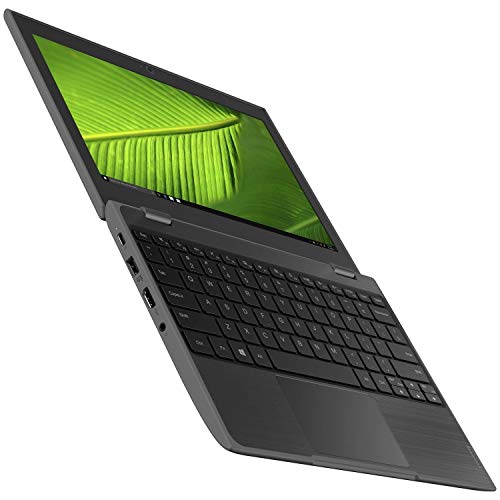
The Lenovo 100e Windows 2nd Gen is a small, simple computer for buyers who value low weight and easy travel. It uses an Intel Celeron N4020 dual-core processor, 4GB of RAM, and 64GB of flash storage. The 11.6-inch display has a 1366 x 768 resolution. This setup suits web browsing, email, word processing, online forms, and light school work.
This is a renewed laptop, so condition can vary by seller and unit. I would treat it as a practical starter computer rather than a fast modern workstation. Windows gives you access to familiar desktop apps, but the modest memory and storage call for careful use. It works best when you keep browser tabs and background apps under control.
Pros:
- Small and easy to carry between home, school, and work
- Windows support for familiar desktop software
- Simple 11.6-inch form factor for younger students
- Useful for web browsing, email, and document work
- Low storage use can encourage simple file management
- Renewed pricing may offer a low-cost way to get a Windows PC
Cons:
- 4GB of RAM limits heavy multitasking
- 64GB of storage leaves little room for large files
- The HD screen is less sharp than a Full HD panel
- Renewed condition may differ from a new laptop
What Amazon Buyers Are Saying
Buyer feedback for renewed computers often focuses on value, startup performance, and physical condition. Many shoppers choose this type of Lenovo for basic tasks and appreciate its compact size. Common concerns with budget refurbished laptops include battery wear, cosmetic marks, missing accessories, or a unit that needs updates before normal use.
I recommend checking the current listing details, seller rating, return terms, and battery expectations before ordering. Customer experiences can vary more with renewed products than with new ones. That does not make this model a poor choice, but it makes the seller and return policy especially important.
My Recommendation
I recommend the Lenovo 100e for a child, student, or home user who needs a basic Windows laptop at a low price. It is not the right pick for video editing, gaming, large spreadsheets, or many open tabs. If you need Windows software and can work within its limits, it remains a sensible budget option.
Lenovo 14-Inch FHD Chromebook

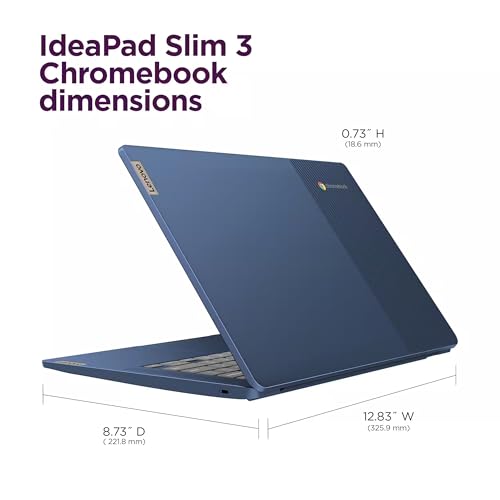
The Lenovo 14-inch Chromebook is the stronger laptop choice in this list for web-first users. It pairs a 14-inch Full HD touchscreen with an eight-core MediaTek Kompanio 520 processor. It also includes 4GB of RAM, 64GB of eMMC storage, Wi-Fi 6, and ChromeOS. The larger screen gives you more room for documents, websites, video calls, and streaming.
ChromeOS keeps the system simple by focusing on browser tools and supported Android apps. It starts with fewer background tasks than many traditional Windows computers, which can help a modest system feel responsive during light work. Still, 4GB of RAM and 64GB of storage set clear limits. Buyers who need full Windows or Mac software should choose a different platform.
Pros:
- Full HD resolution gives text and video a cleaner look
- Touchscreen adds an easy way to scroll and interact
- 14-inch size offers a useful balance of screen space and travel
- ChromeOS is simple for browsing, school work, and streaming
- Wi-Fi 6 can support newer compatible wireless networks
- Eight-core MediaTek processor suits everyday Chromebook tasks
- Light ChromeOS setup can be easier for new computer users
Cons:
- ChromeOS cannot run every Windows desktop program
- 4GB RAM may feel tight with many tabs open
- 64GB eMMC storage is limited for large offline files
- Cloud use works best with a reliable internet connection
What Amazon Buyers Are Saying
Reviews for budget Chromebooks commonly praise the simple setup, clear screen, and ease of use. Buyers often select them for school tasks, browsing, email, video streaming, and casual home use. The most common concerns tend to involve storage size, app limits, and the difference between ChromeOS and Windows.
I suggest reading recent buyer comments for the exact configuration shown on the current listing. Chromebook updates and support periods also matter, so check Google’s current Auto Update policy before buying. That step helps you judge the computer’s useful life, not just its sale price.
My Recommendation
This is my top laptop pick from the supplied products for most light users. The FHD touchscreen and 14-inch size make it more comfortable than the small Lenovo 100e for daily browsing and school work. I would buy it for a student, family member, or remote worker who mainly uses web apps and does not need Windows-only programs.
HIBBO HP Blue-Tip Laptop Charger

The HIBBO charger is not a laptop. It is a replacement power adapter for compatible HP computers. The listing identifies 45W and 65W smart blue-tip charging support. This can help when your original adapter is lost, damaged, or needed in a second room.
Charger compatibility needs more care than a simple brand match. You must compare the required wattage, connector size, voltage, and laptop model. A blue tip alone does not prove that the adapter fits every HP computer. I would use the product compatibility list and compare it with the label on your original charger before placing an order.
Pros:
- Useful replacement for a lost or damaged compatible HP adapter
- Supports common 45W and 65W power needs listed by the seller
- Smart adapter design can help match supported charging needs
- Convenient as a spare charger for home, office, or travel
- Can cost less than buying an original replacement from the laptop maker
- Blue-tip design makes it easy to identify among other adapters
Cons:
- It does not fit every HP laptop
- Buyers must verify voltage, wattage, and plug dimensions
- It adds no performance benefit to the laptop itself
- Third-party charger quality may vary by seller and batch
What Amazon Buyers Are Saying
Reviews for replacement chargers often focus on whether the plug fits, whether the laptop recognizes the adapter, and how well the cable holds up. Buyers usually value a working replacement at a lower cost. Complaints can arise when a customer orders the wrong tip or expects one adapter to support a model outside the stated range.
Because charger safety matters, I would not guess based only on a product photo. Check the output information printed on your old adapter and the requirements in your HP manual. If the laptop reports an unknown adapter or will not charge, stop using it and contact the seller.
My Recommendation
I recommend this HIBBO adapter only after a careful compatibility check. It can be a useful low-cost backup for a supported HP laptop, but it should not be treated as a universal HP charger. For a laptop under $1000, a correct spare charger can extend convenience and reduce travel hassle, but the computer’s original power needs must come first.
MNN 15.6-Inch Portable Monitor

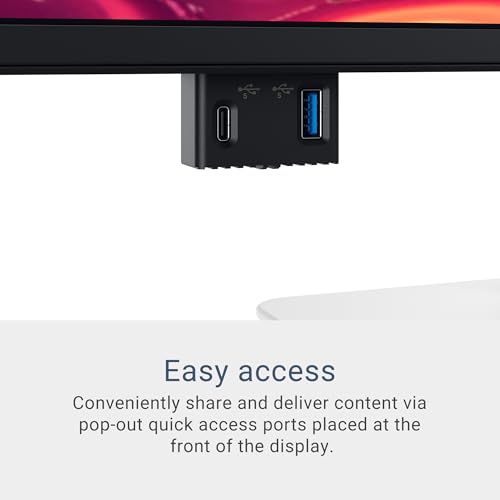
The MNN portable monitor gives a laptop a second 15.6-inch screen. It has a Full HD IPS panel, a 60Hz refresh rate, HDR support, and USB-C and HDMI connectivity listed by the seller. The included smart case can help protect the panel and support it during use.
This accessory can improve work on a small laptop. You can place email, notes, or a video call on one screen and your main task on the other. It can also connect with compatible phones, Macs, PCs, and game consoles. However, USB-C features differ across devices. Some computers support video over USB-C, while others need HDMI or a suitable adapter.
Pros:
- Large 15.6-inch screen adds useful workspace
- Full HD resolution suits documents, media, and general work
- IPS technology can provide broad viewing angles
- USB-C and HDMI give you more connection choices
- Portable design works well for travel and flexible work areas
- Smart case helps protect the monitor between uses
- Can pair with compatible laptops, phones, Macs, and consoles
Cons:
- It needs a compatible host device to display an image
- One-cable USB-C use depends on the device’s ports and power
- Some setups may need a second cable or external power
- A portable monitor adds weight to a travel bag
What Amazon Buyers Are Saying
Portable monitor buyers often like the extra screen space, easy travel size, and quick connection options. Many choose this type of display for remote work, gaming, school tasks, or hotel use. Common issues include confusion about USB-C video support, brightness expectations, cable needs, and power draw from the laptop.
I would read the current connection guide before buying. Check whether your laptop has HDMI, DisplayPort over USB-C, or another supported output. A monitor can be a strong upgrade for one of the best laptops under $1000, but only when the laptop and cable setup support the desired connection.
My Recommendation
The MNN monitor is a useful add-on for buyers who already own a compact laptop. It does not replace a computer, but it can make work far easier by adding a second display. I recommend it for remote workers, students, and travelers who often feel limited by a small laptop screen.
VJYUIJAY 65W USB-C Laptop Charger

The VJYUIJAY charger is a 65W USB-C power adapter aimed at compatible laptops and Chromebooks. The listing names brands such as HP, Lenovo, Dell, Acer, Asus, Samsung, and Google. A USB-C charger can be convenient because many newer computers use the same port for power and other functions.
Brand coverage does not mean universal compatibility. The laptop must support USB-C charging, and its power requirement must fit the adapter. Some USB-C ports handle data only, while others accept power delivery. I would confirm the laptop model, required wattage, connector type, and charger specifications before use.
Pros:
- 65W output suits many compatible light laptops and Chromebooks
- USB-C design can support a modern, simple charging setup
- May work across supported devices from several listed brands
- Useful as a spare charger for work, school, or travel
- Can reduce the need to carry brand-specific adapters
- Helpful for households with more than one compatible USB-C device
Cons:
- It cannot charge laptops that do not support USB-C input
- 65W may not meet the needs of a larger or high-performance laptop
- Compatibility depends on the exact model and power profile
- Buyers should confirm included cable details before ordering
What Amazon Buyers Are Saying
Customer feedback on universal USB-C chargers often centers on easy setup, charging speed, portability, and device fit. Buyers like having one adapter for compatible computers and accessories. Negative experiences usually come from a laptop that needs more power, lacks USB-C charging, or uses a different charging standard.
I recommend treating the compatibility chart as essential reading. Do not rely on a general statement such as “works with Lenovo” or “works with Dell.” Laptop families can use different power needs. If the charger becomes unusually hot, makes noise, or fails to charge correctly, disconnect it and contact the seller.
My Recommendation
This VJYUIJAY adapter makes sense as a spare for a compatible USB-C laptop. It is especially useful for people who move between home, work, and school. I would not buy it as a blind replacement. Confirm USB-C charging and the 65W requirement first, then compare the current listing with your laptop maker’s guidance.
How to Choose the Best Laptops Under $1000
The best laptops under $1000 do not all serve the same buyer. A good school laptop may need long battery life and a strong keyboard. A work laptop may need more memory and ports. A travel model should stay light. I use the following checks before I recommend any budget computer.
1. Match the Operating System to Your Apps
Start with the software you use every day. Windows supports a broad range of desktop programs. It is often the safer choice for special business tools, older programs, and some creative apps. ChromeOS works well for browser tools, Google Workspace, email, streaming, and many school systems.
Do not assume that a Chromebook can run every Windows application. Check the software maker’s requirements first. If your work depends on Microsoft Access, a full desktop accounting program, or a special Windows utility, ChromeOS may not meet your needs. If you mainly use web apps, a Chromebook can offer simple setup and strong value.
2. Check RAM, Storage, and Processor Balance
RAM controls how many tasks a laptop can handle at once. Four gigabytes can work for light browsing and basic documents, but it leaves less room for many tabs. Eight gigabytes is a more comfortable target for general work. Buyers who edit photos, use large spreadsheets, or run several programs should look above entry-level hardware when possible.
Storage also matters. A 64GB drive can fill quickly after system files, updates, downloads, and photos take space. Cloud storage can help, but it does not remove the need for local room. Look for a solid-state drive when speed matters. eMMC storage works for basic Chromebook use, but it usually offers less room and flexibility than a larger SSD.
Do not judge a processor by its core count alone. The processor generation, cooling system, memory, and operating system all affect real use. For simple tasks, an entry-level chip may be enough. For heavier work, choose a stronger processor and at least 8GB of RAM if your budget allows it.
3. Compare the Screen, Build, Ports, and Long-Term Value
A laptop screen affects comfort every day. A Full HD display gives sharper text than a basic 1366 x 768 panel. A 14-inch screen often gives a good mix of workspace and portability. An 11.6-inch model can be easier for a child to carry, but it may feel cramped for long work sessions.
Check the ports before you buy. USB-C may support charging, display output, data, or only some of these functions. HDMI helps connect an external display. A headphone jack, USB-A port, and memory card slot can also reduce the need for adapters. Read the full specification list rather than relying on a product photo.
Build quality and support matter just as much as a low sale price. Look at the return policy, warranty, update support, and seller record. With renewed laptops, inspect the condition notes and battery terms. With Chromebooks, check the update end date. With chargers, verify voltage and wattage. A small check before buying can prevent a costly return.
Final Verdict: Which Should You Buy?
Among these products, the Lenovo 14-inch Chromebook is my top laptop choice for web work, school, and streaming. The Lenovo 100e fits buyers who need a compact Windows device. The MNN monitor and chargers are useful add-ons, not laptops.
The best laptops under $1000 depend on your apps, screen needs, storage, and travel habits. Check compatibility and support details before you order for better long-term value.
FAQs Of Best Laptops Under $1000
What is the best laptop under $1000 for basic school work?
The Lenovo 14-inch Chromebook is a strong choice for browser-based school work, documents, email, and streaming. Choose the Lenovo 100e instead if you need Windows desktop software.
Is 4GB of RAM enough for a budget laptop?
Four gigabytes can handle light browsing and basic documents. It may feel limited with many tabs or large apps. Choose 8GB when you expect heavier multitasking.
Is a Chromebook better than a Windows laptop?
Neither is best for everyone. ChromeOS suits web apps and simple use. Windows offers wider desktop software support. Choose based on the programs you need.
Can I use the MNN portable monitor with any laptop?
No. Your laptop needs a supported video connection, such as HDMI or compatible USB-C display output. Check the laptop ports and monitor instructions before buying.
How do I know if a replacement laptop charger is safe to use?
Match the laptop model, voltage, wattage, connector, and charging standard. Do not rely on brand names alone. Stop using any adapter that becomes unusually hot or fails to charge correctly.
Are renewed laptops worth buying?
Renewed laptops can offer good value for basic tasks. Review the seller, return policy, physical condition, battery terms, and included accessories before purchase.