Best External Hard Drive: Smart Buying Guide
The best external hard drive balances storage, speed, durability, compatibility, and price for your daily needs.
Your laptop is full, your phone photos keep growing, and cloud storage fees can add up fast. An external drive gives you a simple way to save photos, videos, work files, games, and backups. I tested the key differences between portable hard disk drives, desktop drives, and solid-state drives. The five models below suit different needs, from low-cost everyday storage to huge 20TB archives and fast travel-ready file transfers. I also looked at real-world value, ease of use, connection options, and common buyer concerns so you can choose with confidence.
See the differences between my top picks at a glance.
Seagate 2TB Portable Hard Drive

The Seagate 2TB Portable Hard Drive is a simple choice for home users, students, and office workers. It uses a standard USB 3.0 connection and works with Windows and macOS. The 2TB size gives you room for documents, photos, music, and many hours of video. It also gets power through USB, so you do not need a separate power brick.
I like this drive for basic backup tasks because the setup feels quick and clear. You can connect it, open the drive, and start moving files with little effort. Mac users may need to reformat the drive for full write access, depending on how it arrives and how they plan to use it. The included Adobe Creative Cloud trial and one-year warranty add useful value, but you should still keep a second copy of important files.
Pros:
- Useful 2TB capacity for daily files and photos
- Compact design fits easily in a bag or desk drawer
- USB-powered operation needs no separate adapter
- Works with Windows and macOS after proper setup
- Simple plug-and-play file storage
- Usually costs less than an external SSD
Cons:
- Hard drive speeds are slower than SSD speeds
- Mechanical parts can be less resistant to drops
- Mac users may need to reformat it
What Amazon Buyers Are Saying
Buyer feedback for this Seagate portable model commonly focuses on easy setup, useful capacity, and good value. Many owners use it for photo libraries, school work, and routine computer backups. Some buyers also like its small size and quiet operation during normal file transfers. As with most portable hard drives, some complaints mention slower speeds when handling very large files or issues caused by unplugging the drive without ejecting it first.
My Recommendation
I recommend the Seagate 2TB Portable Hard Drive for anyone who wants affordable storage without complex software. It is a good fit for basic backups and file transport. I would not choose it for heavy video editing or frequent travel in rough conditions. Overall, it offers strong value for simple home and office use.
WD Elements 6TB Portable External Drive

The WD Elements 6TB Portable External Hard Drive targets people who need more space but still want a portable design. Its large capacity can hold a growing photo collection, video files, work folders, and system backups. It uses USB 3.2 Gen 1, which is also compatible with USB 3.0 ports. Like other portable HDDs, it draws power from the connected computer.
This model makes sense when 2TB or 4TB no longer feels comfortable. I find the 6TB size useful for photographers, families, and users who store lots of media. The drive is ready for plug-and-play use with compatible Windows systems, while Mac users may need to format it for their preferred file system. It is still a mechanical drive, so I would carry it with care and keep it away from shocks while running.
Pros:
- Large 6TB capacity in a portable form
- Good choice for photo, video, and document archives
- USB 3.2 Gen 1 and USB 3.0 compatibility
- No separate power adapter for normal portable use
- Simple design with little setup work
- Better capacity value than many smaller portable drives
Cons:
- Mechanical HDD speed limits demanding workflows
- Large capacity can take a long time to fill or scan
- Mac formatting may be required for some uses
What Amazon Buyers Are Saying
Amazon buyers commonly praise this WD Elements model for its generous capacity and straightforward setup. Many customers buy it for backups, media storage, and expanding a computer that has a small internal drive. The portable size also receives positive attention because it offers much more space without taking up a lot of desk room. Common concerns with large HDDs include transfer speed, cable connection problems, and the need to format the drive for a particular computer or operating system.
My Recommendation
The WD Elements 6TB is one of my favorite picks for buyers who want a lot of storage at a sensible price. It is especially useful for a large media library or several backup sets. Choose another model if you need very fast editing performance or strong drop protection. For affordable high-capacity storage, it earns a strong rating.
Seagate 5TB Portable Hard Drive
The Seagate Portable 5TB External Hard Drive is a strong middle option for people who need more room than a small backup drive provides. It supports USB 3.0 and works with PCs, Macs, PlayStation 4, and Xbox systems when formatted for the right device. Its 5TB capacity gives you space for games, videos, photos, and computer backups. It also includes a one-year Rescue Data Recovery Services plan, subject to the product terms.
I see this drive as a flexible choice for a mixed household. One person can use it for a computer backup, while another can use it to store a media collection or compatible console games. The drive remains compact and USB powered, which makes it easy to move between rooms. Remember that game console support depends on the console, game, and required format, so check your system rules before moving important data.
Pros:
- Useful 5TB capacity for mixed storage needs
- Works across PC, Mac, PS4, and Xbox use cases after setup
- Includes one-year Rescue Data Recovery Services plan
- Portable body fits travel and home use
- USB-powered design keeps the setup tidy
- Good balance between price and storage space
Cons:
- HDD performance is not ideal for demanding creative work
- Console use may require reformatting and limits cross-device use
- Important data still needs a second backup
What Amazon Buyers Are Saying
Customer comments often highlight the 5TB capacity, broad device support, and simple connection process. Buyers use this drive for console storage, video collections, computer backups, and general file storage. The included recovery service also attracts attention from people who want an extra layer of support. Some reviews raise familiar HDD concerns, such as slower transfer times, occasional cable issues, or the need to format the drive before using it with a console or Mac.
My Recommendation
I recommend this Seagate model for families and gamers who want one flexible external drive. The 5TB capacity feels generous without the size and cost of a desktop unit. It is not the best choice for fast video editing, but it is excellent for affordable storage and console expansion. I rate it highly for versatility.
WD Elements 20TB Desktop Hard Drive

The WD Elements 20TB Desktop External Hard Drive is built for people with very large storage needs. It offers enough room for long-term video archives, business files, large photo libraries, and multiple backup sets. This model uses USB 3.0 and a desktop-style design, so it needs a wall power adapter. It is best placed beside a computer, workstation, or home media setup rather than carried in a backpack.
A 20TB drive can simplify storage because you do not need to split one large collection across many small drives. I would use it as a central archive, then keep a second copy of the most important files in another location. Its large capacity does not make it a backup plan by itself. Also, large transfers may take many hours, so I suggest starting them when the computer can stay on and connected.
Pros:
- Massive 20TB capacity for large archives
- Useful for video, photography, and business storage
- USB 3.0 supports broad computer compatibility
- Plug-and-play design keeps setup simple
- Desktop form suits a permanent workstation
- Reduces the need for many smaller external drives
Cons:
- Requires a wall power connection
- Not designed for regular travel
- Large file transfers can take a long time
- A single drive should not hold the only copy of vital files
What Amazon Buyers Are Saying
Amazon buyers often choose this WD Elements desktop drive because of its huge capacity and simple storage role. Common uses include video archives, surveillance files, large work folders, and backup collections. Many customers value the ability to keep one large library in one place. The most common concerns with a desktop drive relate to its power requirement, size, and the normal limits of a mechanical hard disk during long transfers.
My Recommendation
This WD Elements model is worth buying if you need maximum capacity at home or in an office. It is not the right pick for travel, console use, or quick on-the-go editing. I recommend it to photographers, video creators, and businesses that already understand the need for a second backup. For capacity, it earns the highest score in this review.
SanDisk Extreme 2TB Portable SSD

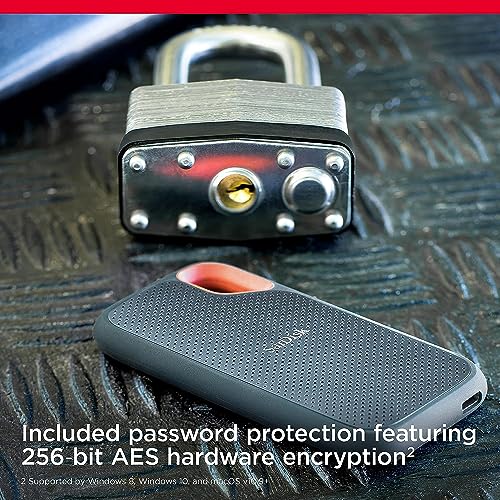
The SanDisk Extreme 2TB Portable SSD is the speed and travel specialist in this group. It advertises read speeds of up to 1,050MB/s when used with suitable hardware and connection settings. Unlike a hard disk drive, it has no spinning platters, which helps it handle movement better during normal use. It also offers IP65 water and dust resistance, up to 3-meter drop protection, 256-bit AES encryption, and USB-C 3.2 Gen 2 connectivity.
I would choose this drive for photo work, video projects, large software folders, and fast file transfers. Its small body is easy to carry, and its solid-state design feels more suitable for a mobile workflow than a standard HDD. The advertised speed is a maximum, not a promise for every computer, cable, or file type. This is an older model listing, so buyers should check the exact product details, warranty terms, and current price before ordering.
Pros:
- Much faster than typical portable HDDs
- Compact design works well for travel
- IP65 water and dust resistance
- Up to 3-meter drop protection is useful on the move
- 256-bit AES hardware encryption support
- USB-C 3.2 Gen 2 connection suits newer computers
Cons:
- Costs more per terabyte than a portable HDD
- Maximum speed depends on the computer and cable
- 2TB may feel small for very large video archives
- This listing identifies it as an older model
What Amazon Buyers Are Saying
Buyer feedback commonly praises this SanDisk SSD for its small size, fast transfers, and travel-friendly protection. Many users choose it for photo and video work or for moving large files between computers. The encryption feature also appeals to people who carry private work files. Reported concerns can include heat during heavy use, speed differences between computers, and connection or cable issues. As with any SSD, buyers should keep a separate backup because solid-state storage is not immune to failure.
My Recommendation
This SanDisk Extreme SSD is my top pick for speed, travel, and active creative work. It costs more than the HDD options, but the faster response and stronger portable design can justify the price. I recommend it for photographers, editors, students, and professionals who move large files often. I rate it as the best performance choice here.
How to Choose the Best External Hard Drive
Choosing the Best External Hard Drive depends on what you store, where you use it, and how often you move files. A cheap HDD can be perfect for backups, while an SSD can save time during active work. Before you buy, match the drive type and capacity to your real needs.
1. Match the Drive Type to Your Work
Hard disk drives use spinning platters. They offer a low cost per terabyte and work well for backups, photos, movies, and long-term storage. They are slower and more sensitive to drops while running. A portable HDD suits home users who want lots of space for less money.
Solid-state drives use flash memory. They respond faster, run quietly, and handle movement better than mechanical drives. They cost more, but the speed can help with video editing, large photo catalogs, software projects, and frequent file transfers. If you work from different places, an SSD may be worth the extra cost.
2. Choose Enough Capacity for Future Files
Do not buy a drive that barely fits your current files. Leave free space for new photos, videos, backups, and system images. A 2TB drive works well for normal documents and personal photos. A 5TB or 6TB model suits large media collections and several backup sets. A 20TB desktop drive makes sense for huge archives, but it needs a permanent power source.
Remember that advertised capacity and usable capacity differ slightly because computers use some space for formatting and file systems. You should also avoid treating one external drive as your only backup. A backup protects you only when another copy exists somewhere else.
3. Check Ports, Compatibility, and Protection
Look at the ports on your computer before ordering. USB 3.0 and USB 3.2 Gen 1 devices can work with many older USB ports, but a fast SSD needs a suitable USB-C or USB 3.2 Gen 2 connection to approach its top speed. The cable matters too. A weak or damaged cable can cause slow transfers or disconnects.
Check the file system as well. Windows and macOS may use different formats for full read and write access. Reformatting can erase the drive, so move important files first. Console storage has its own rules, and a drive prepared for one device may not work for another without another format.
For travel, look for a compact body and protection against drops, water, and dust. The SanDisk Extreme offers stronger protection features than the HDD models in this review. For a desk archive, size matters less than capacity and stable power. Finally, review the warranty and any recovery service, but never rely on recovery support instead of a good backup plan.
Final Verdict: Which Should You Buy?
For most buyers, the Seagate 5TB Portable Hard Drive offers the best balance of space, flexibility, and price. Choose the SanDisk Extreme SSD for speed, the WD 20TB for huge archives, or the Seagate 2TB for basic backups.
The Best External Hard Drive is the one that fits your files and daily habits. Pick enough capacity, use the right cable, and keep a second copy of important data.
FAQs Of Best External Hard Drive
What is the best external hard drive for most people?
The Seagate 5TB Portable Hard Drive is a strong choice for most people. It offers useful space, broad device support, USB power, and good value.
Is an external SSD better than an external HDD?
An external SSD is faster and handles movement better. An external HDD usually costs less and offers more storage for the money. Choose based on speed, portability, and budget.
Can I use an external hard drive with both Windows and Mac?
Yes, but you may need to format it with a file system that both systems can read and write. Formatting erases existing files, so back them up first.
How much external storage do I need for photo and video backups?
Many users should start with 2TB to 6TB. Choose 20TB if you manage very large video archives or several years of high-resolution media.
Is one external hard drive enough for backup?
No. Keep at least two copies of important files. Store one copy on another drive or in a separate location to reduce the risk of data loss.