Best Monitor Light Bar: Better Lighting Guide
The best monitor light bar adds clear desk light, cuts screen glare, and keeps your workspace calm and clutter-free.
Late-night work can leave your desk too dark while a desk lamp may shine into your eyes or reflect on the screen. A monitor light bar solves this by lighting your keyboard and desk from above the display. I tested the key features that matter most, including glare control, brightness, color range, controls, monitor fit, and value. The five options below suit home offices, gaming desks, reading, drawing, and long computer sessions.
See the differences between my top picks at a glance.
| Monitor Light Bar | Best For | Controls | Special Feature | Fit | Check Price |
|---|---|---|---|---|---|
| Quntis Computer Monitor Lamp | Simple home office use | Touch control, auto-dimming | Eye-care front light | Standard monitors | View on Amazon |
| Quntis Curved Monitor Light Bar 15 | Large curved screens and gaming | Touch controls | RGB backlight, dual light | 34-inch and larger screens | View on Amazon |
| BenQ ScreenBar Halo 2 | Premium desk setups | Wireless controller, sensor | Front and rear lighting | Flat and curved monitors | View on Amazon |
| Quntis Light Bar with Backlight | Office, gaming, and drawing | Remote control | Adjustable backlight | Compatible monitor tops | View on Amazon |
| Quntis Remote Control Light Bar | Flat or curved displays | Remote, auto-dimming | Flexible monitor fit | Curved and flat monitors | View on Amazon |
Quntis Computer Monitor Lamp

The Quntis Computer Monitor Lamp is a simple and useful choice for a normal home office. It sits on top of the monitor and sends light down toward the desk. That setup keeps the lamp off your work surface. The front light also helps brighten a keyboard, notebook, or small reading area.
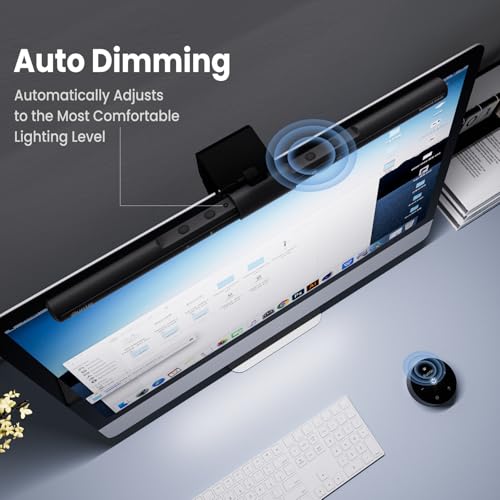
This model uses touch control for quick changes. Its auto-dimming feature can help match the room as light levels change. You can also adjust the brightness and color tone to suit work or reading. The USB power design keeps setup easy, though you need an open USB port or a suitable USB power source.
Pros:
- Compact design saves valuable desk space
- Touch controls are quick to use
- Auto-dimming can reduce repeated manual adjustments
- Adjustable brightness suits work, reading, and study
- Color adjustment helps create a warmer or cooler light
- USB power makes placement simple
Cons:
- It may not suit very thick monitors or unusual monitor shapes
- It lacks the rear RGB lighting found on gaming-focused models
- Touch controls may feel less convenient than a wireless remote
What Amazon Buyers Are Saying
Buyer feedback commonly focuses on the clean look, easy setup, and useful desk light. Many owners like that it frees space where a traditional lamp would sit. Reviews also tend to value the brightness controls and the ability to change the light tone. As with many monitor bars, some buyers mention that fit depends on the monitor frame and that the power cable must reach a USB port.
My Recommendation
I recommend this Quntis model for anyone who wants a basic monitor light bar without extra gaming effects. It offers the main benefits most office users need, and its controls are easy to learn. Check your monitor thickness and top shape before ordering. For everyday work, it is a practical value pick.
| Category | Rating |
|---|---|
| Light quality | 4.2/5 |
| Glare control | 4.2/5 |
| Controls | 4.1/5 |
| Monitor fit | 4/5 |
| Value for money | 4.4/5 |
| Overall Rating | 4.2/5 |
Quntis Curved Monitor Light Bar 15

The Quntis Curved Monitor Light Bar 15 targets people with wide and curved displays. It is designed for screens of 34 inches and larger, so it makes more sense for an ultrawide setup than a small monitor. The bar provides front desk light and rear RGB light. That dual-light layout can make a gaming or work area feel more balanced.
The foldable design helps it sit across a curved display. Brightness and color temperature controls let you tune the light for different tasks. The RGB rear light adds visual style without taking space behind the desk. I see this as a strong choice for users who want both useful task lighting and a more personal gaming setup.
Pros:
- Designed for large 34-inch-and-up curved screens
- Foldable structure helps follow a curved monitor shape
- Front light brightens the desk and keyboard area
- Rear RGB light adds atmosphere to a gaming space
- Brightness and color temperature can be adjusted
- Dual-light design reduces the need for a separate desk lamp
Cons:
- It may be excessive for a small office monitor
- RGB lighting is not important to every buyer
- Curved-monitor compatibility still depends on the screen design
What Amazon Buyers Are Saying
Customer comments for this type of model often praise the wide-screen fit and the stronger visual effect from the rear RGB light. Buyers who use gaming desks tend to like the extra color and the space-saving form. Some users may find the controls take time to learn, especially when they switch between front light and rear light settings. Before buying, buyers should measure the display and review the mounting details shown on the product page.
My Recommendation
This is my preferred Quntis option for a large curved gaming monitor. It offers more than basic task light and looks better in a modern setup. I would not choose it for a small flat display because its main strengths may go unused. If you own a wide curved screen and want RGB backlighting, it is worth considering.
| Category | Rating |
|---|---|
| Light quality | 4.3/5 |
| Curved-screen fit | 4.4/5 |
| RGB backlight | 4.5/5 |
| Control range | 4.1/5 |
| Value for large monitors | 4.2/5 |
| Overall Rating | 4.3/5 |
BenQ ScreenBar Halo 2

The BenQ ScreenBar Halo 2 is the premium choice in this group. It combines a front monitor light with rear light and a wireless controller. The controller lets you change brightness and color temperature without reaching behind the display. A motion sensor adds another layer of convenience when you sit down at the desk.
BenQ also lists eye-care design, no screen glare, and compatibility with curved monitors among its key features. In real use, the value comes from the polished control system and the balanced front-and-rear lighting. It is a better fit for someone who spends many hours at a desk and wants a refined setup. The higher price makes most sense when convenience and finish matter more than saving money.
Pros:
- Wireless controller keeps adjustments within easy reach
- Front and rear lighting can brighten the work area
- Motion sensor adds hands-free convenience
- Adjustable brightness supports different room conditions
- Adjustable color temperature suits work and relaxing tasks
- Designed to work with flat and curved monitors
- Premium design fits a clean professional desk
Cons:
- It usually costs more than basic USB monitor lamps
- It may offer more features than casual users need
- Wireless controls require attention to battery or power needs
What Amazon Buyers Are Saying
Amazon buyers commonly discuss the premium feel, easy wireless control, and useful rear light. People who work late or use a monitor in a dim room often value the ability to change settings from the desk. The motion feature also attracts buyers who prefer automatic operation. The main concern in buyer discussions is usually price, with some customers asking whether the extra controls and finish justify the premium over simpler light bars.
My Recommendation
I recommend the BenQ ScreenBar Halo 2 when you want the most complete experience in this comparison. It is not the budget choice, but it offers strong convenience and a polished design. It is especially suitable for professionals, creators, and serious home-office users. For buyers who want the best monitor light bar experience rather than the lowest cost, this is my top pick.
| Category | Rating |
|---|---|
| Light quality | 4.7/5 |
| Glare control | 4.7/5 |
| Wireless control | 4.8/5 |
| Monitor compatibility | 4.6/5 |
| Value for money | 4.1/5 |
| Overall Rating | 4.6/5 |
Quntis Light Bar with Backlight

This Quntis monitor light bar adds rear backlighting while keeping the front light focused on the desk. It comes with a remote, which makes it useful when the monitor sits in a hard-to-reach place. The product supports stepless brightness and color temperature adjustment. That gives you more control than a lamp with only a few fixed modes.
The gray finish should blend well with many office and gaming desks. It can support several tasks, including computer work, reading, drawing, and gaming. The backlight may also help soften the sharp contrast between a bright screen and a dark wall. I like this model for users who want remote control without moving into the higher price range of a premium brand.
Pros:
- Remote control makes daily adjustments convenient
- Front light covers common desk tasks
- Rear backlight adds depth to the display area
- Stepless brightness offers fine control
- Stepless color temperature adjustment suits many tasks
- Works for office work, drawing, reading, and gaming
Cons:
- The remote needs a clear place where you can find it
- Monitor fit can vary with thick bezels and rear housings
- Backlight may not appeal to users who want a plain setup
What Amazon Buyers Are Saying
Common buyer feedback highlights the remote, the adjustable light, and the added backlight. Users often appreciate being able to change the lamp while seated. Reviews for products in this class may also mention that the front light works best when the bar sits in the correct position on the monitor. A few buyers may prefer a simpler control system, but the remote remains a major reason to choose this model.
My Recommendation
I recommend this Quntis bar for buyers who want a good middle ground. It gives you remote control and rear lighting without focusing only on gaming style. It is a sensible pick for a shared office, study desk, or creative workspace. Measure the top of your display first, then compare the price with the premium BenQ if wireless convenience is your highest priority.
| Category | Rating |
|---|---|
| Front lighting | 4.3/5 |
| Backlight effect | 4.3/5 |
| Remote control | 4.4/5 |
| Adjustment range | 4.4/5 |
| Overall value | 4.4/5 |
| Overall Rating | 4.3/5 |
Quntis Remote Control Light Bar

The Quntis Remote Control Light Bar is built for people who want broad monitor compatibility. Its design fits curved and flat monitors, which makes it easier to use across different desk setups. The USB-powered lamp provides light above the screen and keeps the desk surface clear. It also includes a remote and auto-dimming for easier daily use.
Brightness and color temperature adjustment lets you move from focused work to relaxed reading. The no-glare design aims the light toward the desk instead of directly toward the screen. That matters when you work with dark themes or watch content at night. This model has fewer lifestyle features than the BenQ, but it covers the core needs of a useful monitor lamp.
Pros:
- Supports both curved and flat monitor setups
- Remote control allows easy changes from the chair
- Auto-dimming can help as room light changes
- Adjustable brightness suits work and reading
- Adjustable color temperature offers warmer and cooler tones
- USB power keeps installation simple
- No-glare design helps protect the screen view from direct light
Cons:
- It may not include the rear lighting of newer backlit models
- Remote placement can become inconvenient if it gets misplaced
- USB power limits placement when nearby ports are scarce
What Amazon Buyers Are Saying
Buyers commonly like the flexible fit, remote, and auto-dimming feature. These details help people who move between work, gaming, and reading during the day. Customer experiences can differ based on the monitor housing, so some users may need to adjust the bar before finding the best light angle. The most common trade-off is that buyers who want rear glow may prefer a backlit model instead.
My Recommendation
This is a strong everyday option for anyone with more than one monitor type in the home. It offers useful controls without making the setup complicated. I would choose it over the touch-control model if you often adjust the lamp from a distance. It earns a good rating for flexibility and practical value.
| Category | Rating |
|---|---|
| Light quality | 4.3/5 |
| Flat and curved fit | 4.4/5 |
| Remote control | 4.4/5 |
| Auto-dimming | 4.2/5 |
| Value for money | 4.3/5 |
| Overall Rating | 4.3/5 |
How to Choose Best Monitor Light Bar
Choosing the Best Monitor Light Bar takes more than looking at brightness. A good model should fit your screen, light the desk without distracting reflections, and offer controls that match your routine. I also check how the lamp gets power, where the controls sit, and whether the design suits work or gaming. The points below can help you make a safer and more useful choice.
1. Check the Monitor Fit and Light Angle
Start by checking your monitor shape. A flat display may accept many standard light bars, while a curved or ultrawide display may need a special design. Look at the screen thickness, top bezel, rear housing, and any attached webcam. These parts can affect how the lamp rests on the monitor.
A good monitor bar should sit firmly without covering the display. It should also point light down toward the keyboard and desk. Light that points into your eyes can feel harsh. Light that points at the screen can create reflections. A model with an adjustable position gives you more room to find a comfortable angle.
If you own a 34-inch or larger curved monitor, consider a bar made for wide screens. The Quntis Curved Monitor Light Bar 15 is aimed at this kind of setup. For a standard office display, the smaller Quntis models may be easier to place. Always compare the product fit details with your actual monitor before ordering.
2. Compare Glare Control, Color, and Brightness
Brightness matters, but maximum brightness is not the only goal. You need enough light to see your keyboard and desk without making the screen look washed out. A good light bar sends light down and away from the display. This helps limit reflections, though no lamp can remove every reflection in every room.
Color temperature is also useful. A cooler white tone can feel alert during work. A warmer tone may feel more relaxed during reading or evening use. Stepless control gives you more precise changes than a lamp with only two or three preset modes. Auto-dimming can help when daylight fades, but some users prefer manual control.
Keep in mind that a monitor light bar does not cure eye strain. The American Academy of Ophthalmology recommends practical habits such as taking breaks and managing screen comfort. Good room lighting, suitable screen brightness, and a comfortable viewing distance still matter. I treat the light bar as one part of a better desk setup, not as a medical device.
3. Match the Controls and Features to Your Desk
Think about how often you change the light. Touch controls work well when the bar sits close to you. A remote works better when the monitor is wide or difficult to reach. A wireless controller, such as the one included with the BenQ ScreenBar Halo 2, adds a more polished experience. Auto-dimming and motion sensing can reduce small daily tasks.
Backlighting is helpful when you want a softer background around the display. It can also add style to a gaming desk. RGB lighting looks fun, but it may not matter for a quiet office. If you want a clean, distraction-free setup, focus on front light and glare control first.
Finally, check the power method. USB power works well with a computer, monitor, hub, or wall adapter. Make sure the cable can reach the port without pulling on the lamp. Also consider whether your monitor has a webcam, a very thin top edge, or a large rear curve. Small fit details can matter more than a long feature list.
Final Verdict: Which Should You Buy?
The BenQ ScreenBar Halo 2 is my top choice for premium control, front-and-rear lighting, and broad monitor support. For value, the Quntis Remote Control Light Bar offers a strong mix of fit and useful features.
The Best Monitor Light Bar should match your screen and habits. Choose glare-free desk light, simple controls, and a secure fit for a more comfortable workspace.
FAQs Of Best Monitor Light Bar
What is the Best Monitor Light Bar for most home offices?
The Quntis Computer Monitor Lamp is a practical choice for most home offices. It offers touch control, adjustable light, auto-dimming, and a space-saving design.
Do monitor light bars cause screen glare?
A well-designed light bar aims light down toward the desk and away from the display. Correct placement helps, but room surfaces and screen angle can still affect reflections.
Can a monitor light bar fit a curved monitor?
Yes, some models fit curved monitors. Check the product details carefully. The Quntis curved model and Quntis remote-control model are aimed at curved-screen setups.
Are monitor light bars good for eye strain?
They can improve desk lighting and reduce harsh contrast between a bright screen and a dark room. They do not cure eye strain, so take breaks and set a comfortable screen brightness.
Do monitor light bars need a wall outlet?
Most USB monitor light bars can use power from a monitor, computer, USB hub, or USB wall adapter. Check the cable length and available ports before buying.