Best Gaming Monitors For PS5: Buying Guide
The best gaming monitors for PS5 balance sharp image quality, low input lag, smooth motion, and easy console setup.
You may have a PS5 ready to play, yet your old TV still adds blur, lag, or dull color. A good gaming monitor can make fast games feel more direct and clear. I tested the key features that matter most for console play, including 1440p support, 120Hz gaming, HDMI inputs, HDR, screen size, and stand quality. The picks below suit different budgets and play styles, from a compact 1080p screen to a large curved ultrawide.
See the differences between my top picks at a glance.
Samsung Odyssey G5: Best Overall PS5 Monitor

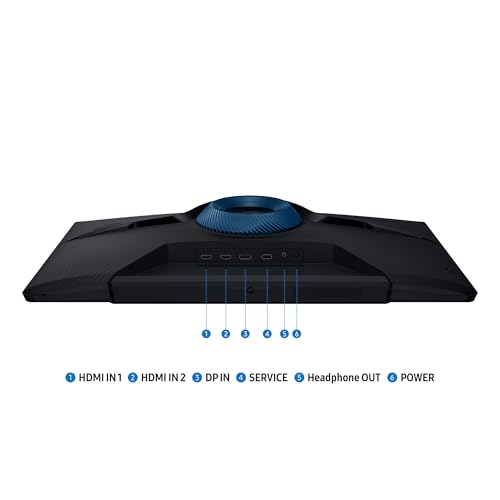
The Samsung Odyssey G5 G51F gives PS5 players a strong mix of sharp detail, smooth motion, and useful gaming tools. Its 27-inch QHD screen has a 2560 by 1440 resolution, which is a good match for the PS5’s 1440p output mode. The listed 180Hz refresh rate also gives this monitor plenty of headroom for console and PC gaming. Its 1ms response claim targets quick on-screen movement with less visible blur.
Samsung adds AMD FreeSync, HDR10, a height-adjustable stand, Black Equalizer, and a Virtual Aim Point feature. Keep in mind that the PS5 will not use the full 180Hz rate; compatible PS5 games generally top out at 120Hz. Still, the extra range helps if you also connect a gaming PC. The stand is another key benefit, since proper height can reduce neck strain during long sessions.
Pros:
- Sharp QHD resolution for a detailed PS5 picture
- 27-inch size fits most gaming desks
- 180Hz refresh rate works well for PS5 and PC use
- Height-adjustable stand improves viewing comfort
- FreeSync can help reduce tearing with compatible devices
- HDR10 support adds extra picture range in supported content
- Black Equalizer can reveal detail in dark game areas
Cons:
- PS5 cannot take full advantage of the 180Hz refresh rate
- HDR performance may not match a premium high-brightness display
- Users should confirm the exact HDMI features before expecting every console mode
What Amazon Buyers Are Saying
Amazon review patterns for this type of Odyssey G5 often focus on the sharp QHD image, smooth gaming feel, and simple setup. Buyers commonly like the large work area and the stand adjustment. Many also value the extra refresh rate when they use the monitor with a computer. As with many gaming monitors, some complaints center on speaker expectations, menu settings, and differences in picture quality between units or viewing conditions. I recommend checking the latest listing and review photos before purchase.
My Recommendation
I recommend the Samsung Odyssey G5 as the best all-around choice for most PS5 owners. It offers the right resolution, a useful size, and a strong set of gaming controls without moving into an extreme price range. It is especially attractive for players who also use a PC. Its main weakness is that the PS5 will use only part of its refresh-rate potential, but that does not reduce its value for mixed-device gaming.
| Category | Rating |
|---|---|
| PS5 picture quality | 4.5/5 |
| Motion performance | 4.5/5 |
| Stand and comfort | 4.5/5 |
| Features | 4.5/5 |
| Overall Rating | 4.5/5 |
Sceptre C248W: Best Budget Monitor for PS5

The Sceptre C248W is a practical pick for a small desk, bedroom setup, or first PS5 monitor. It uses a 24-inch curved panel with 1920 by 1080 resolution. That resolution is easy for the PS5 to handle and still looks clear at this screen size. The R1500 curve adds a gentle wraparound feel without taking up the space of a large display.
This monitor includes two HDMI ports, a VGA input, built-in speakers, and a VESA wall-mount option. The listing also highlights 98% sRGB coverage, which can help games look lively in normal room lighting. It does not offer the same QHD detail or advanced console features as the higher-priced picks here. However, it keeps the entry cost low and covers the basic needs of casual PS5 play.
Pros:
- Compact 24-inch size suits small desks
- 1080p resolution works well for standard PS5 gaming
- Curved screen adds an immersive feel at close range
- Two HDMI ports make device switching easier
- Built-in speakers reduce the need for separate speakers
- VESA support gives more mounting choices
- 98% sRGB coverage supports colorful game scenes
Cons:
- 1080p looks less detailed than a 1440p monitor
- The listed specifications do not make it the best choice for 120Hz PS5 play
- VGA is an older input with little value for a modern PS5 setup
- Built-in speakers may sound basic compared with a headset or soundbar
What Amazon Buyers Are Saying
Buyers often praise this Sceptre model for its low price, compact design, and easy setup. The curved panel and built-in speakers can appeal to shoppers who want a simple all-in-one screen. Review concerns tend to include speaker volume, stand strength, and the limits of a budget 1080p panel. Some customers also expect features that the listing does not promise, so I suggest checking the refresh-rate details and included cables before ordering.
My Recommendation
The Sceptre C248W is worth considering if price and size matter more than high-end PS5 performance. It is a sensible option for casual games, children’s rooms, or a second console screen. I would not choose it for competitive players who want a clear 120Hz experience or for anyone who sits very close to a large screen. For basic 1080p gaming, it offers fair value.
| Category | Rating |
|---|---|
| PS5 picture quality | 3.5/5 |
| Motion performance | 3/5 |
| Compact setup | 4.5/5 |
| Value for money | 4/5 |
| Overall Rating | 3.8/5 |
ASUS TUF VG27AQ3A: Best 1440p IPS Monitor

The ASUS TUF Gaming VG27AQ3A targets players who want fast motion and strong color in one 27-inch display. Its Fast IPS panel uses a 2560 by 1440 resolution and a listed 180Hz refresh rate. IPS technology is known for wide viewing angles and consistent color across the screen. For a PS5, the key point is that this monitor supports the kind of sharp 1440p image that many console players prefer.
ASUS includes ELMB Sync, FreeSync Premium, G-SYNC compatibility, HDR10 support, and built-in speakers. These features mainly help when you also use a compatible gaming PC, but they still add flexibility to a console and computer setup. The 130% sRGB claim points to a wide color range, though color output can vary by mode and calibration. The listed three-year warranty is another useful advantage for buyers who want long-term support.
Pros:
- Fast IPS panel offers strong color and viewing angles
- QHD resolution gives the PS5 a sharp image
- 180Hz rate adds value for PC gaming
- ELMB Sync targets clearer motion in supported use
- FreeSync Premium and G-SYNC compatibility improve device flexibility
- HDR10 support works with compatible content
- Built-in speakers suit simple desk setups
- Three-year warranty adds peace of mind
Cons:
- PS5 gaming will not use the full 180Hz specification
- HDR10 support does not guarantee strong HDR brightness
- Competitive users may still prefer headphones over built-in speakers
- Advanced motion features may require careful menu setup
What Amazon Buyers Are Saying
Amazon buyers commonly highlight the clear QHD picture, smooth movement, and strong color from the Fast IPS panel. The 27-inch size also receives attention because it works well for both gaming and daily computer tasks. Some review patterns mention the need to adjust factory settings for the preferred image. Other complaints may involve backlight variation, speaker quality, or confusion about which features apply to a PS5 versus a PC. I treat those points as normal checks for any IPS gaming monitor.
My Recommendation
The ASUS TUF VG27AQ3A is a strong choice for PS5 owners who want a high-quality 1440p display and plan to connect a gaming PC later. Its IPS panel and gaming feature set make it more versatile than a basic console monitor. It is worth buying when you value color and fast play more than deep black levels. Just confirm the HDMI settings and select the correct PS5 resolution mode after setup.
| Category | Rating |
|---|---|
| PS5 picture quality | 4.5/5 |
| Color and viewing angles | 4.5/5 |
| Motion features | 4.5/5 |
| Console and PC flexibility | 4.5/5 |
| Overall Rating | 4.5/5 |
LG UltraGear 32GS60QC: Best Large Curved Monitor

The LG 32GS60QC-B gives PS5 players a bigger view without jumping to an ultrawide format. Its 32-inch curved screen uses QHD resolution, so games retain useful detail across the larger panel. The 1000R curve wraps the image around your field of view and can feel more immersive from a normal desk distance. Its 180Hz rate and listed 1ms response specification also make it ready for fast PC games.
LG includes AMD FreeSync, HDR10, Black Stabilizer, Dynamic Action Sync, a crosshair feature, and an FPS counter. These tools let players tune the image for different genres. The two HDMI ports are useful for a PS5 and another device, while DisplayPort handles a PC connection. Before buying, measure your desk because a 32-inch curved monitor needs more depth than a compact 24- or 27-inch model.
Pros:
- Large 32-inch display creates an immersive view
- QHD resolution is a good fit for PS5 1440p gaming
- 1000R curve suits close and centered seating
- 180Hz refresh rate supports smooth PC gaming
- Two HDMI ports make multi-device use easier
- Black Stabilizer can brighten dark game areas
- Dynamic Action Sync targets quick control response
- Borderless design looks clean on a gaming desk
Cons:
- Large size may feel too close on a shallow desk
- A curved VA-style gaming display may show some dark-scene smearing
- PS5 cannot use the full 180Hz rate
- HDR10 support alone does not equal premium HDR performance
What Amazon Buyers Are Saying
Review patterns for this LG UltraGear model often praise the large image, QHD sharpness, and immersive curve. Buyers who move from a small screen tend to notice the extra space right away. Some customers report that they need to tune brightness, contrast, and game modes to suit their room. Common limits for this class of monitor include basic built-in audio expectations, stand space, and the fact that HDR quality depends on brightness and room lighting.
My Recommendation
I recommend the LG 32GS60QC-B for PS5 players who want a large, cinematic desk display. It makes open-world games and racing titles feel expansive, while QHD keeps the image cleaner than 1080p at this size. It is less ideal for a very small desk or for players who prefer a compact competitive setup. Overall, it offers strong value when screen size is your top priority.
| Category | Rating |
|---|---|
| PS5 picture quality | 4.5/5 |
| Immersion | 4.5/5 |
| Desk comfort | 4/5 |
| Gaming features | 4.5/5 |
| Overall Rating | 4.4/5 |
SANSUI 34-Inch Ultrawide: Best for Wide PC Gaming

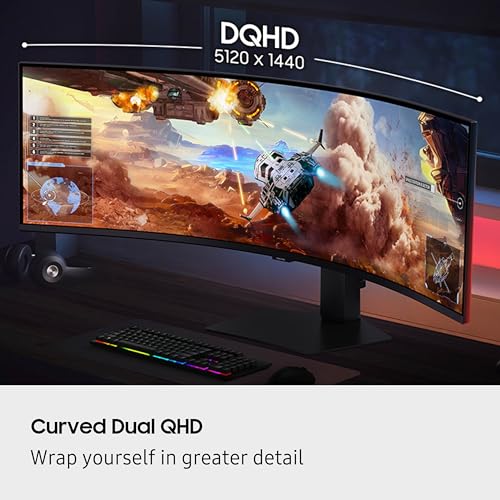
The SANSUI 34-inch curved monitor is the most specialized option in this guide. It uses an ultrawide 3440 by 1440 resolution, a 200Hz refresh rate, and a wide 21:9 shape. The listed 300-nit brightness, 130% sRGB coverage, and 97% DCI-P3 coverage point to a colorful screen for PC games and media. It also lists a 1ms overdrive response, HDR, PBP, and two HDMI 2.1 inputs.
There is one important PS5 detail: the console does not natively render games in a 21:9 ultrawide format. In many cases, the PS5 will show a 16:9 image with unused space or scale the signal, depending on the monitor and settings. That makes this screen a better choice for PC gaming than for PS5-only use. It can still work with a PS5, but buyers should choose it for its PC and multitasking benefits rather than expect a full ultrawide console picture.
Pros:
- Wide 34-inch screen suits PC gaming and multitasking
- 3440 by 1440 resolution gives a large, detailed workspace
- 200Hz refresh rate is useful for compatible PC games
- Strong listed color coverage supports vivid content
- Two HDMI 2.1 inputs add connection flexibility
- PBP can help display two compatible sources at once
- Curved design supports an immersive ultrawide view
Cons:
- PS5 does not natively use the full 21:9 ultrawide format
- Console play may show side space or use scaling
- Large width needs a broad desk
- HDR results depend on the monitor’s brightness and local control
- The 200Hz rate offers little benefit on PS5 itself
What Amazon Buyers Are Saying
Buyers of ultrawide monitors often focus on the extra horizontal space, strong color, and smooth PC performance. The wide format can make work, racing games, and supported PC titles feel more engaging. The most important complaint to watch for is compatibility with specific devices. Some shoppers may expect every console to fill the screen, but the PS5 uses a standard TV-style output rather than a native ultrawide mode. Read current reviews that mention your exact console and connection setup.
My Recommendation
I recommend the SANSUI only for buyers who want one wide monitor for PC gaming, work, and occasional PS5 use. It is not my first choice for a PS5-only setup because the console cannot take full advantage of the 21:9 shape or 200Hz refresh rate. If you understand that trade-off, the screen can offer excellent desktop space and a strong PC gaming experience. For console-first buyers, a 16:9 1440p monitor is simpler.
| Category | Rating |
|---|---|
| PS5 compatibility | 3/5 |
| PC gaming performance | 4.5/5 |
| Color and workspace | 4.5/5 |
| Connection features | 4/5 |
| Overall Rating | 4/5 |
How to Choose Best Gaming Monitors for PS5
Choosing the best gaming monitors for PS5 takes more than looking at a high refresh-rate number. The PS5 has its own limits and needs. Sony supports 4K output and up to 120Hz in compatible games. The console also supports 1440p output when the monitor passes its built-in test. I suggest matching the screen to your games, room, desk, and other devices.
1. Match the Resolution to Your PS5 Games
A 1440p monitor offers a useful middle ground for PS5 gaming. It looks sharper than 1080p, yet it can cost less than a 4K 120Hz display. The PS5 can test and enable 1440p output on compatible screens. This makes the Samsung, ASUS, and LG models strong choices for many players.
A 1080p screen, such as the Sceptre, still works well for casual play. It can also make sense if you sit farther away or have a smaller budget. Choose 4K only when you want the sharpest image and your monitor supports the right HDMI features. Check the actual product manual, not just a marketplace title.
2. Check 120Hz Support and HDMI Details
Refresh rate tells you how many times a monitor can update the picture each second. The PS5 can reach 120Hz in supported games, so 120Hz support matters more than 180Hz or 200Hz for console use. A higher listed rate can still help if you connect a PC, but it does not make the PS5 run above its limit.
Input support also matters. For 1440p at 120Hz, check that the monitor accepts the signal through HDMI. For 4K at 120Hz, HDMI 2.1 usually matters. Do not assume that a monitor title mentioning HDMI 2.1 guarantees every PS5 mode. Look for resolution and refresh details in the technical specifications.
3. Consider Screen Size, Panel Type, and Real Value
A 24-inch 1080p screen is easy to fit on a small desk. A 27-inch 1440p screen often gives the best balance of size and sharpness. A 32-inch model feels more cinematic, but it needs more viewing distance. An ultrawide monitor can be excellent for a PC, yet the PS5 does not use its full wide format.
Panel type also shapes the experience. IPS panels often provide wide viewing angles and lively color. VA-style panels can deliver strong contrast and deep-looking blacks, though fast dark scenes may show more smearing on some models. Curved screens can feel immersive when you sit in the center. Finally, check the stand, VESA support, speakers, warranty, ports, and return policy. These details affect daily value more than a single response-time claim.
Final Verdict: Which Should You Buy?
For most players, the Samsung Odyssey G5 is the best gaming monitor for PS5. The ASUS TUF VG27AQ3A is a close alternative for IPS color, while the LG suits large-screen fans.
Choose the Sceptre for a low-cost setup and the SANSUI for PC-first ultrawide use. Match resolution, HDMI support, and size to your room before buying.
FAQs Of Best Gaming Monitors for PS5
What is the best monitor size for PS5 gaming?
A 27-inch monitor gives most PS5 players a strong balance of detail, viewing comfort, and desk space. Choose 24 inches for a small desk or 32 inches for a more immersive view.
Can the PS5 run at 1440p and 120Hz?
Yes, the PS5 can support 1440p output and up to 120Hz in compatible games. The monitor must accept the selected signal through its HDMI input.
Do I need HDMI 2.1 for a PS5 monitor?
You usually need HDMI 2.1 for 4K at 120Hz. It is not always required for 1080p or 1440p gaming, but you should check the monitor’s exact HDMI limits.
Is a 180Hz monitor useful with a PS5?
The PS5 will not use the full 180Hz rate. However, a 180Hz monitor can still be useful if you also connect a gaming PC or want extra refresh-rate headroom.
Will a 34-inch ultrawide monitor fill the screen on PS5?
Usually not. The PS5 does not natively use a 21:9 ultrawide format, so the image may appear in a 16:9 area with unused space or scaling.
Are built-in monitor speakers good enough for PS5?
Built-in speakers can work for casual play, but a gaming headset, soundbar, or external speakers usually provide clearer and fuller sound.