Best Gaming Monitor: Best Options For Every Gamer
The best gaming monitor combines fast refresh, clear motion, sharp images, and features that match your games.
You sit down for one quick match, but blurry motion, screen tearing, or slow controls ruin the fun. A good gaming monitor fixes those problems with a fast refresh rate, low response time, smooth sync support, and a size that fits your desk. I compared five strong options for 2026, from affordable 22-inch displays to high-end QD-OLED panels. These monitors suit different players, so the right choice depends on your budget, graphics card, favorite games, and preferred screen size.
See the differences between my top picks at a glance.
SANSUI 32-Inch Curved 240Hz Monitor

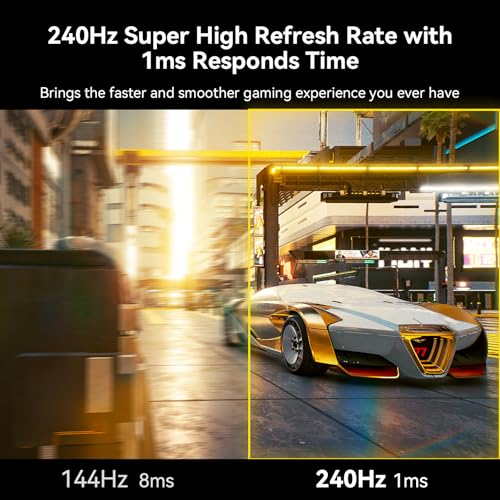
The SANSUI 32-inch curved monitor gives you a very large gaming view without moving into an expensive premium panel. Its 240Hz refresh rate is the main draw. That rate can make quick camera turns feel much smoother when your gaming PC can send enough frames. The listed 1ms MPRT response feature also targets fast motion.
This model uses a Full HD 1080p resolution on a 32-inch screen. That choice keeps the graphics load lower than QHD, which may help mid-range systems reach high frame rates. The 1500R curve adds a more wrapped viewing shape, while HDMI and DisplayPort 1.4 provide useful connection options. HDR, a metal stand, VESA support, and an included DisplayPort cable add practical value.
Pros:
- Very fast 240Hz refresh rate for supported games
- Large 32-inch screen creates an immersive view
- 1500R curve can make the display feel more engaging
- 1ms MPRT targets reduced blur in quick scenes
- DisplayPort 1.4 and HDMI support flexible setup options
- VESA compatibility helps users mount the monitor
- Included DisplayPort cable saves an extra purchase
Cons:
- 1080p resolution looks less sharp on a 32-inch panel than QHD
- You need a powerful enough system to benefit from 240Hz
- Curved screens may not suit people who prefer flat displays
What Amazon Buyers Are Saying
Buyer feedback should always be checked on the current Amazon listing because ratings and comments can change. The product details make the large size, high refresh rate, curve, and low listed motion figure the main points to examine. Shoppers should also look for comments about stand stability, setup, brightness, and whether their computer reaches high frame rates.
Some buyers may value the screen size and speed more than pixel density. Others may find that Full HD feels soft at 32 inches, especially for text or close desktop work. I suggest reading the latest reviews with your own use in mind. Pay close attention to comments from PC users with similar graphics cards and connection types.
My Recommendation
I recommend the SANSUI for players who want a big, fast screen at a practical price. It makes the most sense for esports games, racing games, and action titles where smooth motion matters more than fine 1440p detail. It is less ideal for close-up office work or cinematic gaming where sharp pixels matter most. Overall, it offers strong speed and size for budget-focused gamers.
Dell SE2726HG 27-Inch 240Hz Gaming Monitor

The Dell SE2726HG takes a more balanced approach than the large SANSUI. It uses a 27-inch Full HD display with an IPS panel. IPS technology often gives a useful mix of color and viewing angle performance for gaming and daily tasks. The 240Hz refresh rate makes this monitor a strong match for competitive play.
AMD FreeSync Premium is included to help match the display refresh with compatible graphics output. This can reduce distracting tearing when frame rates change. Dell also lists two HDMI ports and DisplayPort 1.4, so you can connect more than one device. The tilt stand keeps the setup simple, but users who need height adjustment may want a monitor arm or riser.
Pros:
- 240Hz refresh rate suits fast competitive games
- 27-inch size fits many gaming desks well
- IPS panel offers a flexible gaming and work experience
- AMD FreeSync Premium supports smoother compatible gameplay
- Two HDMI ports make device switching easier
- DisplayPort 1.4 supports a modern PC connection
- Simple tilt adjustment is easy to use
Cons:
- Full HD has less detail than a QHD gaming monitor
- The listed stand offers tilt rather than full ergonomic adjustment
- 240Hz benefits depend on your PC producing high frame rates
What Amazon Buyers Are Saying
Before buying, I would review the latest Amazon comments for details on image quality, setup, refresh-rate use, and stand comfort. The published features point to speed, FreeSync support, and practical ports as the central strengths. Buyer comments can also help confirm how the IPS screen looks in a bright room and how well the tilt range fits a desk.
Users often judge a 240Hz monitor by more than its number. They want smooth movement, clear menus, and easy cable setup. Check whether reviewers mention the same game system you use. Also confirm the seller, return terms, and current warranty information on the listing before ordering.
My Recommendation
The Dell is my safest all-purpose pick for players who want high speed without a very large screen. Its 27-inch size feels easier to manage than a 32-inch display, and its IPS panel suits mixed use. I would choose it for shooters, sports games, and everyday PC work. It is worth buying if you want 240Hz and do not need QHD resolution.
Sceptre 22-Inch 144Hz Gaming Monitor

The Sceptre E225W-FW144 is the most compact and budget-friendly monitor in this comparison. Its 22-inch Full HD screen suits a small desk, a starter gaming PC, or a second display. The refresh rate reaches up to 144Hz, which is a clear step above basic 60Hz screens. That can make scrolling, aiming, and camera movement feel more fluid in supported games.
This model includes HDMI, DisplayPort, and built-in speakers. Those speakers can help when you need simple sound without adding desk speakers, though dedicated headphones may still provide a better gaming experience. The smaller size keeps the pixel density reasonable for 1080p. It also makes this monitor easier to fit in dorm rooms, study areas, and compact workstations.
Pros:
- Compact 22-inch design works well on small desks
- Full HD resolution fits the screen size well
- Up to 144Hz offers smooth play at an affordable level
- HDMI and DisplayPort support common gaming devices
- Built-in speakers add convenience for basic audio
- Good starter choice for a first gaming monitor
Cons:
- Smaller screen feels less immersive than 27-inch and 32-inch options
- 144Hz is slower than the 180Hz and 240Hz alternatives here
- Built-in speakers may not replace a headset or external speakers
What Amazon Buyers Are Saying
For this type of monitor, I would focus on buyer notes about value, screen size, speaker volume, and connection setup. The listing makes the compact size, 1080p resolution, 144Hz support, and built-in speakers the key selling points. Recent comments may also show whether buyers use it as a primary screen, a second monitor, or a console display.
Budget monitors can satisfy buyers who want a clear upgrade from an older office display. They may disappoint shoppers who expect premium contrast, a large screen, or a fully adjustable stand. Read the newest reviews and compare the stated ports with your computer before you place an order.
My Recommendation
I recommend the Sceptre for a first-time PC gamer, a student, or anyone with limited desk space. It gives you the core features needed for smooth 1080p gaming without paying for extras you may not use. Choose another model if you want a cinematic view or very high refresh rate. For its role, it is a practical value option.
Samsung Odyssey OLED G6 27-Inch Monitor

The Samsung Odyssey OLED G6 is the premium choice in this group. It pairs a 27-inch QHD resolution with a QD-OLED panel. QHD gives you more detail than Full HD, while OLED technology can produce very deep blacks and strong contrast. The listed 240Hz refresh rate and 0.03ms response time target exceptionally quick motion.
This monitor also lists HDR10, Pantone validation, a glare-free design, and a height-adjustable stand. Those features make it more flexible for both gaming and creative work. Samsung includes OLED Safeguard features and a three-year warranty in the product title, which may give buyers added peace of mind. Still, OLED buyers should use the panel care tools and follow the maker’s guidance for long-term use.
Pros:
- QD-OLED panel offers strong contrast and deep black scenes
- QHD resolution gives games and media more detail
- 240Hz refresh rate suits serious competitive gaming
- Very low listed 0.03ms response time targets quick pixel changes
- HDR10 support adds compatible high-dynamic-range content
- Height-adjustable stand improves desk comfort
- Glare-free design can help in bright gaming spaces
- OLED Safeguard features and a listed three-year warranty add value
Cons:
- Premium OLED pricing may not suit a tight budget
- OLED panels require care to reduce the risk of image retention
- QHD gaming at 240Hz needs a capable graphics card
What Amazon Buyers Are Saying
Buyers considering this monitor should read current comments about black levels, HDR, glare, text clarity, stand movement, and OLED care. The listed features clearly position it as a premium gaming display. Look for reviews from users who play in a similar room and connect it to a similar PC.
OLED feedback often varies by user needs. A player may love the contrast and fast response, while a person who displays static work windows all day may focus more on panel care. I would also check comments about firmware, cable choice, and how the monitor handles the buyer’s preferred refresh and resolution settings.
My Recommendation
The Samsung Odyssey OLED G6 is my pick for the best gaming monitor here when image quality matters most and the budget allows it. It combines QHD detail, OLED contrast, 240Hz speed, HDR10, and useful stand features. I recommend it to competitive players, single-player fans, and users who want a premium display. It is not the best value for casual 1080p gaming.
Samsung Odyssey G5 32-Inch QHD Monitor

The Samsung Odyssey G5 gives gamers a larger QHD option without the price or care needs of OLED. Its 32-inch Fast IPS panel uses a 2560 by 1440 class resolution, as stated in the product title. This combination offers more workspace and detail than 1080p while keeping the screen large and easy to enjoy. The 180Hz refresh rate is fast enough for smooth competitive and casual play.
The monitor lists HDR10, NVIDIA G-Sync compatibility, AMD FreeSync, and a 1ms GtG response time. These features aim to keep motion smooth when paired with compatible hardware. The adjustable stand gives more setup control than a basic tilt-only stand. For buyers who want one screen for games, streaming, browsing, and general work, this is a strong middle ground.
Pros:
- Large 32-inch screen creates a comfortable gaming view
- QHD resolution delivers more detail than Full HD
- 180Hz refresh rate supports fluid motion
- Fast IPS panel fits gaming and general use
- HDR10 supports compatible high-dynamic-range content
- G-Sync compatibility and AMD FreeSync offer broad sync support
- 1ms GtG response specification suits fast games
- Adjustable stand helps improve viewing comfort
Cons:
- 32 inches may feel too large for a shallow desk
- 180Hz is below the 240Hz rate of the fastest models here
- QHD at high frame rates still requires a capable gaming PC
What Amazon Buyers Are Saying
When checking Amazon reviews, I would look for real notes about QHD clarity, viewing distance, stand adjustment, HDR use, and sync performance. The listed specifications make this model attractive as a large all-round monitor. Current buyer comments can help you judge whether the size works well at your desk.
Some shoppers want a big screen for story games and video. Others may prefer a smaller display for competitive play because it keeps the full view closer to the center. Read reviews that mention the same use. Also check your graphics card and cable plan before expecting 180Hz at QHD.
My Recommendation
I recommend the Odyssey G5 to gamers who want QHD detail, a large screen, and broad sync support at a more balanced level than OLED. It works well for open-world games, racing, strategy, and everyday PC use. Choose the Dell if you mainly play competitive shooters and want 240Hz. Choose this Samsung if size and sharper QHD visuals matter more.
How to Choose the Best Gaming Monitor
Choosing the Best Gaming Monitor starts with your PC, desk, and favorite games. A high refresh rate looks impressive, but it only helps when your system can produce enough frames. Screen size, resolution, panel type, sync support, and stand design also affect daily use. Use the points below to narrow your choices before you buy.
1. Match Resolution and Refresh Rate to Your PC
Start with the graphics card and the games you play. Full HD is easier to run at high frame rates, so it works well with affordable gaming PCs and esports titles. QHD gives a sharper image, but it asks more from your graphics card. If your PC often produces 200 frames per second or more, a 240Hz monitor may make sense.
Do not buy a 240Hz screen only because the number looks large. A 144Hz or 180Hz monitor can feel smooth when your system runs near that range. Check which ports support the needed resolution and refresh rate. DisplayPort often gives PC users a useful path, while HDMI helps with consoles and other devices.
2. Pick the Right Panel and Screen Size
IPS panels offer a good balance for games, work, and shared viewing. OLED panels can deliver deeper blacks and very fast response, but they cost more and need sensible care around static images. A curved screen can feel immersive, yet some users prefer the straight lines of a flat screen.
Choose 22 inches for a small desk or a low-cost setup. A 27-inch monitor works well for many players and viewing distances. A 32-inch model gives a bigger picture, but it needs more desk depth. At 32 inches, QHD usually gives a sharper look than Full HD for close work.
3. Check Sync, Stand Comfort, and Long-Term Value
Adaptive sync can help reduce tearing when frame rates change. Look for features such as AMD FreeSync, FreeSync Premium, or G-Sync compatibility, then confirm support for your graphics card. Response-time figures can help, but real motion clarity also depends on the panel and settings.
Do not ignore the stand. Tilt-only stands may work, but height adjustment can improve posture and comfort. VESA support gives you more mounting options. Finally, check warranty terms, return rules, included cables, and current seller details. The best gaming monitor is the one that fits your complete setup, not just the one with the fastest headline number.
Final Verdict: Which Should You Buy?
For the best overall image and speed, I choose the Samsung Odyssey OLED G6. For value, the Dell SE2726HG is a safer all-round pick, while the Sceptre suits small desks and tight budgets.
The Best Gaming Monitor should match your GPU, games, desk, and budget. Check current Amazon pricing and specifications before ordering.
FAQs Of Best Gaming Monitor
What refresh rate is best for a gaming monitor?
For most players, 144Hz to 180Hz feels smooth and offers good value. Choose 240Hz when your PC can produce very high frame rates in the games you play.
Is 1080p or 1440p better for gaming?
1080p is easier to run at high frame rates and costs less. 1440p looks sharper and suits larger screens, but it needs a stronger graphics card.
Is a 27-inch monitor good for gaming?
Yes. A 27-inch display offers a useful balance of screen space and desk fit. It works especially well with either Full HD or QHD, depending on your viewing distance.
Are OLED gaming monitors worth buying?
OLED monitors are worth considering if you want deep blacks, strong contrast, and very fast response. They cost more, so follow panel-care guidance and consider your static desktop use.
Do I need FreeSync or G-Sync?
Adaptive sync can reduce tearing when frame rates change. Choose a monitor that supports the sync feature that works with your graphics card, and confirm the connection requirements.